There are a variety of different attachments that can be added to articles in the knowledge base.
To add one first login to the AI dashboard. Next either create a new article, by clicking the create article button in the upper right, or click on an existing article to begin editing it. Once managing an article there is a clip button which can be clicked to attach a file.
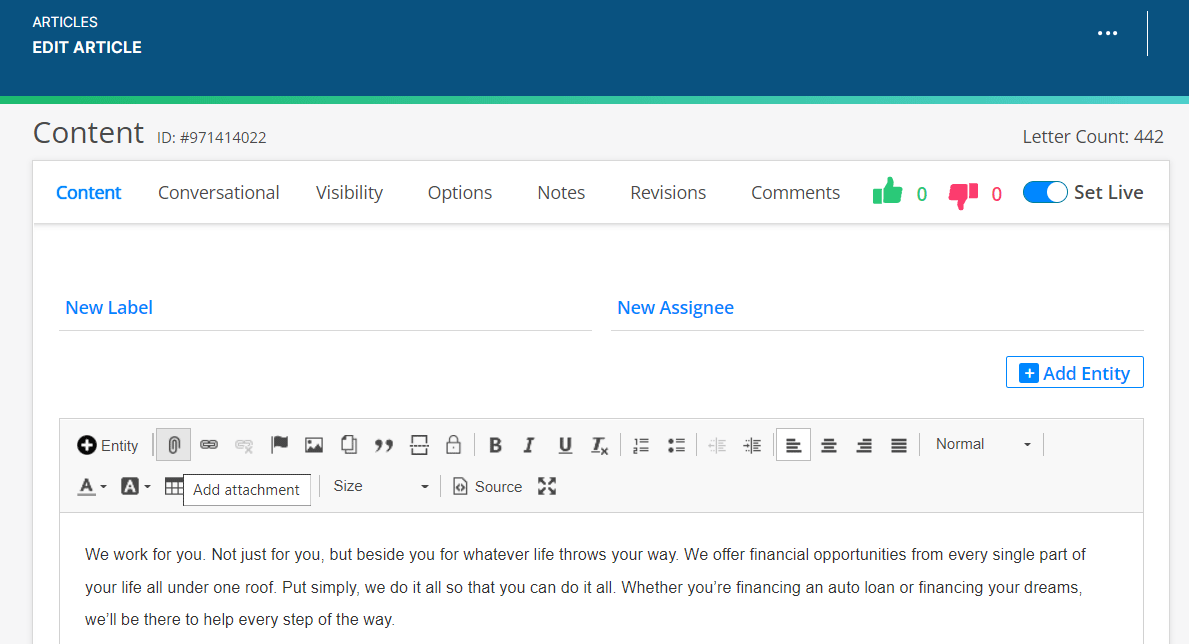
In terms of what kind of files are supported, the following can be used:
- jpg
- jpeg
- png
- gif
- bmp
- bml
- tif
- pdf
- doc
- docx
- xls
- xlm
- xlsx
- ppt
- pptx
- zip
- rar
- txt
- xml
- eml
- pps
- ppsx
- rtf
- csv
- tar
- gz
- set
- html
- mobileconfig
- apn
- cs
- aspx
- mht
- ged
- uzed
- zed
- mp4
- wav
- mov
- avi
If you have a file type that's not present but need to attach it, we can work with you to get it supported on your account.
------------------------------
Anthony Romero
Genesys - Employees
------------------------------