I went back through the Genesys documentation because there is an important detail that may explain what you are seeing.
This makes me wonder whether this is the missing piece in your configuration.
Genesys manages that assignment separately. An Agent Copilot is associated with one or more queues, and the agents can then be assigned automatically or manually to that Copilot.
There is one important nuance here: the Virtual Agent documentation describes the native summary behavior with the Conversation Summary > View permission, while the more specific Agent Copilot transfer summaries documentation explicitly adds the Copilot licensing/queue-assignment requirement for Virtual Agent transfers. So I think checking that association is the best next step before we look at APIs or custom Scripts.
If no Agent Copilot is currently assigned to your test queue/user, that may explain the behavior you are seeing.
Original Message:
Sent: 09-21-2026 08:34
From: Catherine DUPIRE
Subject: Conversation with Voice Bot is Not Appearing in Transcript Tab
Hi Fernando, thanks again for your answers. That''s indeed what I had understood, but not what I have observed.
I confirm that I do have the required permission.
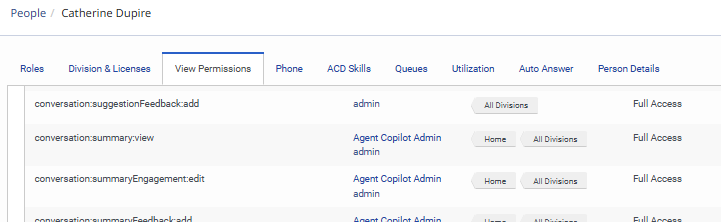
I was initially performing my tests using Agent Escalation, but this morning I also tried transferring the call from the inbound flow that the interaction had returned to. The result is exactly the same.
------------------------------
Catherine DUPIRE
Customer Success Manager
NXO FRANCE SASU
------------------------------
Original Message:
Sent: 09-21-2026 08:18
From: Fernando Sotto dos Santos
Subject: Conversation with Voice Bot is Not Appearing in Transcript Tab
Hi Catherine,
Your screenshot actually helped a lot, and I think I can clarify where the confusion came from.
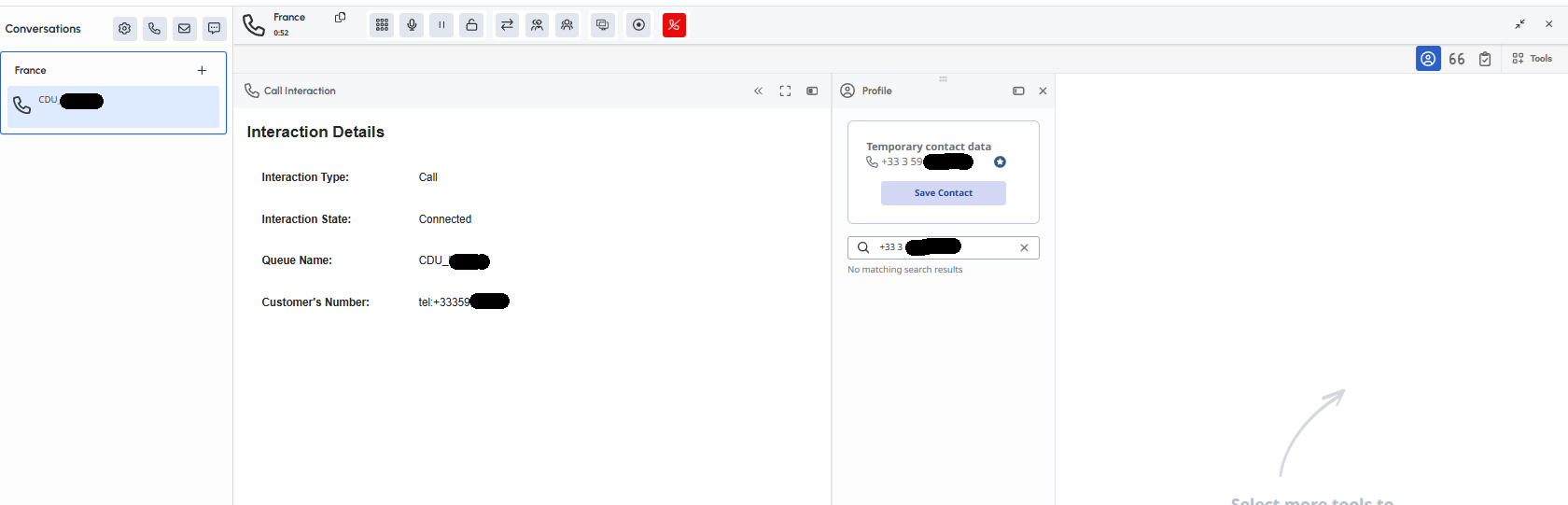
You are correct: the panel in the center of your screenshot is your Script. When Genesys documentation says that the Virtual Agent summary is displayed "to the right of the interaction panel", it does not mean that you need to add the summary to that Script.
According to the Genesys documentation, when Summarize Conversation is enabled and the Virtual Agent transfers/escalates the interaction to an agent, the summary should be displayed automatically in the agent UI. No custom Script, Data Action or API should be required for that native summary. The documented permission required for the receiving agent is:
Conversation > Summary > View
Since you can already see the generated summary in Performance, that is actually very useful information: it strongly suggests that the Virtual Agent is successfully generating the summary. So I would now focus on why the receiving agent cannot see it.
You mentioned that the agent already has Conversation > Summary > View. I would double-check the effective permissions of the actual agent user, rather than only the permissions configured on the role:
Admin / User Management → Users → [agent] → View Permissions
and search specifically for:
Conversation > Summary > View
Genesys provides this view to show the permissions effectively assigned to the user and the roles from which they come.
If that permission is effectively present, then I would check the next piece: exactly how the Virtual Agent exits and hands the call to ACD. Genesys distinguishes an Agent Escalation (AgentRequestedByUser) from other transfer paths, so it would be useful to understand which path your test interaction is following.
But I would not build an API/Data Action solution for the summary yet. Since the summary is already being generated, the native behavior should be solved first.
The full bot transcript is still a separate requirement - for that, a Script/API approach can make sense if you need the entire dialog immediately visible to the agent.
Link to the documentation: Configure after contact settings for Virtual Agent - Genesys Cloud Resource Center
------------------------------
Fernando Sotto dos Santos
Consultor de Atendimento Senior Grupo Casas Bahia
------------------------------
Original Message:
Sent: 09-21-2026 05:10
From: Catherine DUPIRE
Subject: Conversation with Voice Bot is Not Appearing in Transcript Tab
@Fernando Sotto dos Santos
I'm really sorry, I don't understand what you mean. Where exactly in my interaction would I be able to see a summary of what was said by the bot? The "Interaction" panel is just the default script, and I don't see how a summary could be added there.
I can find the summary in Performance, but not anywhere in the agent interface.
Here is a screenshot of my agent's UI. Could you show me where I'm supposed to find the summary ? (Sorry to bother you with this, but I genuinely don't understand what you mean...)
------------------------------
Catherine DUPIRE
Customer Success Manager
NXO FRANCE SASU
------------------------------
Original Message:
Sent: 09-18-2026 08:47
From: Fernando Sotto dos Santos
Subject: Conversation with Voice Bot is Not Appearing in Transcript Tab
Hi Catherine,
Yes, let me clarify one important point: when I said the summary appears in the interaction panel, I did not mean an Architect Script.
If your Bot Flow is Virtual Agent-enabled, Summarize Conversation is enabled, and the agent has Conversation > Summary > View, the summary should be displayed natively in the agent interface during escalation, without needing a Script, Data Action, API, or Agent Copilot.
The endpoint:
GET /api/v2/conversations/{conversationId}/summaries
is useful if you want to retrieve that summary for another purpose, such as storing it, sending it to a CRM, or displaying it in a custom Script. It should not be required just to show the native Virtual Agent summary.
So I would separate the two requirements:
- Summary: should be available natively with Virtual Agent.
- Full bot transcript: if you want it immediately visible to the agent inside a Script, then yes, API/Data Action is a valid custom approach.
Since your summary is not appearing even with the correct settings, I would troubleshoot that first rather than building the Data Action immediately.
I suggest checking:
- The flow was republished after enabling
Summarize Conversation. - The bot conversation is long enough to generate a meaningful summary.
- In Virtual Agent Performance, check whether the summary was actually generated.
- For one test conversation, call
/summaries. If the API returns a summary but the agent does not see it, then the problem is likely on the UI/handoff side. If the API returns nothing, then the summary was not generated.
Agent Copilot is not required for the Virtual Agent summary itself.
For the full transcript, however, I would treat that as a separate requirement and use Script + API/Data Action if the customer really needs the entire bot conversation visible at handoff.
------------------------------
Fernando Sotto dos Santos
Consultor de Atendimento Senior Grupo Casas Bahia
------------------------------
Original Message:
Sent: 09-18-2026 03:59
From: Catherine DUPIRE
Subject: Conversation with Voice Bot is Not Appearing in Transcript Tab
@Fernando Sotto dos Santos Thanks again for your explanations. My bot flow (AVA) has the "Summarize Conversation" option enabled, and my agent has the "conversation > summary > view" permission.
However, I am not sure I fully understand.
For the full transcript, I understand that I need to use the API and display the result in the script, ok.
But regarding the summary, it sounds like you are saying that this is not necessary. You mentioned that the summary should appear "in the agent interaction panel",
On my side, I have all the settings you mentioned. Yet I still do not see any summary.
Could you confirm that when you say "in the interaction panel", you mean that I need to create a custom script and populate it with two variables from my flow using Data Actions? One variable would be populated using GET /api/v2/conversations/{conversationId}/summaries , and the other one... I'll have to figure that out :-) .
Is that what you mean, or should the summary be displayed automatically somewhere in the agent interface without any custom scripting?
In principle, I need both the summary and the full transcript, but I will check with my customer whether a summary alone would be sufficient.
In either case, if I do not have Copilot, my understanding is that this can only be achieved through APIs (with transcription enabled, of course). Can you confirm that?
Because in my tests, without any data action, I can't see any summary neither .
------------------------------
Catherine DUPIRE
Customer Success Manager
NXO FRANCE SASU
------------------------------
Original Message:
Sent: 09-17-2026 12:18
From: Fernando Sotto dos Santos
Subject: Conversation with Voice Bot is Not Appearing in Transcript Tab
Not necessarily, I would separate the summary from the full bot conversation history, because Genesys handles them differently.
For the summary, Agent Copilot is not mandatory. If your Bot Flow is upgraded to Genesys Virtual Agent, you can enable:
Settings → After Contact → Conversation Summary → Summarize Conversation
Virtual Agent will generate the bot conversation summary when the interaction is escalated to an agent and display it in the agent interaction panel. The agent needs the Conversation > Summary > View permission.
So this part can be done natively with Virtual Agent, without requiring Agent Copilot.
For the entire bot conversation, however, it is a little different. The normal Genesys voice transcript can contain IVR/bot participants, but I would not rely on the Speech & Text Analytics transcript as a guaranteed real-time handoff mechanism to the agent.
Your idea of API + Script is definitely possible. Genesys scripts can execute Data Actions and display the returned information.
For example, Virtual Agent summaries can be retrieved through:
GET /api/v2/conversations/{conversationId}/summaries
Genesys documents this API specifically for retrieving the summary generated by Virtual Agent.
You can also retrieve the Speech & Text Analytics transcript through the transcript APIs, but there is one important limitation: the transcript may not be available immediately because STA processing can continue after the interaction. Therefore, I would be cautious about using that API as the source for an immediate screen pop.
If the requirement is "the agent must see everything the customer and bot discussed immediately when the call arrives", another design would be:
Bot Flow → store the relevant bot context/history → Transfer to ACD → Script retrieves and displays it
For a few structured values such as intent, slots, customer request and transfer reason, Participant Data is perfect. For the entire conversation, I would probably store it externally and retrieve it through a Data Action, because Participant Data has size limits in Bot Flows.
So in short:
Bot summary: Virtual Agent can provide it natively.
Full historical transcript: native Speech & Text Analytics transcript.
Full conversation immediately visible to the agent: custom handoff using Script + Data Action/API is also a valid option.
Agent Copilot can certainly provide a richer real-time agent experience, including transcription and assistance, but it is not the only way to satisfy the requirement.
------------------------------
Fernando Sotto dos Santos
Consultor de Atendimento Senior Grupo Casas Bahia
------------------------------
Original Message:
Sent: 09-17-2026 06:24
From: Catherine DUPIRE
Subject: Conversation with Voice Bot is Not Appearing in Transcript Tab
@Fernando Sotto dos Santos ,
Thank you very much!! That was the checkbox I was missing. I hadn't seen it. Many thanks!
Just to be sure : if I want the agent to receive the conversation history and summary from the bot, that can only be done with Copilot, right?
Or maybe using API and script ?
------------------------------
Catherine DUPIRE
Customer Success Manager
NXO FRANCE SASU
------------------------------
Original Message:
Sent: 09-16-2026 12:40
From: Fernando Sotto dos Santos
Subject: Conversation with Voice Bot is Not Appearing in Transcript Tab
Hi Catherine,
Regarding the IVR suppression I mentioned, this is configured in the Inbound Call Flow itself. In Architect, open the flow and go to:
Settings → Recording and Speech Recognition → "Suppress recording for the entire flow"
One important detail is that Genesys enables this setting by default. If it is checked, Genesys does not generate a transcript for the IVR portion of the call, and that content will also not be available to the summarization process. So even though you correctly enabled the Transcription action just before Call Bot Flow, I would definitely check this setting first.
If your recording/compliance policy allows it, try disabling Suppress recording for the entire flow, publish the flow, and run another test. Genesys Cloud voice transcripts can include the IVR participant, so in principle the bot portion should be able to appear in the interaction transcript as well.
For your second requirement, giving the agent a summary immediately when the bot escalates the call, if this Bot Flow has been upgraded to Genesys Virtual Agent, there is a native option that may fit perfectly:
Bot Flow → Settings → After Contact → Conversation Summary → Summarize Conversation
When enabled, Virtual Agent generates a summary of the bot conversation during agent escalation and displays it next to the agent interaction panel. The agent also needs the Conversation > Summary > View permission.
So I would separate the two requirements:
Full conversation: first solve the IVR recording/transcription suppression so that the bot portion becomes part of the native voice transcript.
Immediate context for the agent: use Virtual Agent Conversation Summary, if available in your configuration.
I would still use Participant Data + Script as an additional option for structured information such as intent, customer identification, order number, bot outcome, or transfer reason. But since you want the entire conversation, I would not use Participant Data as the transcript repository.
One final consideration: the normal voice Transcript tab is primarily the interaction transcript/history. Genesys documents that for Genesys Cloud Voice and BYOC Cloud the transcription is processed near real time but becomes available in the UI/API within minutes after the interaction completes. Therefore, if the requirement is specifically for the agent to read the entire bot transcript immediately at the exact moment of transfer, I would distinguish that from the native Virtual Agent Summary, which is explicitly designed for the escalation handoff.
I would start by checking that suppression setting, especially because it is enabled by default.
------------------------------
Fernando Sotto dos Santos
Consultor de Atendimento Senior Grupo Casas Bahia
------------------------------
Original Message:
Sent: 09-16-2026 10:30
From: Catherine DUPIRE
Subject: Conversation with Voice Bot is Not Appearing in Transcript Tab
Hi @Fernando Sotto dos Santos thank you for your feed back.
Yes, in my inbound call, just before the "call bot flow" action, I added a transcription action / enabled.
However , you mention "IVR suppression is active" : where can this setting configured ?
What I want is for the agent to have access to the entire conversation with the bot, as well as its summary.
Catherine
------------------------------
Catherine DUPIRE
Customer Success Manager
NXO FRANCE SASU
------------------------------
Original Message:
Sent: 09-16-2026 09:35
From: Fernando Sotto dos Santos
Subject: Conversation with Voice Bot is Not Appearing in Transcript Tab
Hi @Catherine DUPIRE,
I would probably look at this from two different perspectives.
First, Genesys Cloud voice transcription can include IVR/voice bot segments, so I would check whether transcription is enabled in the inbound call flow before the Call Bot Flow action, and especially whether IVR transcription/recording suppression is enabled. If IVR suppression is active, Genesys will not generate transcripts for that part of the interaction.
However, if your main objective is to provide context to the agent when the bot transfers the call, another approach would be to use Participant Data. Voice Bot Flows support Set/Get Participant Data, so you could store the relevant information collected by the bot - intent, slots, customer request, result, transfer reason, etc, and then display those values in an Agent Script using a Screen Pop.
I would avoid trying to store the entire bot transcript there. Instead, I would pass a structured handoff or a short summary of what happened.
If you are using Genesys Virtual Agent, there is also a native Conversation Summary option under the Virtual Agent After Contact settings, which can automatically provide the bot conversation summary to the agent during escalation.
So, depending on the requirement, I would use the native transcript for historical/analytics purposes, and Participant Data + Script (or Virtual Agent Summary) for the real-time agent handoff.
------------------------------
Fernando Sotto dos Santos
Consultor de Atendimento Senior Grupo Casas Bahia
------------------------------