Original Message:
Sent: 10-09-2026 02:32
From: Akshat Sharma
Subject: Genesys Architect – Normalize Natural Language Time Input to 24-Hour Format
Hi @Akhil Akhil,
Yes, based on my testing, the AI follows the expected date format configured in the slot examples. I have also explicitly mentioned the preferred date format in the prompt, so the AI interprets the input according to the specified format.
I also tested natural-language inputs, such as "I started facing the issue yesterday at 10 in the morning," and the AI recognized the date and time correctly.
For ambiguous dates where both DD/MM/YY and MM/DD/YY are possible, we can consider adding a clarification prompt to confirm the intended date and avoid incorrect interpretation.
------------------------------
Akshat
CTI Engineer
------------------------------
Original Message:
Sent: 10-06-2026 08:48
From: Akhil Akhil
Subject: Genesys Architect – Normalize Natural Language Time Input to 24-Hour Format
Hi @Akshat Sharma,
Thanks for testing this. One scenario I'd be interested in understanding is what happens when the slot examples are configured as DD/MM/YY, but a user provides a date in MM/DD/YY format. Based on your testing, would the AI still follow the configured examples and interpret the date as DD/MM/YY, or do you have any handling in place, such as a clarification prompt, for ambiguous dates?
------------------------------
Akhil
------------------------------
Original Message:
Sent: 10-06-2026 05:36
From: Akshat Sharma
Subject: Genesys Architect – Normalize Natural Language Time Input to 24-Hour Format
Thank you @Akhil Akhil! I tested this behavior by adding specific examples/expected values to the AI-powered slot. After adding those examples, the bot consistently interpreted the ambiguous date based on the patterns provided in the slot configuration.
Based on my testing, it appears that the examples/expected values configured for the AI-powered slot have a significant influence on how an ambiguous date such as 01/03/2026 is interpreted, rather than relying solely on the bot's configured language/locale.
------------------------------
Akshat
CTI Engineer
------------------------------
Original Message:
Sent: 10-05-2026 07:20
From: Akhil Akhil
Subject: Genesys Architect – Normalize Natural Language Time Input to 24-Hour Format
Nice approach, @Akshat Sharma, One thing I'm particularly interested in checking is whether the interpretation of ambiguous dates such as 01/03/2026 is driven by the bot's configured language/locale or by the examples/expected values configured in the AI-powered slot.
------------------------------
Akhil
------------------------------
Original Message:
Sent: 10-05-2026 06:12
From: Akshat Sharma
Subject: Genesys Architect – Normalize Natural Language Time Input to 24-Hour Format
Thank you, Phaneendra Avatapalli and Akhil Akhil, for your suggestions and inputs. I really appreciate your help. I explored the requirement further and implemented a slightly different approach by creating a separate AI Powered slot to capture the date and time together in a single variable. I tested multiple date/time combinations, and it is working as expected.
I created an AI Powered slot for Issue Start Time and configured it to capture the date and time together in a single variable.
Within the slot, I added different possible combinations of how a caller might provide the date and time, including:
5 10 2026 14:30October 5th at 14:305th October, 2:30 in the afternoon5 October 2026 at 2:30 PM01/03/2026 14:301st March at 2:21 AM1 March 2026 at 2:21 AMMarch 1st 2026 at 2:21 AM
The AI-powered slot correctly identifies these different variations and returns the date and time in the required format, allowing me to use one variable for both date and time and pass it to the API.
I have also tested different combinations of 12-hour format, 24-hour format, natural language, AM/PM, and different date formats, and the slot is working as expected.
This approach avoids having to maintain separate date and time slots and then combine them before making the API call.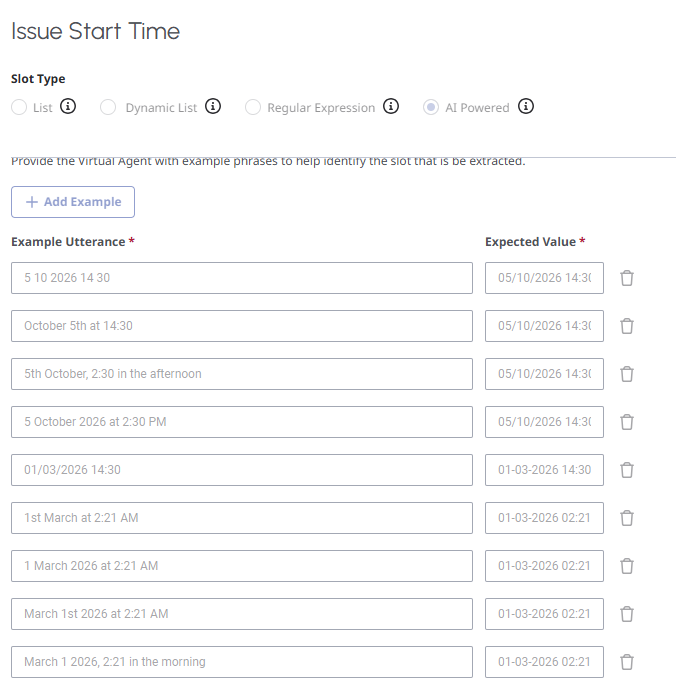
------------------------------
Akshat
CTI Engineer
------------------------------
Original Message:
Sent: 10-05-2026 04:29
From: Phaneendra Avatapalli
Subject: Genesys Architect – Normalize Natural Language Time Input to 24-Hour Format
Hi Akshat,
You should be able to achieve this using the built-in builtin:time slot type rather than manually converting the value with an expression.
Genesys documents that builtin:time maps to the Architect Time data type and converts natural-language time expressions into a time value. For example:
- "3 p.m." → 15:00:00.000
- "three-thirty p.m." → 15:30:00.000
- "four in the morning" → 04:00
- "two p m" → 14:00
So for your example, "5 PM" should be interpreted as a 17:00 time value.
I would configure the outage start time using a builtin:time slot and test the different variations you expect callers to use with your configured language, particularly phrases such as "evening 5".
Genesys documentation: https://help.genesys.cloud/articles/slots-and-slot-types-overview/
------------------------------
Phaneendra
Technical Solutions Consultant
------------------------------