Genesys Cloud - Main

 View Only

Sign Up

Expand all | Collapse all

New Analytic Workspace Feedback

Mark Whitchurch

Mark Whitchurch10-06-2026 13:06

  • 1.  New Analytic Workspace Feedback

    Posted 09-22-2026 23:24
    Edited by Robert Niblock 09-22-2026 23:38

    Hi all,

    Just sharing some of my own feedback regarding the new redesign of the Analytic Workspace.

    I've noticed now the leading column contains the Conversation ID, but you cant even copy paste the text in that field.  You need to use the Row Action to copy the conversation id.  Would have been nice to have the copy icon trailing the ID in that row and not require people to navigate all the way to the right to copy it. Or just allow users the ability to copy from that column.

    Also the rows now have to be reordered from the Edit Column button via Reorder Columns.  Why can't we just reorder the columns from the table itself?  

    Some of the columns have no consistency to the sizing.  For example, a Queue name column is really wide, but then the row for Skills is tiny and all of the text get squished into a small box that's hard to read which in turn changes all the height for those rows and it looks all out of whack. a few times I've opened "Interactions" the Conversation duration column is excessively wide, so much so that you couldn't even have a number that large take up that space. So every time you open this, you have to resize it.

    I've also noticed in Queue Activity, the top aggregrate row and the rows for the queues dont line up either which is an odd design choice.

    For a feature update that claims it enhances accessibility, its made things more challenging and isn't very sightly either with the alternating row colours. 

    Sorry if this is a rant, but for a tool that I use on a daily basis, I cant say this update has made any improvement on my experience.


    #Reporting/Analytics

    ------------------------------
    Robert
    Contact Centre Technology Analyst
    ------------------------------


  • 2.  RE: New Analytic Workspace Feedback

    Posted 09-23-2026 11:05
    Edited by Orhun Sahin 09-24-2026 06:00
    Hi Robert,
    I completely agree with your feedback. Here is additional input based on my experience using the new datatable:

    • Column Sizing and Subject Column: Some columns like Subject cannot be minimized properly and remain way too wide.
    • Conversation Duration Wasted Space: The Conversation Duration column cannot be shrunk because of its title, even though the text inside takes up very little space, resulting in a clear waste of screen real estate.
    • Column Reordering: Being able to reorder columns directly via drag-and-drop on the table itself would be much more intuitive and user-friendly.
    • Persistent Resizing: The column resizing changes we make are not saved, meaning we have to readjust them every single time we open the view.
    • Conversation ID Column: Having the Conversation ID fixed is unnecessary since agents rarely need to see it, and it just occupies unneeded screen space.
    • Horizontal Scrolling on Laptops: On smaller laptop screens, horizontal scrolling doesn't work properly and only functions when the layout is expanded to a larger screen.

    Hope these UX pain points can be addressed soon!


  • 3.  RE: New Analytic Workspace Feedback

    Posted 09-24-2026 04:41

    Good morning All,

    I agree with all of the feedback offered to date, hopefully these issues can be addressed in the coming weeks.  I also find that there's an unnecessary amount of whitespace in the rows too,  which requires more vertical scrolling than before :-(


    ------------------------------
    Andrew Smith
    ------------------------------


  • 4.  RE: New Analytic Workspace Feedback

    Posted 09-24-2026 05:20

    Hi all, 

    Sorry to jump in - my organisation agrees with @Orhun Sahin concerns regarding Conversation ID Column being fixed in  place. The fact that this column cannot even be removed is concerning. 

    We have saved analytical reports that have been altered by this column. Lots of these reports are downloaded every morning and plugged into different locations for reporting / tracking. This morning all these reports failed! (in the grand scheme of things a minor issue as I'll have them fixed by the afternoon, but it is annoying for our saved reports to have been altered).


    ------------------------------
    Ben
    ------------------------------


  • 5.  RE: New Analytic Workspace Feedback

    Posted 09-24-2026 06:31

    @ben walk 100% agree this has caused our customer many issues also. 


    ------------------------------
    Marc
    Corporate Telephony Engineer
    ------------------------------


  • 6.  RE: New Analytic Workspace Feedback

    Posted 09-23-2026 12:31

    Good UX should make users want to spend time in a product. This redesign has the opposite effect on me.


    ------------------------------
    Roman
    Technical Architect
    ------------------------------


  • 7.  RE: New Analytic Workspace Feedback

    Posted 09-24-2026 07:42

    I agree that this new design is terrible.  We should be able to click on any attribute for an interaction to open the details.  The Conversation ID should be able to be hidden.  I'm not looking forward to the feedback I'll receive from my users as they see this today.


    ------------------------------
    Tom
    Sr Principal System Engineer
    ------------------------------


  • 8.  RE: New Analytic Workspace Feedback

    Posted 09-24-2026 10:04

    100% agree with all the comments on this thread.

    I didn't enjoy those changes at all.

    Having ConversationID as a mandatory field is a terrible change... Who exactly asked for that? Anyone that WANTED that could already do it by adding the field manually, ordering it as the 1st column and saving their view like that...

    The column sizes are all over the place, and changing them manually is not saved for future use.. Very disappointed on the changes.


    ------------------------------
    Marcello
    Senior PS Consultant
    ------------------------------


  • 9.  RE: New Analytic Workspace Feedback

    Posted 09-24-2026 10:56

    Instead of locking such a long field, fixing a compact 'Interaction Type' column which has a small icon would have been much more practical and space-saving. They probably moved the row-level navigation(clicking anywhere) to the Conversation ID column to prevent accidental clicks, this is why it's fixed to allow open the conversation details tab. 

    However, if preventing accidental clicks was the goal, they could have consider implementing a simple double-click mechanism instead. Now, this creates another issue: if you have multiple columns and are reviewing data on the far right of the table, you have to scroll all the way back to the left just to click the Conversation ID and open the details page.


    ------------------------------
    Orhun
    ------------------------------


  • 10.  RE: New Analytic Workspace Feedback

    Posted 09-24-2026 11:27

    Yeah, being able to actually copy stuff from all the columns without accidentaly opening the interaction is great... But like you said it could have been implemented in several other ways.

    Instead of adding the conversationId like that, they could have just used the Interaction Type icon.. Just make it clickable so we can access the Interaction Details View. Or better yet, just add a new icon on the far left for the Interaction Details View and leave all the data columns as optional, as they were before.


    ------------------------------
    Marcello
    Senior PS Consultant
    ------------------------------


  • 11.  RE: New Analytic Workspace Feedback

    Posted 09-24-2026 14:31

    I agree with several of these points, especially around column sizing and reordering.

    For something we use so frequently, small usability details like being able to copy the Conversation ID directly or rearrange columns from the table itself make a big difference in the day-to-day experience.

    Hopefully some of these usability points can be refined in future updates.


    ------------------------------
    Gustavo Nogueira
    CX - Data Analyst
    ------------------------------


  • 12.  RE: New Analytic Workspace Feedback

    Posted 09-25-2026 03:06

    I completely agree with the points mentioned.


    ------------------------------
    Narasimha
    ------------------------------


  • 13.  RE: New Analytic Workspace Feedback

    Posted 09-25-2026 03:17

    As a relatively new participant here, could someone please explain the announcement process for such changes as these? This poor experience follows on from the recently backed-out User Management UI changes. Where else would you recommend I register interest so that one has earlier visibility of these changes please?

    THanks 


    ------------------------------
    Richard
    Contact Centre Solution Implementation Consultant
    ------------------------------


  • 14.  RE: New Analytic Workspace Feedback

    Posted 09-25-2026 03:34

    Hey Richard,

    Most commonly announcements come from the Release notes on the Resource Centre. Genesys Cloud Release notes - Genesys Cloud Resource Center .  From time to time, you can also track some features on the Ideas Lab roadmap. Genesys Cloud Ideas Portal

    Genesys does have a Beta testing forum for customers/partners to opt into for testing upcoming features.  Genesys Cloud - Beta HQ - Genesys Community

    The best example of a roll out Genesys did in recent times was the revamp on the Agent Workspace and UI.  Businesses could enable the new view and give their staff access to getting acquainted with it before the actual permanent rollout.  This was good because we could feedback to Genesys what worked and what didn't.  

    This new update for Analytic Workspace is a poor example of a deployment I've seen from them.  If there were people testing this, how could they not fix some of these issues before rolling it out.  It would have been nice to opt in to the new UI and then have the ability to roll back and provide feedback to Genesys on what works and what doesn't.  

    I also find it interesting not one Genesys rep has responded to this thread yet in terms of what they're going to do to resolve these issues.  


    ------------------------------
    Robert
    Contact Centre Technology Analyst
    ------------------------------


  • 15.  RE: New Analytic Workspace Feedback

    Posted 09-25-2026 10:36

    This points to a particular problem within Genesys lack of consistency in how enhancements/new features are announced.  As customers we should not be forced to hunt and find these announcements when there are established communications methods that have been in use for years.  Specifically Release Notes and Announcements page


    ------------------------------
    Bob
    .
    ------------------------------


  • 16.  RE: New Analytic Workspace Feedback

    Posted 09-26-2026 01:31

    Hi Bob and hello to the rest of the commentors on this thread. This thread is on the Genesys "main" community. In case you are not aware, there is a community specifically dedicated to all things WEM. That forum is managed by @Tracy Vickers. If you are not yet a member of that community, I would recommend signing up there. Tracy does a great job managing that forum. There are lots of resources such as a WEM discussion board, a library where videos and other assets can be found, network with other users, planned webinars and "how to" sessions, and information about Updates and releases. 

    Here is the link to sign up for the WEM Community:  

    https://community.genesys.com/communities/workforce-optimization?CommunityKey=f6e20f73-2c94-4b44-be95-118216aafb4f                       

    You can also talk to your account team who can provide Roadmap information on what new enhancements are coming. 


    ------------------------------
    Mark
    Senior AI & CX Advisor
    ------------------------------


  • 17.  RE: New Analytic Workspace Feedback

    Posted 09-25-2026 10:54

    Thanks Robert

    I was quite impressed by the Genesys engagement on the WEM custom colour-coding of activities that was release a few months ago. I paid particular attention to that since it was a bug-bear for our business users, but these last two UI updates haven't been handled nearly as well.  


    ------------------------------
    Richard
    Contact Centre Solution Implementation Consultant
    ------------------------------


  • 18.  RE: New Analytic Workspace Feedback

    Posted 09-25-2026 03:36

    Hi @Richard Billett

    We should regularly review the weekly release notes to stay informed about relevant updates and new features.

    Genesys Cloud – September 2026 - Genesys Cloud Resource Center

    Genesys Cloud – Genesys Cloud release notes - Genesys Cloud Resource Center


    ------------------------------
    Narasimha
    ------------------------------


  • 19.  RE: New Analytic Workspace Feedback

    Posted 09-25-2026 10:49

    Hi Narasimha

    Thanks for the feedback.

    I was really meaning more advance notice that the Monday before the release. Especially when the release notes don't include specifics of the release (in this instance the static Conversation ID column) 


    ------------------------------
    Richard
    Contact Centre Solution Implementation Consultant
    ------------------------------


  • 20.  RE: New Analytic Workspace Feedback

    Posted 09-25-2026 13:11

    Adding my voice to the dissatisfaction with this update.  My QA Specialists have each lost about an hour of productivity re-doing their views on a day when our timelines were already tight.  The interactions column being unmovable, taking up a huge amount of screen space to the point where horizontal scrolling is needed when finding new interactions to evaluate adds another layer of friction and frustration to the process.

    What was the goal here?  What was the benefit?


    ------------------------------
    Brin
    Workforce Optimization and Quality Assurance Program Manager
    ------------------------------


  • 21.  RE: New Analytic Workspace Feedback

    Posted 09-25-2026 13:23

    Some preliminary notes on what we're seeing/are sharing:

    1. Once you adjust the width of any column, that adjustment is not saved even if you save the view. It reverts back to default even when changing tabs or views (e.g., if you change the width of the Answer column in Agent Performance and then go to Interactions for that rep, when you go back to Performance the column is instantly reset to default).
    2. You cannot make the width of a column smaller than the title of the column (e.g. Conversation Duration has to stay as wide as those two words even though the content of the field is much smaller).
    3. You are forced to have Conversation Id as first column in the Interactions space (it cannot be reordered), and you can't shrink the width to make it wrap either.

    Hope these UI pain points can be addressed soon!


    ------------------------------
    Raja Sridhar Nagella
    ------------------------------


  • 22.  RE: New Analytic Workspace Feedback

    Posted 09-25-2026 13:59

    I agree with the comments shared above. When we first saw this enhancement in the release notes, we were excited about the potential to customize columns and expected it to make the experience easier for our customers. Unfortunately, today's deployment has caused significant disruption. The most urgent issue is the inability to save a view after adjusting the columns. The fact that these changes are not saved automatically feels like a significant oversight. In addition, many of our partners work remotely on smaller laptop screens, making it unnecessarily difficult to scroll across the page to reconnect to an email. This is especially challenging for teams whose roles require frequent email communication with multiple stakeholders. I hope Genesys addresses these issues quickly, as the impact has been highly disruptive.


    ------------------------------
    Katie
    manager
    ------------------------------


  • 23.  RE: New Analytic Workspace Feedback

    Posted 09-25-2026 18:55

    Disappointing Update – Performance View Issues

    100% agree with all the comments above. Even if you can resize the columns, the upper columns still don't match the bottom columns, which makes the layout inconsistent and difficult to work with.

    We also have multiple tabs open in Analytics, and when going back to the Performance view, all the column resizing and ordering we previously set is lost. Having to repeatedly resize and reorder columns every time we return to the view is frustrating and creates unnecessary extra work.

    This update feels like a step backward in usability. The column layout should remain consistent, and user preferences for column size and order should be saved when navigating between tabs and views.


    ------------------------------
    Sal Barba
    ------------------------------


  • 24.  RE: New Analytic Workspace Feedback

    Posted 09-25-2026 19:11

    We've heard the feedback on the new Conversation ID column in Performance Views data tables. This column was added to preserve one-click access to interaction details after we updated keyboard navigation and screen-reader support for accessibility, but we recognize making it pinned and non-removable created real disruption, including for scheduled exports and downstream automations that didn't expect a new column.

    We will roll out a fix within the next two weeks that removes the requirement for this column to be pinned, so you'll be able to hide or reposition it based on your own workflow.

    We also realize that the inability to store the column sizes with the view is a real limitation. We will address that in a future release. Please follow DARAR-I-2965 for updates.

    We will take all of the other feedback on this thread into consideration.  Thank you for taking the time to let us know how this update affected your business operations.

    We apologize for the inconvenience.


    ------------------------------
    Greg Cole
    Principal Product Manager, Genesys Cloud
    Reporting and Analytics
    ------------------------------


  • 25.  RE: New Analytic Workspace Feedback

    Posted 09-28-2026 06:13
    Edited by Chad Blanton 09-28-2026 06:17

    I know it's already been addressed and thanks, Greg, for saying it will be addressed in a future release, but I cannot emphasize enough how much we need persistent resizing.  Until we have that, you've effectively made the view worse for a lot of people with existing saved views that they regularly use because now we open up the view and have to completely resize everything.  EVERY SINGLE TIME.  Not just every time we open the view, but every single time we have to open a 2nd interactions view.

    You've made the product worse until resizing can be saved -- or, at very least, doesn't until it doesn't reset an existing tab when you have to open a second interactions tab.

    You need to have real world users testing UI rollouts beforehand.  It seems like the product team doesn't understand how the product is actually being used.


    ------------------------------
    Chad Blanton
    Director, WFM/WEM/All Things Genesys
    ------------------------------


  • 26.  RE: New Analytic Workspace Feedback

    Posted 09-28-2026 09:40

    Hi,

    Maybe it's time for Genesys to not only think about storing the column size, but storing the actual session too instead of refreshing the previous page every time something has been opened? I imagine the refresh (restore to default) of the column size is directly tied to the fact that Genesys does not seem to want to persist on user sessions. This has been lying in the Ideas Hub for years by now and is a major inconvenience to anyone working with the system on a daily basis.


    ------------------------------
    Laura
    Group Customer Service Process Manager
    ------------------------------


  • 27.  RE: New Analytic Workspace Feedback

    Posted 09-26-2026 16:51

    Hi Robert Niblock!

    I fully agree with the points raised. Many customers did indeed complain, especially about the difficulty of copying the ConversationID.


    ------------------------------
    Juliano Fernandes Mendes Pimentel De Paiva
    Genesys Analyst
    ------------------------------


  • 28.  RE: New Analytic Workspace Feedback

    Posted 09-27-2026 02:13

    Hi all


    Regarding copying the Conversation ID, you can copy the ID by clicking the three dots on the right side of the interaction row.


    3 dot


    ------------------------------
    Mohammad Saad
    Senior Technical Support Specialist
    Abu Sharif Brothers Company LLC
    ------------------------------


  • 29.  RE: New Analytic Workspace Feedback

    Posted 09-27-2026 09:55

    Thanks for the tip @Mohammad Saad.


    ------------------------------
    Akhil
    ------------------------------


  • 30.  RE: New Analytic Workspace Feedback

    Posted 09-29-2026 09:07

    This 'Copy Conversation ID' has always been available (Row Actions), but now is much less accessible (ironic) as the previously mentioned sizing issues often cause this final column to be way off-screen, and requires a scroll (this view, especially with dynamic sizing, should never have a scrollbar..)

    This conversation has mentioned most of the issues, but I'd like to add a couple more;

    - Subject: the email subject column can only be minimised to the length of the text string value - email subjects are arbitrary and can be very long, this causes most views with multiple emails to end up with a scrollbar and pretty unmanageable 
    - Resizing handles: are these a single pixel? The one big new feature of this update is frustratingly fiddly to use

    The last (big) UI change had permissions-control to stay on the old version, at least for a while - this would be good practice going forward, to avoid the pain of these 'surprise' releases, whose shortcomings seriously impact our business 


    ------------------------------
    Tom
    ------------------------------


  • 31.  RE: New Analytic Workspace Feedback

    Posted 09-29-2026 14:19

    Hi Tom,

    Thank you for your input.  I understand that the small size of the resize cursor is difficult to manage.  I will add this to the list of requested enhancements associated with this release.  Thank you also for your suggestion of allowing an opt-in for analytics UI changes.  We will consider it for future major UI changes in analytics.

    Greg


    ------------------------------
    Greg Cole
    Principal Product Manager, Genesys Cloud
    Reporting and Analytics
    ------------------------------


  • 32.  RE: New Analytic Workspace Feedback

    Posted 09-30-2026 07:07

    Hello,

    I agree 100% with everyone's post in this discussion, terrible design (I wonder if the designer even uses Analytic Workspace). With over 5000 Travel agent, our engineers send most of their day in Analytic Workspace and they're quite unhappy with this change.

    The bigger question is: why has this discussion stopped appearing in the daily Personalized Digest for Genesys Cloud emails?

    The last mention of this Community Conversation was on Sunday, September 27, 2026 (ET). However, there have clearly been several new posts (8 total) on Monday, September 28, 2026, and Tuesday, September 29, 2026.

    Pat


    ------------------------------
    Pat
    Genesys Engineer II
    ------------------------------


  • 33.  RE: New Analytic Workspace Feedback

    Posted 09-28-2026 09:25

    Hi Robert Niblock!

    I completely agree!!!


    ------------------------------
    Juliano Fernandes Mendes Pimentel De Paiva
    Genesys Analyst
    ------------------------------


  • 34.  RE: New Analytic Workspace Feedback

    Posted 09-28-2026 11:40

    Our team is quite unhappy with the latest updates. Moving forward, it would be much better to preview the look and feel of future changes before they hit production, rather than seeing them for the first time at launch. We completely understand that this is a continuous deployment environment, but having a staging area or even just advance screenshots of upcoming UI changes would be incredibly helpful.


    ------------------------------
    Harshit Rana
    ------------------------------


  • 35.  RE: New Analytic Workspace Feedback

    Posted 09-28-2026 11:50

    Completely agree with each of these points.  It has increased the amount of time it takes for me to do my work.   I fully admit to being particular about my screen views, so changes tend to be irksome, but typically it's easy to adapt when the benefit is obvious.   I was happy to read that the issues will be addressed in the future, and I'm sure there is a process for thinking of and creating changes, but this feels like there wasn't any input by anyone that actually uses the views.   Sorry for my additional mini-rant on a Monday morning. 


    ------------------------------
    Cindy Dexter
    Contact Center Technology Analyst
    ------------------------------


  • 36.  RE: New Analytic Workspace Feedback

    Posted 09-29-2026 15:13

    I agree with most here, I think this has been the worst update in recent memory for the productivity of my team.  We have taken several steps back and I am not excited about where we go from here.  Please address these issues and not just start an Idea page.  Thank you for all the hard work, we appreciate you all.


    ------------------------------
    Joel White
    Republic Services WFM Mgr
    ------------------------------


  • 37.  RE: New Analytic Workspace Feedback

    Posted 09-29-2026 15:20

    Why can Genesys not revert back to the previous version while they improve the new design?  That would be far less disruptive than waiting for them to release an enhancement.


    ------------------------------
    Tom
    Sr Principal System Engineer
    ------------------------------


  • 38.  RE: New Analytic Workspace Feedback

    Posted 10-01-2026 08:00
    Edited by Pat Smith 10-01-2026 08:00

    Agreed Tom,

    Standard enterprise IT change management dictates that if a deployment causes widespread, immediate operational disruption, the default protocol is to execute a backout or rollback plan. 

    So, I'll ask Tom's question again, why can't or won't Genesys Cloud simply roll back to the previous UI layout in production while these fixes are being engineered?
    ------------------------------
    Pat
    Genesys Engineer II
    ------------------------------


  • 39.  RE: New Analytic Workspace Feedback

    Posted 09-30-2026 19:47

    Can all reading this thread and wanting this remediated quickly please vote for https://genesyscloud.ideas.aha.io/ideas/DARAR-I-2965


    ------------------------------
    Graeme
    ------------------------------


  • 40.  RE: New Analytic Workspace Feedback

    Posted 10-06-2026 13:06
    Edited by Mark Whitchurch 10-06-2026 13:12

    Moved my response to the next entry.


  • 41.  RE: New Analytic Workspace Feedback

    Posted 10-06-2026 13:10
    Edited by Mark Whitchurch 10-06-2026 13:10

    Hi @Graeme Provan. The Idea you linked is for data tables. This topic is for Analytics>Analytics Workspace column views.

    I completely agree with this thread. There has always been the ability to copy the conversationID from the far-right of each interaction which was always helpful. Putting it as a non-removable/non-configurable column was a bad decision and a terrible use of screen space. It should be changed so users can move or remove it from their individual view like it used to be.

    Please bring back the ability to do this.


    ------------------------------
    Mark Whitchurch
    Senior Engineer
    IHG Hotels & Resorts
    ------------------------------


  • 42.  RE: New Analytic Workspace Feedback
    Best Answer

    Posted 10-06-2026 13:40
    Edited by Jason Kleitz 30 days ago

    Thank you, everyone, for the detailed feedback on this recent Analytics Workspace update. I'm sorry this release made a tool you use daily harder to work with. Several of you raised problems we should have caught, and I want to share what we've already changed and what's coming.

    Why the change happened
    The Interactions view moved to a common data table control that supports web accessibility standards (WCAG), such as keyboard navigation and screen reader support. This is the data table in the Idea Graeme refers to above. A side effect is that we can no longer support a single click on a row to open Interaction Details. We added a Conversation ID hyperlink so users could still drill in. Pinning that column to the left was the wrong call. It was disruptive on screen, and it also added a column to scheduled exports, which broke downstream processing for some customers.

    What we've already changed

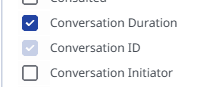
    • Conversation ID column is optional. It no longer has to be pinned or visible. You can show or hide it from the column picker, which now lives in the settings icon at the top of the table. We moved it there because columns can now be resized and scrolled horizontally, which would have left the old plus icon off-screen. It also gives us a home for upcoming user preferences and view settings. This is active now.
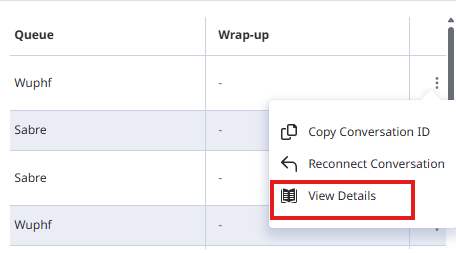
    • View Details in the row menu. A new "View Details" item is being added to the three-dot menu on each row, so you can open Interaction Details without the Conversation ID column. Rollout begins Friday, October 9.
    What we're working on next

    • Saving column widths. Resizing works today, but the widths aren't saved in the view, so you have to resize each time. The common data table control doesn't yet support saving widths. We're working with the team that owns it to add that as quickly as possible. I don't have a date yet, and I'll update this thread when I do.

    What we've heard and captured
    Copying the Conversation ID directly from the column, reordering columns from the table itself, column sizing defaults and minimum sizes (Subject, Conversation Duration, Skills), horizontal scrolling on smaller laptop screens and the alternating row colors are all noted. I don't have commitments or timelines on these yet.

    High-level Analytics Roadmap Themes
    For those who have not seen this yet, you can see a high-level overview of our areas of focus for Genesys Cloud Analytics here:
    https://genesyscloud.ideas.aha.io/sections/7278059275007246623?note_id=7676166506550360861

    Again, sorry for the disruption this recent release caused.  Thank you for your patience and for the detailed feedback. If you have more to share, please post it here.

    Thanks,

    Greg


    ------------------------------
    Greg Cole
    Principal Product Manager, Genesys Cloud
    Reporting and Analytics
    ------------------------------


  • 43.  RE: New Analytic Workspace Feedback

    Posted 10-06-2026 13:58

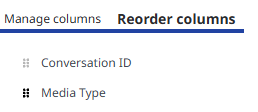
    Thank you for the prompt response and clarification. I just checked and conversationID is still mandatory and non-moveable. Is it being rolled out in phases and perhaps hasn't hit my org yet?

    ------------------------------
    Mark Whitchurch
    Senior Engineer
    IHG Hotels & Resorts
    ------------------------------


  • 44.  RE: New Analytic Workspace Feedback

    Posted 10-07-2026 10:11

    Hi Mark,

    The update is still rolling out to all the regions.  Please give it another 24 hours or so.

    Thanks,

    Greg


    ------------------------------
    Greg Cole
    Principal Product Manager, Genesys Cloud
    Reporting and Analytics
    ------------------------------


  • 45.  RE: New Analytic Workspace Feedback

    Posted 25 days ago

    Hi Greg-

    It appears the change is pushed to USW2, however there are some challenges. First, the conversationID column can be moved to a different location, however, when you leave that page and go back into it the column is in the first position every time.

    Second, referencing your post above, the only way to get into the interaction is by having the conversationID column available. Having this available and then constantly having to move it to our customized display, and/or removing then re-adding it just to see the interaction details is a serious waste of time.

    A couple questions:

    1. Is there any possibility of just introducing a small button on the far left of each interaction that acts as the clickable section to open the interaction?
    2. Is the conversationID supposed to be permanently in the first column position regardless of where I move it?

    Many thanks for your help.


    ------------------------------
    Mark Whitchurch
    Senior Engineer
    IHG Hotels & Resorts
    ------------------------------


  • 46.  RE: New Analytic Workspace Feedback

    Posted 25 days ago

    Hi Mark,

    Thank you for your continued feedback.  Regarding #1 above, you might have missed it, but I posted the following in my message last week:

    • View Details in the row menu. A new "View Details" item is being added to the three-dot menu on each row, so you can open Interaction Details without the Conversation ID column. Rollout begins Friday, October 9.

    Regarding #2, this might not be obvious.  You can move the ConversationId column, but you can only do this via the Manage Columns tab in the column picker.  I just tested this on a local environment and verified that it works.  Please let me know if you are unable to enable the column, then move it, then leave the view and return and have it be in the same place.

    Thanks!

    Greg


    ------------------------------
    Greg Cole
    Principal Product Manager, Genesys Cloud
    Reporting and Analytics
    ------------------------------


  • 47.  RE: New Analytic Workspace Feedback

    Posted 25 days ago

    Hi Greg-

    Many thanks for the prompt follow-up. I verified just now and the 'conversationID' column will now stay put where I want it, where Friday it would not.

    I did miss the part of your post regarding the 'View Details' in the menu. I also see that available for use.

    I don't know about others, but because of the number of columns I have in my saved views, it is a little tedious to scroll all the way to the right to get to this menu to both copy the conversationID and 'View Details'. Is there any consideration to making this movable so it could be set as the far-left column?

    Many thanks again,


    ------------------------------
    Mark Whitchurch
    Senior Engineer
    IHG Hotels & Resorts
    ------------------------------


  • 48.  RE: New Analytic Workspace Feedback

    Posted 25 days ago

    Hi Mark,

    That is good news!  We are working with our UX Design Team to make further improvements to the Data Table used in Views.  In particular, we are looking at ways to easily drill into an interaction.  Again, thank you for your input.

    Greg


    ------------------------------
    Greg Cole
    Principal Product Manager, Genesys Cloud
    Reporting and Analytics
    ------------------------------