Original Message:
Sent: 11-04-2026 17:27
From: Akhil Akhil
Subject: What is your best practice for working on messaging flow, testing, publishing to production and roll back if needed.
I think building the actual Inbound Message Flow first is a better approach, especially since you want to validate the complete SMS journey rather than just the logic inside a Reusable Task.
One suggestion would be to create a dedicated test Inbound Message Flow and associate your test TFN directly with it through Message Routing.
That way, you can build and test the complete flow, including keyword recognition, default paths without having to move the logic into another task-based flow.
This also avoids maintaining duplicate copies of the same logic in multiple places.
------------------------------
Akhil
------------------------------
Original Message:
Sent: 11-04-2026 16:35
From: Jean Lam
Subject: What is your best practice for working on messaging flow, testing, publishing to production and roll back if needed.
Because the entire flow resides in a Reusable Tasks in the keyword/path flow, troubleshooting like you mentioned doesn't fully replicated a true end-to-end test. In some instance, broken behaviors goes to the default path of the test keyword/path flow instead of the actual flow that's sitting within a Tasks.
Also, if I build my SMS flow in the test keyword/path flow then I have to copy all of that from the task to a new Messaging flow. Maybe I should start by build a new Messaging flow then move it into the test keyword/path flow for testing.
------------------------------
Jean
------------------------------
Original Message:
Sent: 11-04-2026 15:03
From: Akhil Akhil
Subject: What is your best practice for working on messaging flow, testing, publishing to production and roll back if needed.
Hi Jean,
For SMS testing, I think your current approach with a test keyword/path is reasonable. The main limitation is that for a true end-to-end test you still need to send an actual SMS, so using reusable tasks would make the flow easier to maintain, but it wouldn't necessarily make that testing loop much faster.
Can you please tell what part is slowing you down. Are you mainly troubleshooting the SMS/keyword recognition itself, or the Architect logic that runs after the keyword is received? If it's the latter, that's where separating and simplifying the test logic could help most.
Curious to hear how others are handling this as well.
------------------------------
Akhil
------------------------------
Original Message:
Sent: 11-04-2026 14:01
From: Jean Lam
Subject: What is your best practice for working on messaging flow, testing, publishing to production and roll back if needed.
Hi Akhil,
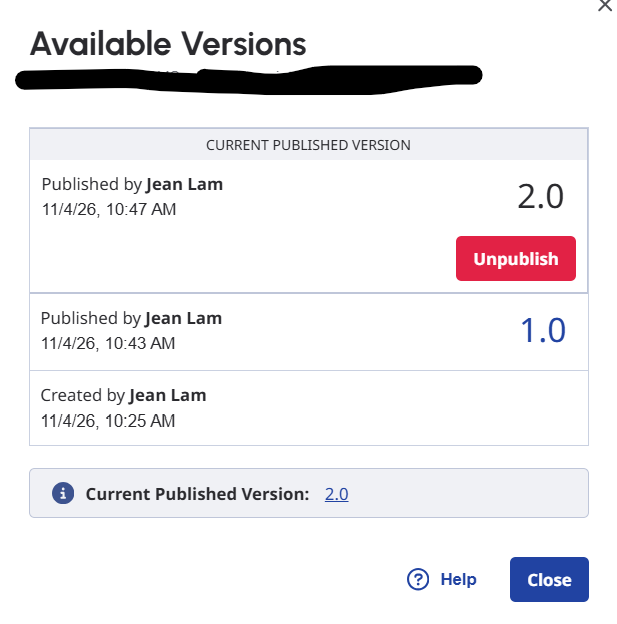
Thank you for sharing this great tip. I tested it and imported the older version on my test Messaging flow and it worked great! All the changes were reverted back to their original state on version 1. Note, I did not use the "unpublished" button.
Question, what is your process for testing SMS flows? Our environment is using a SMS enabled TFN that is keyword enabled in the Messaging flow, this flow routes to a specific task that is replicating a production flow if you text the keyword. That works well but it's not efficient when troubleshooting.
------------------------------
Jean
------------------------------
Original Message:
Sent: 11-04-2026 13:21
From: Akhil Akhil
Subject: What is your best practice for working on messaging flow, testing, publishing to production and roll back if needed.
Hi @Jean Lam,
Good question. There is actually a cleaner way to roll back an Inbound Message Flow without creating another flow or changing the Message Routing association.
If v3.0 is your last known-good version and v4.0 has the unwanted change:
- Open the existing Inbound Message Flow.
- Go to Versions and open v3.0.
- Export v3.0 as an .i3flow.
- Return to the original flow and open it for editing.
- Import the v3.0 .i3flow.
- Validate the flow.
- Publish.
This publishes the older configuration as a new version of the same flow, rather than literally making v3.0 current again. The benefit is that you don't need to create another flow with Save As or change the existing Message Routing association.
In our environment, we also keep flow changes versioned and tested, with related configuration such as routing, Data Tables, schedules, prompts, queues, skills and Data Actions documented alongside them.
So I'd keep an export of the last known-good production version before any major change. If a rollback is needed:
Export → Import → Validate → Publish
One thing to remember is that the import replaces the flow configuration rather than merging it with the current changes.
------------------------------
Akhil
------------------------------