It is enabled in the ORG settings but all of our flows are not set to this Execution Data Flow Level.
Original Message:
Sent: 12-04-2025 17:13
From: Tristen Schwarzenberger
Subject: Evaluation Dispute Notification
Is it also enabled in your organization settings?

If it's not I would be cautious with your global setting being "All" if you have a lot of traffic going into your environment. Just something to be aware of.
------------------------------
Tristen Schwarzenberger
IT Engineer
GCP
Original Message:
Sent: 12-04-2025 17:06
From: Sheree Barrett
Subject: Evaluation Dispute Notification
Hi Tristen,
Yes we have it enabled at the below level:
------------------------------
Sheree Barrett
NA
Original Message:
Sent: 12-04-2025 16:57
From: Tristen Schwarzenberger
Subject: Evaluation Dispute Notification
Hey Sheree,
Do you have Execution Data enabled on your org? If not, here is an article giving an overview of it. The big thing to keep in mind is it will count towards your organization's data storage limit:
https://help.mypurecloud.com/articles/historical-execution-data-overview/
If you do have it enabled, do you have it enabled on the flow? You can look by checking the box next to the flow in Architect and selecting "Execution Data" at the top. For this purpose you could just select "Base" just to confirm if the flow is being hit or not.

If it is enabled on the org and the flow and you're still not seeing it, this is when I would look into notifications/topics on the developer center. Basically what this does is allow you to see the json schema of the events associated to the topic. This is a bit more complicated, but it will allow you to see your dispute tests and what the value of "status" and "dispuseCount" is to verify accuracy:
https://developer.genesys.cloud/devapps/about/notifications
I will say I have already setup this trigger and tested on my own end doing a dispute and it was successful so I don't believe it's the configuration of your trigger. The issue should either be the way the test is conducted, or the workflow.
------------------------------
Tristen Schwarzenberger
IT Engineer
GCP
Original Message:
Sent: 12-04-2025 16:28
From: Sheree Barrett
Subject: Evaluation Dispute Notification
Hi Tristen.
I ran a test but nothing appears in the Execution History. The flow is saved and published.
------------------------------
Sheree Barrett
NA
Original Message:
Sent: 12-04-2025 14:57
From: Tristen Schwarzenberger
Subject: Evaluation Dispute Notification
Awesome! Now if you can, try disputing a test evaluation in your Genesys environment. If the flow is simply sending an email notification, it shouldn't take very long for that to appear. If nothing happens, check that Execution History mentioned above.
It is very important to note though that you won't see Execution History data unless it's enabled for you org and for the flow.
------------------------------
Tristen Schwarzenberger
IT Engineer
GCP
Original Message:
Sent: 12-04-2025 14:51
From: Sheree Barrett
Subject: Evaluation Dispute Notification
That worked my friend.
------------------------------
Sheree Barrett
NA
Original Message:
Sent: 12-04-2025 14:44
From: Tristen Schwarzenberger
Subject: Evaluation Dispute Notification
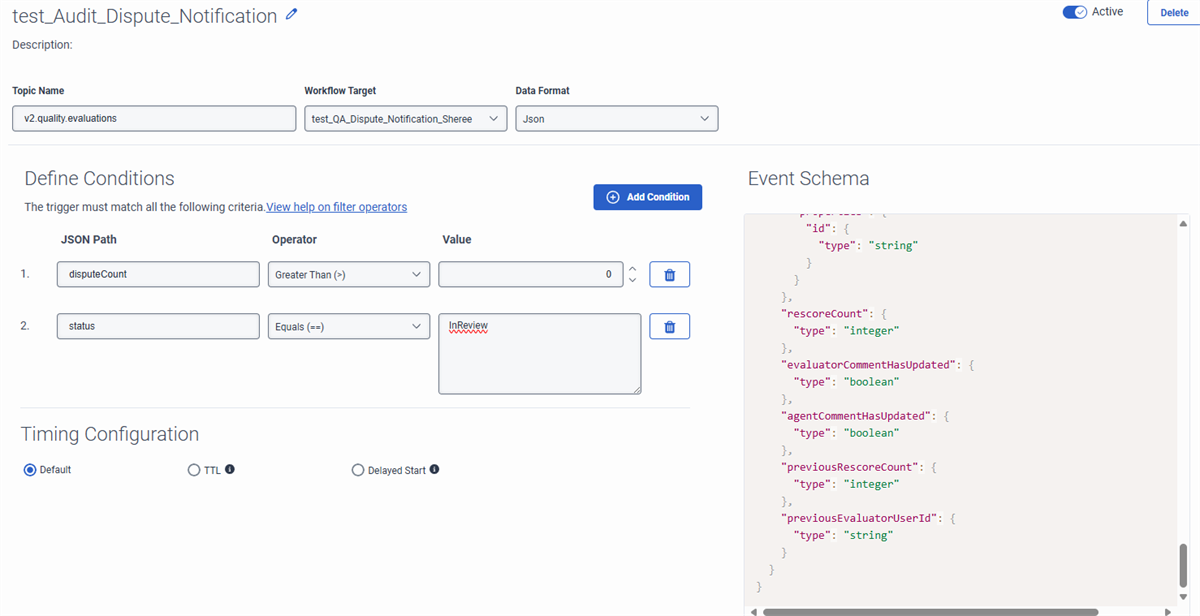
The event schema on the right is more of a reference and doesn't exactly work when it's pasted in the test event body unfortunately. The actual live event schema you can use is found in the Developer Center via Notificaitons/Subscribing to topics, but we don't need that at this time.
Try just copying and pasting the below into the test event body. This is actually how those 2 fields show up in the notifications, I just trimmed out all the JSON it isn't looking for and inserted values if an agent were to dispute it for the first time.
{
"status": "InReview",
"disputeCount": 1
}
------------------------------
Tristen Schwarzenberger
IT Engineer
GCP
Original Message:
Sent: 12-04-2025 14:36
From: Sheree Barrett
Subject: Evaluation Dispute Notification
Hi Tristen,
I ran the test with 2 conditions but I received the same results.
------------------------------
Sheree Barrett
NA
Original Message:
Sent: 12-04-2025 14:23
From: Tristen Schwarzenberger
Subject: Evaluation Dispute Notification
Thanks, Sheree!
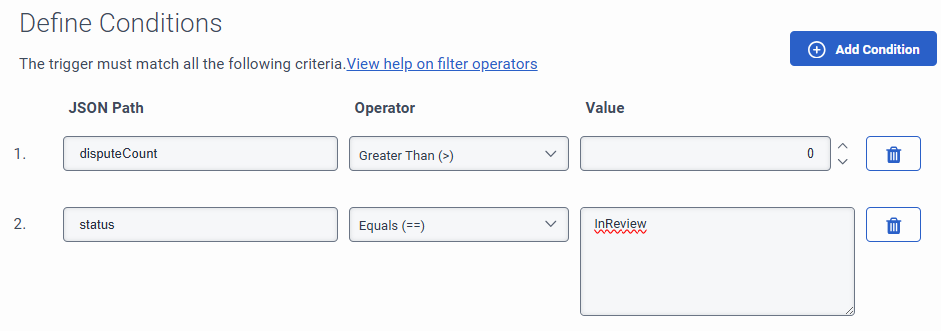
So the issue here I think is each condition has to be met for the trigger to go off. What is happening is it wants:
Status == inReview AND agentCommentHasUpdated == true AND disputeCount > 0.
Go ahead and remove condition 2 for agentCommentHasUpdated and then try copying and pasting this JSON into the test event body to see if you can get a success:
{
"status": "InReview",
"disputeCount": 1
}
These should be the only 2 conditions:
------------------------------
Tristen Schwarzenberger
IT Engineer
GCP
Original Message:
Sent: 12-04-2025 13:44
From: Sheree Barrett
Subject: Evaluation Dispute Notification
Here you go my friend.
------------------------------
Sheree Barrett
NA
Original Message:
Sent: 12-03-2025 09:41
From: Tristen Schwarzenberger
Subject: Evaluation Dispute Notification
Interesting.... definitely would've thought that condition would work.
You would only need one, I would say just do disputeCount > 0.
Just a few things to confirm:
-Are you able to successfully test on the trigger itself? Whether or not the workflow runs, curious if at least can get a success in the trigger test.

-Was the trigger changed from inactive to active? (I've missed this part a couple times haha)
 -Confirm it's the trigger and not the workflow. Does the workflow run successfully if you activate it via an inbound call or something?
If I'm mistaken on the dispute, you could maybe pivot to the condition agentCommentHasUpdated Equals (==) true
An agent has to leave a comment when disputing so this should be another valid approach and it's the condition we use for this exact same use case.
There's more advanced troubleshooting you can do via Notifications and subscribing to topics in the Developer Center and also flow execution in Architect, but before that's needed I'd say just verify everything I've mentioned above.
------------------------------
Tristen Schwarzenberger
IT Engineer
GCP
Original Message:
Sent: 12-03-2025 08:34
From: Sheree Barrett
Subject: Evaluation Dispute Notification
Hello Tristen. Thank you for replying. Yes I would love more help. We set the condition as:
disputeCount Greater Than(>) 0 and disputeCount Equals (=) null but neither worked. It's not running the Workflow.
------------------------------
Sheree Barrett
NA
Original Message:
Sent: 12-02-2025 14:14
From: Tristen Schwarzenberger
Subject: Evaluation Dispute Notification
Hey Sheree,
Not for disputes, but we have done one to notify our supervisors when an agent comments on an evaluation. I'm sure they are pretty similar.
You're looking for the topic v2.quality.evaluations and I personally prefer the Json Data Format because it's easy to setup and utilize once you understand it. This only really matters though if you want to pass the schema data into the workflow.
My thought would be that your condition is:
disputeCount Greater Than(>) 0
Maybe even doesn't equal 0, but I don't think that should make a difference.
I would imagine that should send a notification for every dispute. And then if you are just wanting a notification, workflows have the "Send Notification" tool that should great for this as well.
If you'd like anymore detail on the process/questions, I'd be happy to help!
------------------------------
Tristen Schwarzenberger
IT Engineer
GCP
Original Message:
Sent: 12-02-2025 11:14
From: Sheree Barrett
Subject: Evaluation Dispute Notification
Has anyone created a trigger and workflow for notifications to individuals when there is a dispute for an evaluation?
#ArchitectandDesign
------------------------------
Sheree Barrett
NA
------------------------------