Original Message:
Sent: 03-10-2025 14:35
From: Vaun McCarthy
Subject: Genesys Cloud CX Release Notes - February 24, 2025
I suspect Jason's right and they just increased it behind the scenes from a hard 15 minutes to hard 60 minutes. The wording of the release notes I believe is the problem and misleading, implying an admin can actual adjust this maximum.
------------------------------
Vaun McCarthy
Original Message:
Sent: 03-10-2025 14:16
From: Jason Kleitz
Subject: Genesys Cloud CX Release Notes - February 24, 2025
Hey Brian,
I'm currently looking to see if there is anything that you would need to configure within the org, but I believe we just increased the ACW recording time cap from 15 minutes to 60 minutes. I'll let you know if I find any other information.
------------------------------
Jason Kleitz
Online Community Manager/Moderator
Original Message:
Sent: 03-10-2025 11:47
From: Brian Jones
Subject: Genesys Cloud CX Release Notes - February 24, 2025
No worries @Jason Kleitz. To answer your question though, I still haven't received a reply to my inquiry on the related Idea. Can anyone else in this community see where they can extend the screen recording ACW timer?
------------------------------
Brian T. Jones | Ascension | Senior Specialist - Technology
Original Message:
Sent: 03-10-2025 11:37
From: Jason Kleitz
Subject: Genesys Cloud CX Release Notes - February 24, 2025
Hey Brian,
Sorry for the delay in response. I didn't receive an email saying that you had replied on this post. Were you able to find the information that you needed?
------------------------------
Jason Kleitz
Online Community Manager/Moderator
Original Message:
Sent: 02-28-2025 22:32
From: Brian Jones
Subject: Genesys Cloud CX Release Notes - February 24, 2025
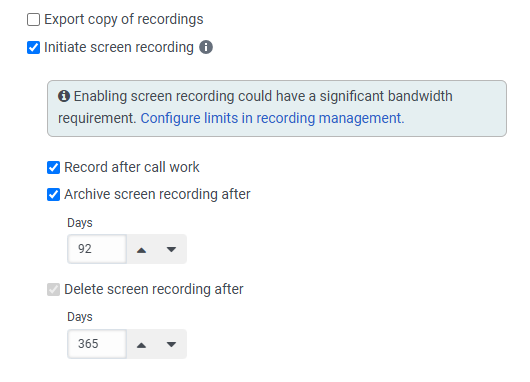
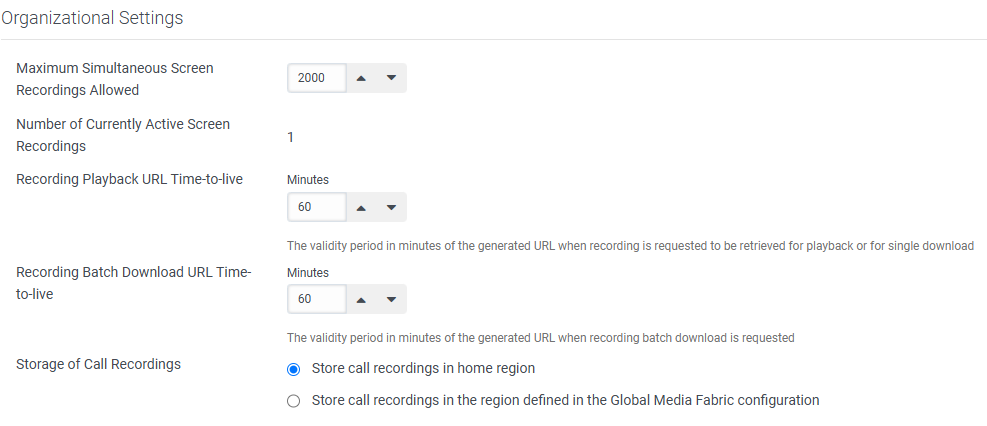
@Jason Kleitz - I also posed this question in the related Idea, but regarding the feature where you can increase the screen recording duration for ACW (to greater than 15 minutes), we are not seeing a place where that can be set in the Policies or Recording Management. Any idea on where that is? We're in the US East region, so I presume it should've shown up by now.
------------------------------
Brian T. Jones | Ascension | Senior Specialist - Technology
Original Message:
Sent: 02-27-2025 16:06
From: Jason Kleitz
Subject: Genesys Cloud CX Release Notes - February 24, 2025
We have roughly 1 month before the new Agent UI multiple contextual panels are rolled out to Genesys Cloud. If you haven't read up on this change, you can find more info here!
------------------------------
Jason Kleitz
Online Community Manager/Moderator
Original Message:
Sent: 02-27-2025 16:04
From: Jason Kleitz
Subject: Genesys Cloud CX Release Notes - February 24, 2025
February is coming to a close but we still have some fresh new features. Have a look at the Release Notes below!
Feature availability may vary and is based on factors such as, but not limited to, region readiness, product licensing, and the Genesys release schedule. For more information, see the Genesys Cloud release schedule.
2024 Genesys CIDR expansion and firewall requirements notification
URGENTPlease take action
now to avoid service disruption. By April 5, 2025, to prevent service disruption and ensure service continuity, customers must take the following steps:
- Configure their firewalls to allow access to the new CIDR IP addresses.
- Complete all applicable readiness tests.
- Read the entire 2024 Genesys CIDR Expansion - Commercial announcement
Genesys previously announced that, during the week of December 7, 2024, Genesys would migrate an additional /18 CIDR block of IP addresses used for Genesys Cloud public-facing media services. Genesys postponed that date to April 5, 2025. These addresses supplement existing regions and cover growth in future regions. The new IP range is 136.245.64.0/18. Additionally, Genesys will expand the RTP port range and move the Force TURN IP addresses to the new Genesys CIDR block.
Multi contextual panels
ImportantThe opt-in/opt-out period for this feature ends on March 31, 2025. As of this date, all agents will use only the new multiple contextual panel experience. For more information, see
Agent UI multiple contextual panels.
Call center admins can use multi contextual panels to improve agent efficiency by reducing the number of clicks. This feature allows agents to display multiple contextual panels simultaneously to more efficiently focus on customer conversation with full context visible at a glance.
Turn on-screen annotation and drawings in co-browse on or off for privacy compliance
Administrators can now enable or disable the on-screen drawing feature in co-browse sessions to align with privacy and compliance requirements. This update provides more granular control over session features. On-screen drawings in co-browse sessions serve as a form of communication, but since these sessions are not recorded, drawings are not retained after the interaction. For organizations with strict compliance policies, the ability to disable this feature helps ensure that untraceable visual annotations do not create regulatory concerns.
Insert a new event between two existing events in Journey Management
Journey management administrators can now insert a new event between two existing events in a journey. The canvas automatically adjusts the positioning of other events to fit the new event. This enhancement helps users add extra context to journeys without removing or rearranging existing events manually. Previously, users needed to delete and reposition events to add a new event in between events. Now, users can drag an event from the event list and place it between two existing events. This feature provides greater flexibility when building complex journeys or refining journey templates.
Enable real-time queue and agent monitoring with customizable notifications on Android
Supervisors can now use the new Insights app for Android to monitor queues and agents in real time, even while away from their desks. They can also set and receive customizable alerts directly on their mobile devices. This enhancement helps supervisors stay informed and respond quickly to changing contact center conditions, improving overall efficiency.
Improved Agent Copilot summarization for English and Spanish Dialects
Genesys Cloud improved Agent Copilot summarization of interactions for English Australia (en-AU), English Great Britain (en-GB), English United States (en-US), Spanish Spain (es-ES) and Spanish United States (es-US) dialects.
Additional screen pop options in CX Cloud from Genesys and Salesforce
Administrators can now set up Salesforce objects to appear as additional subtabs alongside the voice call record page in CX Cloud from Genesys and Salesforce. This update provides more flexibility in customizing the agent workspace by allowing relevant information to be displayed dynamically based on the interaction. Previously, CX Cloud supported only the voice call record page when an interaction was delivered to an agent. Administrators can now define additional screen pops in Genesys Architect using specific attributes and commands, such as the GC_SCREEN_POP custom attribute, which allows them to screen pop a specific Salesforce page for inbound calls and callbacks. The screen pop can be a Salesforce page, a Visualforce page, or a new record page with pre-populated data from an Architect workflow. This feature improves efficiency by ensuring that agents have immediate access to key Salesforce records, reduces the need for manual navigation, and enhances workflow continuity.
Purchase Speech and Text Analytics as a standalone product
Genesys Cloud now offers Speech and Text Analytics (STA) capabilities as an add-on for organizations using Genesys Cloud CX 1 or CX 2 such as voice transcription, sentiment analysis, and topic spotting, without purchasing the full Workforce Engagement Management (WEM) Add-On. This new standalone STA offering provides greater flexibility for customers who only need speech and text analytics features. Customers can add STA to their subscription by purchasing the Genesys Cloud AI Experience Token Bundle. Organizations using both WEM and STA will continue to be billed for the WEM Add-On, as WEM includes STA. In a single organization, all users must be on either the STA Add-On or the WEM Add-On, not a mix of both.
Turn customer sentiment analysis on or off
Administrators can now enable or disable customer sentiment analysis based on their organization's preferences and regulatory requirements. This setting applies to new interactions after the administrator configures the setting. When disabled, customer sentiment analysis does not remove previously configured sentiment feedback phrases; however, it prevents that feedback from being used in analysis going forward. This update provides organizations further granularity in speech and text analytics settings, and also aligns with the existing ability to toggle agent empathy analysis to provide administrators with consistent experiences with their analytics configuration.
Division-aware permissions and APIs for external contacts
Administrators can now view new division-aware external contacts permissions and developers can see the division ID field in select contacts APIs. This update precedes division-aware functionality by making available new permissions and APIs. Developers can also use the updated APIs to observe division IDs in response data. These updates help organizations plan for scenarios where access to external contacts can be segmented by division, such as separating customer data by brand, business unit, or other groupings.
Increase screen recording duration for after-call work
Administrators can now extend the screen recording duration during after-call work (ACW) to up to 60 minutes, an increase from the previous 15-minute limit. This change helps ensure that agents who need more time to complete post-call tasks can still be recorded for quality and compliance monitoring. The longer duration aligns with the previously increased ACW timeout, providing a more consistent experience for contact centers that require longer ACW periods.
Set scheduling constraints for calendar months
Administrators and schedulers can now define scheduling constraints across calendar months to help balance agents' paid hours and the number of weekends worked. This update allows administrators to set minimum and maximum limits for specific work plan shifts and restrict the number of worked weekends within a planning period. When Genesys Cloud generates schedules, the process automatically suggests the number of weeks needed to cover the full month or the remaining part of the month. This behavior helps to ensure that work plan constraints are optimized and balanced. This feature is especially beneficial in regions where labor laws require workforce management on a monthly basis, including rules for overtime, night shifts, and weekend work.
Note:
- Genesys Cloud enables features for release starting on Monday and completing by the end of the day Thursday, per region. If you do not see a feature enabled for your organization by the following business day, check the required subscriptions and permissions provided in the Release Notes and related documentation. If you confirm the subscription and permissions and still experience issues, contact Customer Care.
- Some features may require an integration add-on.
#Roadmap/NewFeatures
------------------------------
Jason Kleitz
Online Community Manager/Moderator
------------------------------