Genesys Cloud - Main

 View Only

Sign Up

  Thread closed by the administrator, not accepting new replies.
  • 1.  How to activate a button after checkboxes have been selected

    Posted 08-31-2022 10:54
    No replies, thread closed.
    I have managed to make a button in active. I have managed to get an active button to only be able to be clicked once check boxes on that page have been selected. I need to combine the 2. I'm still learning a lot about Genesys and could use some help (step by step if possible). 

    How do I make a button inactive unless checkboxes are selected? 

    Thank you!
    Julie
    #ArchitectureandDesign

    ------------------------------
    Julie Kleedorfer
    Inspiritec, Inc.
    ------------------------------


  • 2.  RE: How to activate a button after checkboxes have been selected

    Posted 08-31-2022 11:12
    No replies, thread closed.
    When you use a checkbox, keep this in mind:  When the radio button is selected at runtime, its "Selected Value Text" becomes the new value of the variable. This way, each radio button can assign a different value to same variable.

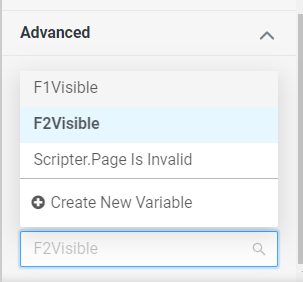
    Once you have the variable set, you can now use the Advanced settings of the button.   Unfortunately, you might have to look at the opposite of the check or make it based on the inverse of a selection.  I found that to be the difficult part. 

    ------------------------------
    Robert Wakefield-Carl
    Avtex Solutions, LLC
    Contact Center Innovation Architect
    https://www.Avtex.com
    https://RobertWC.Blogspot.com
    ------------------------------


  • 3.  RE: How to activate a button after checkboxes have been selected

    Posted 08-31-2022 16:34
    No replies, thread closed.
    You kind of have two options

    You can either make the button invisible while the checkbox is unticked, in which case you can just set the same checkbox value variable to the button visibility value (under layout)
    Or like Robert suggested you need an additional variable that flips the boolean value of the checkbox, so if ticked set it to false,  then set the Button's disabled parameter to that new boolean. This is just because the disabled parameter for buttons, disables the button when it is true, and enables it when it is false. 

    In a dynamic Boolean variable, you can flip the checkbox value with just
    Not {{CheckboxBoolean}}
    Or you with
    {{CheckboxBoolean}} != True

    ------------------------------
    Anton Vroon
    ------------------------------


  • 4.  RE: How to activate a button after checkboxes have been selected

    Posted 09-01-2022 14:22
    No replies, thread closed.
    Thank you for your help. I'm really out of my element when it comes to this. I tried your idea and I see it makes the button disappear completely. I'd like it to be visible but not active.. Please see below ( I apologize if I didn't explain properly before). If you see my screen shot below, I want the Successful button shown like that unless both checkboxes are checked and then I'd like the Successful and Unsuccessful button to flip which is active. It looks like I have it set correctly right now but even if I have both checkboxes checked the buttons don't change. 


    ------------------------------
    Julie Kleedorfer
    Inspiritec, Inc.
    ------------------------------


  • 5.  RE: How to activate a button after checkboxes have been selected

    Posted 09-01-2022 16:23
    No replies, thread closed.
    Sure
    So here is an example:
    I have 2 tick boxes, first one's value is Condition1Bool second on e is Condition2Bool
    eg

    Now I create a 2 Dynamic Boolean variables
    Value for Unsuccess is:
    {{Condition1Bool}} and {{Condition2Bool}}
    Value for Success is:
    not {{Condition1Bool}} or not {{Condition2Bool}}

    Then set the disabled parameter under advanced to these new variables
    eg

    And similar for the unsuccessful button

    And that should work


    ------------------------------
    Anton Vroon
    ------------------------------


  • 6.  RE: How to activate a button after checkboxes have been selected

    Posted 09-12-2022 12:32
    No replies, thread closed.
    Thank you so much!!!! You have no idea how much this means to me!  This worked out perfectly!

    ------------------------------
    Julie Kleedorfer
    Inspiritec, Inc.
    ------------------------------