Have you compared the 32-bit apps memory consumption between the problem user and the others? How many other 32-bit apps are running on the machine? As per Jeff's previous post and the memory management facility for the 32-bit environment, the less there are running concurrently the better.
While not specifically the Geneyss Desktop application, I have seen 32-bit apps complain of running out of memory when there's too many of them running concurrently and by too many in what I have seen, upwards of 30 - 50 32-bit processes and then one comes along and consumes a signiicant portion of the heap and ultimately crashes. If there is a way for you to reduce the footprint of the 32-bit processes running, evem as a test to see if that overcomes the issue, might be of value.
Mike.
Original Message:
Sent: 08-03-2025 20:27
From: Jeff Hoogkamer
Subject: .NET crash 2.43.829
Only thing I can think of why it's only affecting some users will be either due to:
- they are very quick/efficient and perform the relevant tasks/actions quicker than other users, which could then result in more successive API calls and loading of screens/pages/actions that contribute to the higher memory usage
- it is a very specific sequence of events, clicks, scrolls, etc that certain users perform versus other users that contribute to it.
------------------------------
Jeff
Original Message:
Sent: 07-31-2025 10:37
From: John Wooten
Subject: .NET crash 2.43.829
Jeff, thank you for the amazing reply. It's evident to me that I'm experiencing the same issue. I'll create a ticket and hope it helps us both.
The thing I can't understand is why it's only happening with one user. I've polled the call center users (6 total) and found that no one else is experiencing the issue. Their application logs back that up so there must be some user behavior as a contributing factor as well.
------------------------------
John Wooten
Original Message:
Sent: 07-31-2025 04:01
From: Jeff Hoogkamer
Subject: .NET crash 2.43.829
Hi John,
I'm going to repost/rehash some info previously raised in 2022 (https://community.genesys.com/discussion/gc-desktop-app-system-freezing#bm14effb72-d993-4298-8ff2-a396967b74d6) that might help explain.
Historically (since going live with Genesys Cloud in 2021 and using the desktop application), we've noticed that the desktop application will occasionally freeze, refresh or just simply close without warning.
In these scenarios, an error will appear in the Windows Event Viewer as either an 'Application Error' (when it just refreshes/freezes), or a '.NET Runtime' error (when it also closes)

According to the Microsoft .NET documentation, there are two common unmanaged SHE exceptions, either Out of Memory, or Access Violation

As the Genesys Cloud desktop application is only a 32-bit process - standard 32-bit applications (that aren't Large Address Aware) have a maximum memory limit of 2GB, and within a .NET application this limit is known to be around 1.2GB and 1.3GB (http://graphicdna.blogspot.com/2012/10/memory-limits-in-net-process.html)

To confirm this back in 2022 - keeping Task Manager running beside my Genesys Cloud instance whilst I was performing maintenance work in the Phone Management section - I noticed that one of the GenesysCloud.exe processes was continuously increasing in Memory utilisation.
As soon as it reached over 1200 MB of Memory utilisation, the application started freezing and showing the loading symbol, before completely refreshing and reloading the entire desktop application

We have been seeing this behaviour since desktop version 2.6.622 and every version up to the latest - even the latest 2.43.829 with the updated .NET framework and C++ runtime versions.
Trying the web version is usually much more reliable as we are running a 64-bit version of Chrome - however testing has shown the Chrome process consuming anywhere in excess of 4-6GB of memory and can still error/crash with 'Aw, Snap' with an Out of Memory error.


Task Manager shows Google Chrome (which was only running Genesys Cloud at the time) was up to 5.1GB memory total utilisation at this point.

We originally raised this with Genesys Support back in 2022 and there is something happening around memory management/utilisation in parts/sections of the Genesys Cloud app - and it's that's just chewing through memory until it reaches an out of memory or an unhandled exception event.
However after much backwards and forwards, with Genesys insisting the problem was with our network, our computers, our firewall, etc - we just gave up trying to get anywhere with a result.
This was mainly because at the time - it really affected admin users (i.e. mainly myself in the Phone Management section) and it never really affected agents or supervisors.
However we have noticed about a month ago (whilst running a minimum of version 2.40.811 but also after in-place upgrading to 2.43.825 and all the new requirements) this behaviour has started affecting agents multiple times a day now when just receiving voice or email interactions, and the random refresh/crashing will drop the WebRTC call with no recovery.
The easiest way we can replicate this on-demand is through the following steps:
- Navigate to 'Admin'
- Click into People
- Once in people, click into a name.
- ACD skills – Remove skill
- Then into queues – remove queue.
- Save and continue, then save again.
- Repeat steps 3 through to 6.
We've since raised this again with Genesys Support, and so far despite referencing our prior experience and tickets, it was originally blamed on the 2.43.825 release which has been post-poned and since replaced with 2.43.829 - but the issue still occurring.
Even after fully uninstalling, removing folders and files, etc - it's not going to fix the underlying issue of the actual Genesys Cloud application both using too much memory AND running on the 32-bit desktop application without having sufficient memory management or exception handling.
So at this point there's not much that you can do other than:
- raise a ticket and hope it gets traction
- move to using the web-based version with a 64-bit browser
- otherwise deal with the issues and prepared for Moments Disconnected with your customers.
Hope that at least explains some things :)
------------------------------
Jeff
Original Message:
Sent: 07-30-2025 16:43
From: John Wooten
Subject: .NET crash 2.43.829
Hello, just throwing this out here in case anyone has seen it before or anything like it. Seems likely to be a Windows or .NET issue more than a Genesys issue, but I'm kind of stuck trying to solve it.
I have a specific user whose Genesys desktop app (2.43.829) is crashing daily for a single user. What happens is that the Genesys application quits and restarts, triggering a login (we use M365)
If it happens with any of my other 130 users, I'm not being told about it. I have even replaced the user's PC, but it continues to be an issue. She can be idle or in a call, and the app will crash. I see these events in the Windows application log. What's kind of interesting is that it only happens once in a given day, but not every day, and there is no pattern to the time.
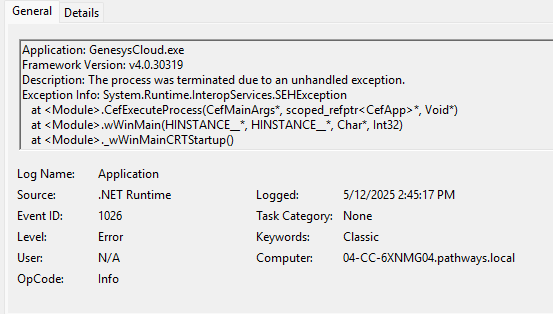
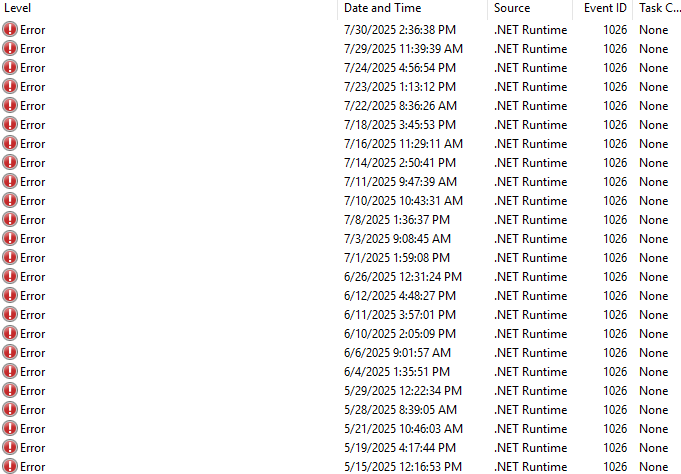
I'm at a loss here. Any insights?
#Omni-ChannelDesktop/UserInterface
------------------------------
John Wooten
------------------------------