Thanks for sharing the idea Chris. I have voted for it.
Original Message:
Sent: 12-02-2025 06:48
From: Chris Grewe
Subject: Performance - Interactions - Email Reporting
This was something our group was looking for as well. We worked with our vendor to find a solution and were unsuccessful. While it doesn't help solve your problem check this Idea out:
https://genesyscloud.ideas.aha.io/ideas/DARAR-I-1943
------------------------------
Chris Grewe
Michigan State University
Original Message:
Sent: 12-02-2025 06:24
From: Jan Heinonen
Subject: Performance - Interactions - Email Reporting
Hi Vikas,
Only way I've figured out so far is to use API POST /api/v2/analytics/conversations/details/jobs, as this can give all conversations that were "active" during the interval regardless of start date.
Downside is that the datalake for that API is only updated daily so it can only be used for historical statistics, since the last 24h might not be included.
------------------------------
Jan Heinonen
Contact Center Specialist
GlobalConnect AB
Original Message:
Sent: 12-01-2025 17:31
From: Vikas Dhall
Subject: Performance - Interactions - Email Reporting
Thanks Rohan.
I did try that and honestly it does provide more info however you can't filter via "End Date" unless I am missing something?
Vikas
------------------------------
Vikas Dhall
Original Message:
Sent: 12-01-2025 16:39
From: Rohan Kundu
Subject: Performance - Interactions - Email Reporting
Hey Vikas,
Can you please add the Total handle and the End Date columns in the interactions view page in addition to the other filters that Stephan suggested? Shown as below:
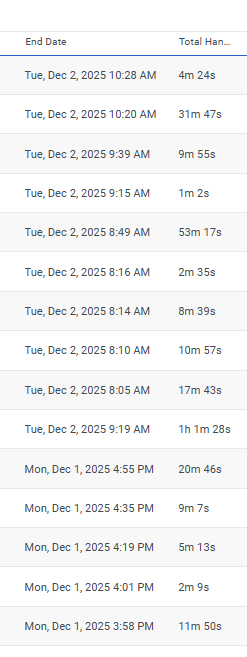
Let me know if that helps :)
Kind regards,
Rohan
------------------------------
Rohan Kundu
Original Message:
Sent: 12-01-2025 16:21
From: Vikas Dhall
Subject: Performance - Interactions - Email Reporting
Hi Stephan,
Thanks for your response.
Yes, you got me right.
The date time stamp i.e. metrics "Date" on the interactions view is the date when email interaction started i.e. landed in the queue. So, the view panel with the filters as advised by yourself would show me those emails that were received and subsequently handled by the user during the selected interval. This view will not show the emails that the user worked on that were sitting in the backlog from previous day (waiting in the queue to be answered). I hope this all makes sense.
Regards,
Vikas
------------------------------
Vikas Dhall
Original Message:
Sent: 12-01-2025 03:30
From: Stephan Taljaard
Subject: Performance - Interactions - Email Reporting
Hi Vikas
Just to ensure I understand correctly. You want to view all the interactions for that specific agent, correct?
If this is the case, you can use the interactions workspace and then add the email and user filter. You can then enter the agent details in the user field, this will allow you to view all the email interactions for that specific agent.
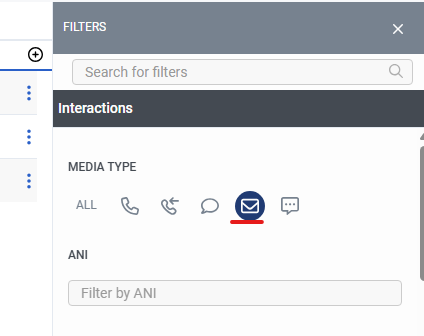

Regards
Stephan
------------------------------
Stephan Taljaard
NA
Original Message:
Sent: 12-01-2025 02:49
From: Vikas Dhall
Subject: Performance - Interactions - Email Reporting
Hi,
If I wanted to view all the email interactions that an agent handled (not the count of email interactions) during the day, how would I do so?
Thanks
#DigitalChannels
#Reporting/Analytics
------------------------------
Vikas Dhall
------------------------------