Hi Jay,
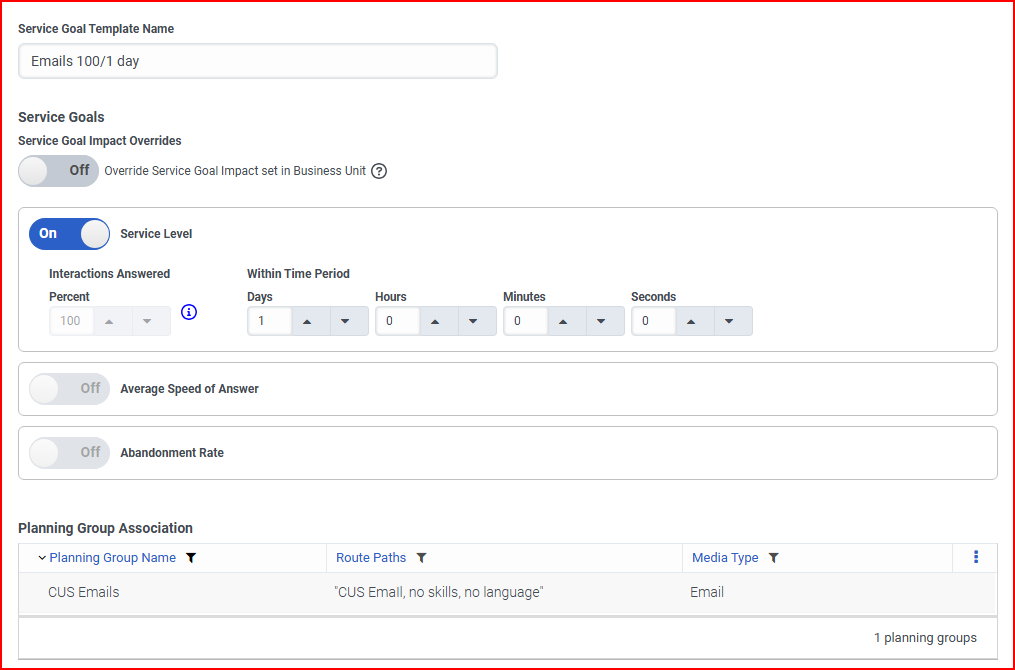
Thank you for getting back to me. Here's what I have set up for my Emails SL.
Our 7 Supervisors (who are not built into the schedule) and only 3 of our CSRs focus on emails during our core hours (9a-7p)
From there, our single overnight person works on emails when there are no calls coming in.
Our goal is to have all emails replied to within 24-hours of them being received.
However, we do have all of our CSRs in the Emails Planning group so they can send outgoing emails if customers requests documentation, but we only want the 7 Supervisors, overnighter, and the 3 CSRs to handle incoming emails.
------------------------------
Jacqueline Turner
Workflow Coordinator
NYCM Insurance
------------------------------
Original Message:
Sent: 11-25-2025 08:28
From: Jay Langsford
Subject: Planning Groups vs Scheduled, Performance, Required Numbers
Adding new load will increase staffing requirement. Only looking at a subset of planning groups will lower staffing requirement. As to why staffing requirement is higher or lower than expected we have a resource article that lists some of the drivers (even very small differences can have significant impact to staffing requirement): https://help.mypurecloud.com/faqs/why-are-staffing-requirements-higher-or-lower-than-expected/
If nothing is apparent, then I would recommend opening a support ticket.
What is your SL/SLO setting in WFM for emails?
------------------------------
Jay Langsford
VP, R&D
Original Message:
Sent: 11-24-2025 13:00
From: Jacqueline Turner
Subject: Planning Groups vs Scheduled, Performance, Required Numbers
Hi there,
Previously, we were not capturing any of our email interactions. I pitched the idea to my manager regarding how we can gain more insight agents workloads by doing so and I created a Service Goal Template and Planning Group for it. A few weeks after enabling it though, I have noticed the numbers in the schedule (Required vs scheduled) have grown dramatically. Rather than relying on the numbers for all planning groups (as we previously had done), I now have to uncheck my callbacks to get a more accurate picture of how many we need vs what we have scheduled.
Is my forecasting now including callbacks again and that's why my volume has changed so dramatically?
Long story short before I included our email interactions, I didn't need to uncheck any planning groups below.
Now that I'm including email interactions, I need to uncheck all callback planning groups and emails to exclude them. Otherwise, we have inflated numbers.
It wasn't until after I played with the email planning group that we began receiving these rather large numbers for the Difference rows.
Excluding Callback & Email Planning Groups:
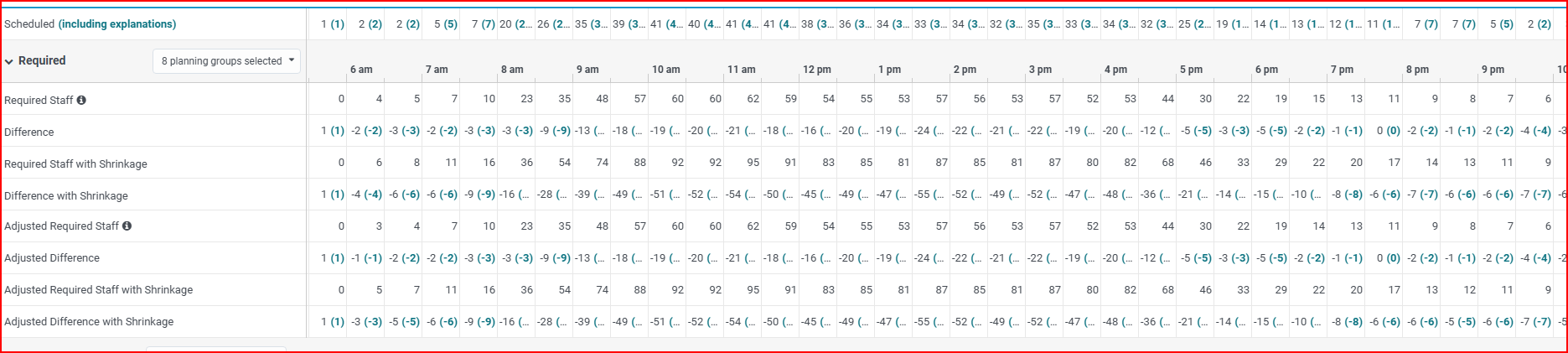
If all planning groups are selected: It's impossible for us to meet these requirements, and I don't think these numbers are correct.

#Forecasting
#ScheduleGeneration
#ScheduleManagement
#WFMConfiguration,BestPractices
------------------------------
Jacqueline Turner
Workflow Coordinator
NYCM Insurance
------------------------------