Glad it is all working now.
Original Message:
Sent: 05-12-2026 00:55
From: Simon Oldroyd
Subject: Disabling a button in script outside of certain hours
Fixed sorry , thank once again
Original Message:
Sent: 5/12/2026 12:36:00 AM
From: Phaneendra Avatapalli
Subject: RE: Disabling a button in script outside of certain hours
Yes, all time calculations happens in Architect, so for the updated 8:30am to 5:00pm requirement, I'd switch from checking hour to checking minutes, because 8:30 needs minute-level accuracy.
In Architect
Create/set local DateTime:
Task.LocalDateTime = AddMinutes(GetCurrentDateTimeUtc(), 570)
570 = GMT+9:30 offset in minutes.
Create/set current local minutes:
Task.CurrentMinutes = (Hour(Task.LocalDateTime) * 60) + Minute(Task.LocalDateTime)
In the screen pop/script input mapping, pass:
Task.CurrentMinutes → CurrentMinutes
In Script
Create script variable:
CurrentMinutes
Type: Number
Input: Yes
On the button Visible property, use this True/False expression:
({{CurrentMinutes}} >= 510 and {{CurrentMinutes}} < 1020)
Where:
510 = 8:30am
1020 = 5:00pm
So the button will show from 8:30am up to before 5:00pm, and hide outside that range.
Hope this helps.
------------------------------
Phaneendra
Technical Solutions Consultant
------------------------------
Original Message:
Sent: 05-12-2026 00:23
From: Simon Oldroyd
Subject: Disabling a button in script outside of certain hours
This will be done in the architect I presume ?
Original Message:
Sent: 5/12/2026 12:18:00 AM
From: Phaneendra Avatapalli
Subject: RE: Disabling a button in script outside of certain hours
Haha, glad you found it, it's always something tiny like a space in the end.
Great to hear it's working now, and no worries at all. I learnt a bit from testing it as well.
For 8:30am to 5pm, you may want to switch from just checking the hour to checking minutes as well, otherwise 8 won't be enough to represent 8:30 accurately.
Something like a local minutes value may work better:
8:30am = 510
5:00pm = 1020
Then the visible logic would be based on whether the current local minutes are between 510 and 1020.
But glad the main script variable/mapping piece is sorted now.
------------------------------
Phaneendra
Technical Solutions Consultant
Original Message:
Sent: 05-12-2026 00:10
From: Simon Oldroyd
Subject: Disabling a button in script outside of certain hours
Well there you go, there was a space..... thanks so much for getting this going for me, now that is going I will work on the actually time as they want 830am to 5pm so they have just emailed me love a customer that changes there mind
Legend I have learnt a lot
Original Message:
Sent: 5/11/2026 11:50:00 PM
From: Phaneendra Avatapalli
Subject: RE: Disabling a button in script outside of certain hours
The expression looks correct, so if {{CurrentHour}} is still showing 0, it looks like the script is still receiving its default value rather than the value from Architect.
Since the mapping screenshot looks correct, I'd next check the publish/versioning side:
Save/publish the script after adding CurrentHour
Make sure the Screen Pop is using the updated script version
Save/publish the Architect flow
Start a brand new test call
If the script still shows 0 after that, then the value is still not being passed at runtime even though the mapping looks correct.
------------------------------
Phaneendra
Technical Solutions Consultant
Original Message:
Sent: 05-11-2026 23:43
From: Simon Oldroyd
Subject: Disabling a button in script outside of certain hours
Original Message:
Sent: 5/11/2026 11:35:00 PM
From: Phaneendra Avatapalli
Subject: RE: Disabling a button in script outside of certain hours
That's strange I tested the same setup on my side and it worked.
To narrow it down, could you temporarily add a text field/label in the script and display:
{{CurrentHour}}
Then run a test call and check what value appears in the script.
If it shows a value between 9 and 16, the button should be visible with:
({{CurrentHour}} >= 9 and {{CurrentHour}} < 17)
If it shows blank, a DateTime value, or a number outside that range, then that would explain why the button is hidden.
------------------------------
Phaneendra
Technical Solutions Consultant
Original Message:
Sent: 05-11-2026 23:20
From: Simon Oldroyd
Subject: Disabling a button in script outside of certain hours
Ok that I better but the bad news is button is still not there
Original Message:
Sent: 5/11/2026 11:06:00 PM
From: Phaneendra Avatapalli
Subject: RE: Disabling a button in script outside of certain hours
Found it
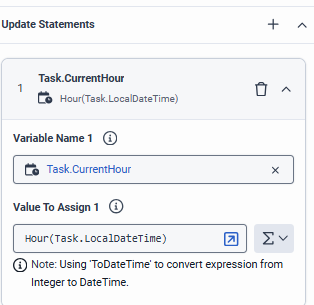
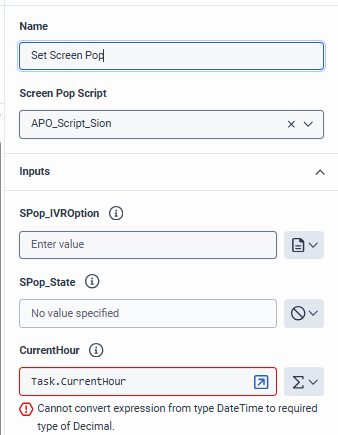
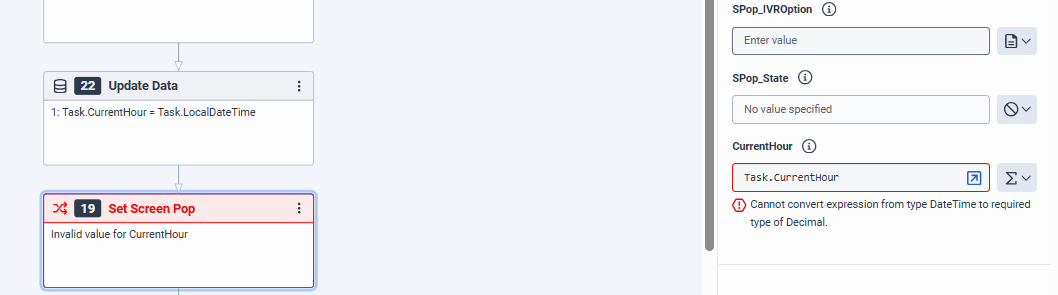
Task.CurrentHour looks like it was created as a DateTime variable. That's why Architect is trying to convert Hour(Task.LocalDateTime) into a DateTime.
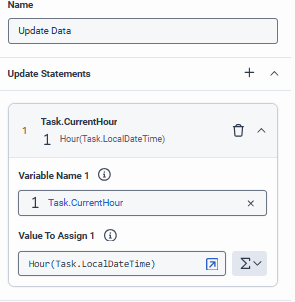
Task.CurrentHour should be an Integer variable, because Hour(Task.LocalDateTime) returns a number like 10.
So I'd recreate/change it as:
Task.CurrentHour
Type: Integer
Value:
Hour(Task.LocalDateTime)
Then pass Task.CurrentHour into the script variable CurrentHour.
That should clear the conversion error.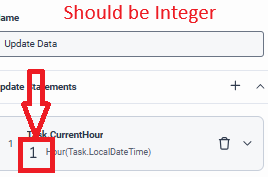
------------------------------
Phaneendra
Technical Solutions Consultant
Original Message:
Sent: 05-11-2026 22:53
From: Simon Oldroyd
Subject: Disabling a button in script outside of certain hours
------------------------------
Simon Oldroyd
Original Message:
Sent: 05-11-2026 22:01
From: Phaneendra Avatapalli
Subject: Disabling a button in script outside of certain hours
Thanks, the script variable looks correct CurrentHour is a Number input, which is what we want.
The issue looks to be in Architect. The error says Task.CurrentHour is still a DateTime value, so Architect is trying to pass a DateTime into the script Number variable.
In the Update Data action, please check that:
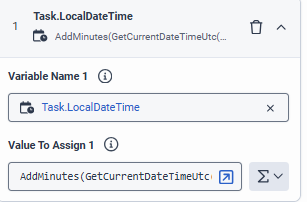
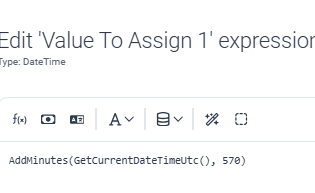
Task.LocalDateTime is a DateTime and is set to:
AddMinutes(GetCurrentDateTimeUtc(), 570)
Then Task.CurrentHour should be an Integer/Number and set to:
Hour(Task.LocalDateTime)
So Task.CurrentHour should contain only a number like 10, not the full DateTime.
Once Task.CurrentHour is an Integer/Number, passing it into the script CurrentHour variable should work.
Would you be able to send screenshots of both Update Data values Task.LocalDateTime and Task.CurrentHour?
Mine is here 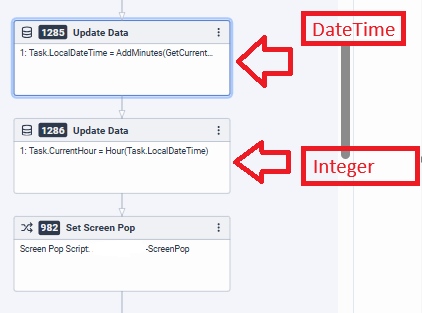
------------------------------
Phaneendra
Technical Solutions Consultant
Original Message:
Sent: 05-11-2026 21:49
From: Simon Oldroyd
Subject: Disabling a button in script outside of certain hours
Sure did 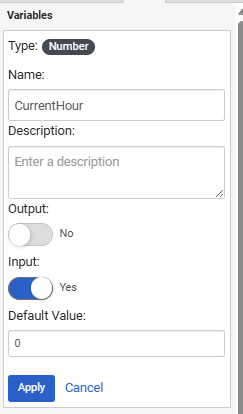
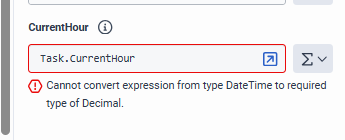
click on the i and i get the same as you
------------------------------
Simon Oldroyd
Original Message:
Sent: 05-11-2026 21:44
From: Phaneendra Avatapalli
Subject: Disabling a button in script outside of certain hours
Did you define CurrentHour as a number in script? Can you click on "i"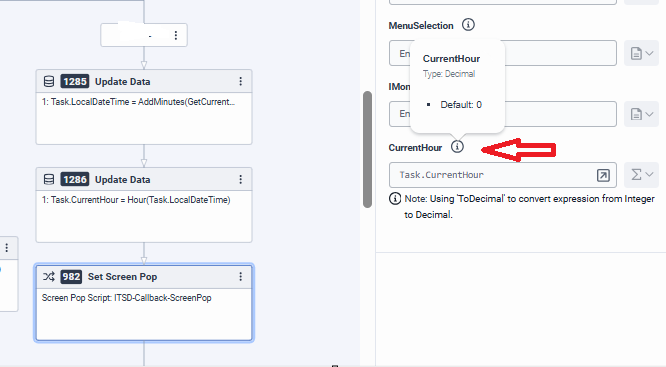
What error are you getting?
------------------------------
Phaneendra
Technical Solutions Consultant
Original Message:
Sent: 05-11-2026 21:35
From: Simon Oldroyd
Subject: Disabling a button in script outside of certain hours
Task.CurrentHour = Hour(Task.LocalDateTime) (Ignore the decimal warning)
I did miss the Hour which I have now fixed
But the CurrentHour Task.CurrentHour is still red and invalid
Original Message:
Sent: 5/11/2026 9:26:00 PM
From: Phaneendra Avatapalli
Subject: RE: Disabling a button in script outside of certain hours
Hi Simon,
Looks like you got it wrong again please define below
1) First Update data as a new variable under data types choose "Date Time" then you first define as per below
Task.LocalDateTime = AddMinutes(GetCurrentDateTimeUtc(), 570)
2) Second update data is where you extract the hour so define another variable as "Integer" then you define as per below
Task.CurrentHour = Hour(Task.LocalDateTime) (Ignore the decimal warning)
3) Then you pass the second variable as input in your screen-pop
Please check screenshots I shared above.
------------------------------
Phaneendra
Technical Solutions Consultant
Original Message:
Sent: 05-11-2026 21:18
From: Simon Oldroyd
Subject: Disabling a button in script outside of certain hours
OK i missed the current hour step but you are correct i get cannot convert expression and i cannot publish
------------------------------
Simon Oldroyd
Original Message:
Sent: 05-11-2026 20:52
From: Phaneendra Avatapalli
Subject: Disabling a button in script outside of certain hours
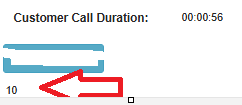
Just adding a screenshot from test here:
------------------------------
Phaneendra
Technical Solutions Consultant
Original Message:
Sent: 05-11-2026 20:50
From: Phaneendra Avatapalli
Subject: Disabling a button in script outside of certain hours
Hi Simon,
I tested this on my side and it seems to work fine when only the extracted hour is passed into the script.
You shouldn't need a custom data action for this if you are doing the time calculation in Architect.
The setup I tested was:
Task.LocalDateTime = AddMinutes(GetCurrentDateTimeUtc(), 570)
Then:
Task.CurrentHour = Hour(Task.LocalDateTime)
Then in the screen pop/script input mapping:
Task.CurrentHour → CurrentHour
In the script, CurrentHour is a Number variable, and the button Visible expression is:
({{CurrentHour}} >= 9 and {{CurrentHour}} < 17)
In my test, it passed 10 into the script and the button displayed correctly.
One thing I noticed from your screenshot is that there may be a String Builder involved somewhere. I'm not sure where that is coming from, but I'd avoid passing the value as a string if possible. The script should receive just the numeric hour, such as 10, not the full DateTime value or a string.
Below is exactly step by step you need to do
Step 1- In your script define a variable CurrentHour as a number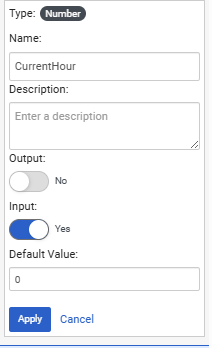
Step 2 :- Please have the below in order in architect
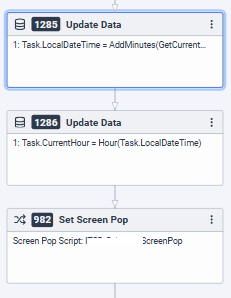
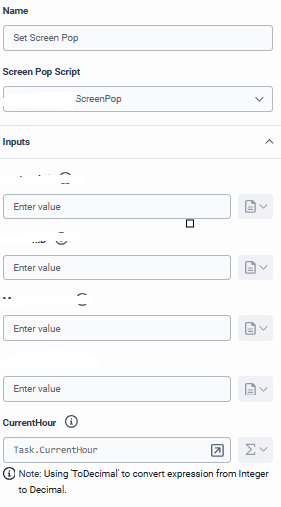 if you see a warning like "Using ToDecimal to convert expression from Integer to Decimal", that should be fine.
Hour(Task.LocalDateTime) returns an Integer, but the script Number variable is treated as a Decimal/Number, so Architect is just converting it automatically.
For example:
10 becomes 10.0
That should still work with the button Visible expression:
({{CurrentHour}} >= 9 and {{CurrentHour}} < 17)
So I wouldn't worry about that warning unless the value is not coming through correctly.
------------------------------
Phaneendra
Technical Solutions Consultant
Original Message:
Sent: 05-11-2026 20:11
From: Simon Oldroyd
Subject: Disabling a button in script outside of certain hours
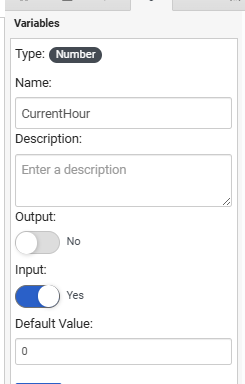
and button variable is
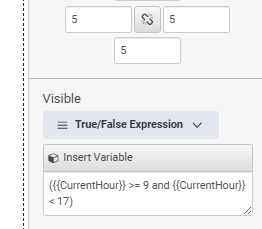
------------------------------
Simon Oldroyd
Original Message:
Sent: 05-11-2026 20:10
From: Simon Oldroyd
Subject: Disabling a button in script outside of certain hours
------------------------------
Simon Oldroyd
Original Message:
Sent: 05-11-2026 20:07
From: Simon Oldroyd
Subject: Disabling a button in script outside of certain hours
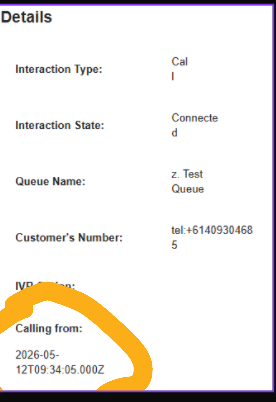
So it is still not working really not sure what i can test to see where the issue is, the TZ in the call is correct
and screen pop is 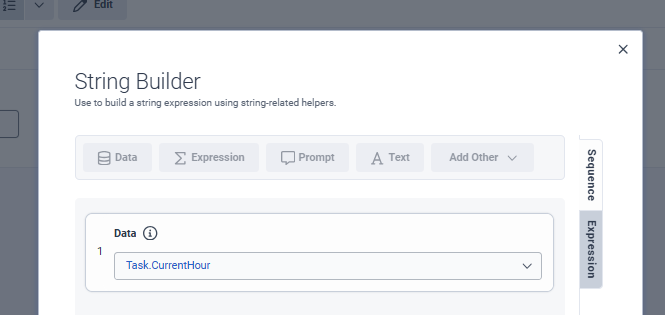
------------------------------
Simon Oldroyd
Original Message:
Sent: 05-11-2026 05:16
From: Phaneendra Avatapalli
Subject: Disabling a button in script outside of certain hours
For the script variable, I would create CurrentHour as a Number variable, not Dynamic String.
In the script:
CurrentHour
Type: Number
Input: Yes
Then in the screen pop input mapping, pass:
Task.CurrentHour → CurrentHour
The button Visible expression can then use:
({{CurrentHour}} >= 9 and {{CurrentHour}} < 17)
Because it is a number comparison, the value needs to come through as a number like 9, 12, or 17, not as a string.
------------------------------
Phaneendra
Technical Solutions Consultant
Original Message:
Sent: 05-11-2026 04:59
From: Simon Oldroyd
Subject: Disabling a button in script outside of certain hours
ok i have done the inbound call flow but this is my last piece of the puzzle i may need to log a job
into your script variable:
CurrentHour
is this a Dyncamis String?? what do i set it to
------------------------------
Simon Oldroyd
Original Message:
Sent: 05-11-2026 02:11
From: Phaneendra Avatapalli
Subject: Disabling a button in script outside of certain hours
No worries at all.
Flow.LocalDateTime was just an example variable name it won't already exist in your flow.
If you are doing this inside a task in an Inbound Call Flow, you can create it as a Task variable instead.
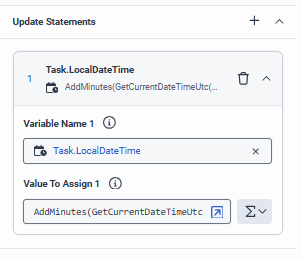
In the task, add an Update Data action before the screen pop.
In that Update Data action, add a DateTime variable, for example:
Task.LocalDateTime
Set it to:
AddMinutes(GetCurrentDateTimeUtc(), 570)
Then add another variable as an Integer/Number, for example:
Task.CurrentHour
Set it to:
Hour(Task.LocalDateTime)
Then in the screen pop/script input mapping, pass:
Task.CurrentHour
into your script variable:
CurrentHour
So the flow is:
UTC time → add 570 minutes → local date/time → extract hour → pass hour into script.
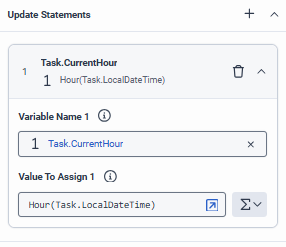
------------------------------
Phaneendra
Technical Solutions Consultant
Original Message:
Sent: 05-11-2026 01:46
From: Simon Oldroyd
Subject: Disabling a button in script outside of certain hours
firstly thanks you so much for you continued help.
So in my incoming call flow there is no such flow localdatetiem, it says i shoudl be able to creat e but once again this is not clear hoiw to add a flow variable
------------------------------
Simon Oldroyd
Original Message:
Sent: 05-11-2026 01:23
From: Phaneendra Avatapalli
Subject: Disabling a button in script outside of certain hours
CurrentHour is just the script variable name I used in my test, not the data action name.
Your data action can still be called currentdate.
If /api/v2/date is returning UTC time, I don't think I'd try to make the script handle the offset directly. I'd convert the time before passing the value into the script.
For GMT+9:30, you need to add 570 minutes to the UTC time:
9 hours × 60 = 540
+ 30 minutes = 570
For example, in Architect logic before the screen pop, you could do something like:
Flow.LocalDateTime = AddMinutes(GetCurrentDateTimeUtc(), 570)
That would return the full converted local date/time.
Then you can extract just the local hour using:
Flow.CurrentHour = Hour(Flow.LocalDateTime)
Then pass Flow.CurrentHour into the script input variable:
CurrentHour
The script button Visible expression can then stay as:
({{CurrentHour}} >= 9 and {{CurrentHour}} < 17)
So the script receives the converted local hour in 24-hour format, rather than UTC/server time.
Hope this helps.
------------------------------
Phaneendra
Technical Solutions Consultant
Original Message:
Sent: 05-11-2026 01:08
From: Simon Oldroyd
Subject: Disabling a button in script outside of certain hours
so Currenthour that you use is the name of the data action? the data action i have created is named currentdate /api/v2/date and that works when i run the test on it, but how do i put the offset in the dataaction which i will need to create a new one of course
------------------------------
Simon Oldroyd
Original Message:
Sent: 05-11-2026 00:55
From: Phaneendra Avatapalli
Subject: Disabling a button in script outside of certain hours
Great, sounds like the button visibility part is working now.
For the timezone issue, I think the easiest approach is to keep the script simple and do the timezone conversion before the value reaches the script.
In my quick test, I used a number variable called CurrentHour and this button Visible expression:
({{CurrentHour}} >= 9 and {{CurrentHour}} < 17)
That worked as expected:
10 → button visible
17 → button hidden
So for your setup, I'd suggest having the data action return the local hour for GMT+9:30 as a number in 24-hour format, rather than UTC/server time.
For example:
UTC 03:00 → local 12:30 → pass CurrentHour = 12
Then the same Visible expression should work, and the script does not need to parse raw time or handle timezone conversion.
The key is that CurrentHour should be the converted local hour in 24-hour format, for example:
9 = 9am
12 = midday
17 = 5pm
------------------------------
Phaneendra
Technical Solutions Consultant
Original Message:
Sent: 05-11-2026 00:24
From: Simon Oldroyd
Subject: Disabling a button in script outside of certain hours
So i have the button hidden good start thanks for that but i need it to be in GMT+930 time cause currently it appears to be UTC server time which is 3am
------------------------------
Simon Oldroyd
Original Message:
Sent: 05-10-2026 23:15
From: Phaneendra Avatapalli
Subject: Disabling a button in script outside of certain hours
Hi Simon,
I did a quick test on this and managed to get the button visibility working using a number variable.
In the script, I created a number variable called CurrentHour, then used the button's Visible property with a True/False expression.
The expression I tested was:
({{CurrentHour}} >= 9 and {{CurrentHour}} < 17)
I then passed different values into CurrentHour (as Number) from the screen pop/script input:
10 → button was visible
17 → button was hidden
So if your data action can return just the current hour as a number, for example 17, then you should be able to map that value into the script input variable and use it in the Visible expression.
That avoids trying to parse raw time in the script, which may be what was causing the NaN issue.
Hope this helps.
------------------------------
Phaneendra
Technical Solutions Consultant
Original Message:
Sent: 05-10-2026 22:22
From: Simon Oldroyd
Subject: Disabling a button in script outside of certain hours
raw curret time currently, in the script last week i added the variable with the time for in and out of hours but teh variable to get current time didnt work returnign Nan, so i have removed it all to start again
------------------------------
Simon Oldroyd
Original Message:
Sent: 05-10-2026 22:11
From: Phaneendra Avatapalli
Subject: Disabling a button in script outside of certain hours
Hi Simon, No worries what are you currently getting back from the time check data action?
For example:
Also, are you able to successfully map the data action output into a script variable, or is that the part that is failing?
I think understanding what the action response/output looks like will help narrow down whether the issue is with:
the data action response,
the script variable mapping,
or the button Visible expression itself.
------------------------------
Phaneendra
Technical Solutions Consultant
Original Message:
Sent: 05-10-2026 22:04
From: Simon Oldroyd
Subject: Disabling a button in script outside of certain hours
Thanks for the response but i think it is the script variable that i am actually struggling with
------------------------------
Simon Oldroyd
Original Message:
Sent: 05-10-2026 21:24
From: Phaneendra Avatapalli
Subject: Disabling a button in script outside of certain hours
Hi Simon,
In the button's Visible property, you should be able to use a true/false expression based on a script variable.
For example, if your data action returns a boolean like isAfterHours, map that to a script variable such as Script.IsAfterHours.
Then in the button Visible expression, you could use something like:
!Script.IsAfterHours
That way:
During 5pm–9am, IsAfterHours = true, so the button is hidden
During 9am–5pm, IsAfterHours = false, so the button is visible
My understanding is the data action would need to run when the interaction/script loads, because the script won't continuously re-check the time unless something triggers the action again.
For new interactions after 5pm this should work fine, as the script will load and evaluate the current time then. The only edge case would be an interaction already open before 5pm, unless the check is triggered again.
Hope this helps.
------------------------------
Phaneendra
Technical Solutions Consultant