Genesys Casual

 View Only

Sign Up

  • 1.  Need to republish Flow when updating Prompts

    Posted 21 days ago

    I wasn't sure exactly where to ask this question, so I thought I'd start it here.

    I've noticed that when we have a request to update audio prompts in GenCloud for an Inbound call flow, after the prompt(s) are updated with a new audio file, the flow has to be opened and then republished to pick up the change to the related prompts that the flow consumes.  This wasn't the behavior when working with the older PureConnect platform.  It "feels" like audio prompts are cached in memory and republishing the flow, causes all prompts for that flow to be refreshed.  I also didn't see this mentioned in any of the training material, although I could have missed it along the way.

    The first time we had a request like this, we updated our prompts but did not republish the flow.  The next day, we got a call from our customer that the system was still playing the older version of the prompts, like it wasn't updated.  We navigated into the Prompts section, and were able to play the new prompt.  As a troubleshooting step, we decided to just republish the flow and it worked.  Now going forward, we just republish the flow as a standard process when we have similar activity.

    My question is - has anyone else experienced this or is this unique to just us?


    #General

    ------------------------------
    Michael Jewell

    ------------------------------


  • 2.  RE: Need to republish Flow when updating Prompts

    Posted 21 days ago
    Edited by Tristen Schwarzenberger 21 days ago

    Hey Michael,

    That's how it works for us as well. Whether or not that's the intention and the reason behind it, I'm not positive, but it is a part of our process when we update prompts. I'm not sure if there is anyway to change that either.


    ------------------------------
    Tristen Schwarzenberger
    IT Engineer
    GCP
    ------------------------------


  • 3.  RE: Need to republish Flow when updating Prompts

    Posted 18 days ago

    Hi Michael,

    As far as I'm aware, this is the default behavior of Genesys. I have to do this several times a years as I update a common module flow with holiday closure messages.


    ------------------------------
    Patrick Mahaffay
    Call Center Applications Support Specialist
    ------------------------------


  • 4.  RE: Need to republish Flow when updating Prompts

    Posted 18 days ago

    Hi @Michael Jewell,

    This is the default behavion.

    You can use the FindUserPrompt functions to handle this situation. Just keep in mind they are limited to 25 unique calls within the same flow. A good approach is to place these functions in a separate task wich will receive a variable with the name of the prompt and reuse them throughout the flow.


    ------------------------------
    Debora Lopes
    ------------------------------


  • 5.  RE: Need to republish Flow when updating Prompts

    Posted 17 days ago

    I thought since other (we call them assets) of the flow such as Data Tables, Queues, and such, you don't have to republish the flow when one of those objects are updated - only prompts.  Since discovering that, a flow republish is standard process.  Sounds like this is standard behavior for the system.  Odd that this isn't mentioned in any training.  This particular thing is important to know if you are a person who designs and updates flows.

    I appreciate everyone's feedback on this question.


    ------------------------------
    Michael Jewell
    NA
    ------------------------------


  • 6.  RE: Need to republish Flow when updating Prompts

    Posted 17 days ago

    To @Debora Lopes' point, the Find User Prompt approach is exactly what we do and it serves us extremely well given we frequently either have to a) update audio based on our dynamic audio file creation process in Architect (thus not requiring us to edit anything in our Architect flows when adding new lines) or b) handle requests to update audio for certain circumstances or menu option updates.

    We also use the approach of storing the variable with the name of the prompt in a Task & reusing them, but if that's not an option for you and you need more than the 25 find user prompt invocation limit, you can open a ticket with Genesys Support requesting a limit increase.


    ------------------------------
    Brian T. Jones | Ascension | Senior Specialist - Technology
    ------------------------------


  • 7.  RE: Need to republish Flow when updating Prompts

    Posted 17 days ago

    Olá, @Michael Jewell!

    Esse é realmente um desafio comum - principalmente em ambientes com governança rígida, onde qualquer alteração em fluxo precisa passar por ciclos de aprovação e publicação. Felizmente, o Architect oferece alternativas para atualizar áudios sem a necessidade de republicar o fluxo todas as vezes.

    1. Uso de Prompts personalizados (User Prompts)


    No seu fluxo do Architect, em vez de inserir o arquivo de áudio diretamente na ação "Play Audio", você pode referenciar um prompt personalizado.
    Exemplo: criar o prompt Flow.PromptGreeting e, dentro do fluxo, usar esse nome em todas as ações que precisam reproduzir essa mensagem.
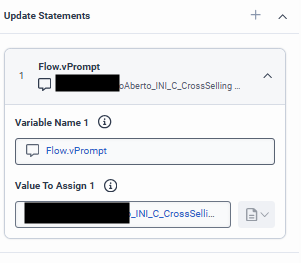
    Quando precisar atualizar o áudio, basta acessar:
    Admin > Architect > Prompts > User Prompts
    Selecionar o prompt → enviar o novo arquivo → salvar.
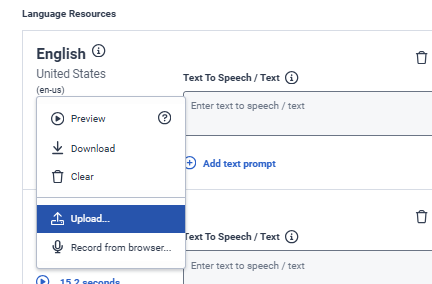
    A documentação reforça que prompts são carregados dinamicamente, então qualquer substituição passa a valer imediatamente, sem necessidade de republicação do fluxo. É exatamente para esses cenários de atualização independente que os User Prompts existem.

    Também é possível criar os audios como texto e usar o TTS.

    2. Uso de Data Tables + TTS ou referência dinâmica
    Se a empresa tem um volume grande de áudios ou mensagens que mudam com frequência (campanhas, avisos operacionais, horários especiais etc.), outro caminho é armazenar o conteúdo em uma Data Table.

    Você pode ter, por exemplo:
    • nomeDoAudio → "Aviso_Fila_Cheia"
    • textoTTS → "No momento estamos com um volume alto de chamadas..."

    No fluxo, você consulta a Data Table e, dependendo da estrutura, usa:
    TTS dinâmico (Text-to-Speech) para ler o conteúdo atualizado;
    • ou referencia um arquivo audio externo, se preferir.

    A vantagem: qualquer atualização no conteúdo é feita diretamente na Data Table, sem republicar o fluxo.


    ------------------------------
    Fernando Sotto dos Santos
    Consultor Grupo Casas Bahia
    ------------------------------