Genesys Cloud - Main

Sign Up

Expand all | Collapse all

Routing Call to Different Queues at Different Times

  • 1.  Routing Call to Different Queues at Different Times

    Posted 5 days ago

    Hello,

    I feel I'm making this more complicated than it needs to be. I am wanting to have an IVR route calls to Queue A during business hours 8am-4pm, Queue B 4pm - 11pm, and Queue C 11pm - 8am. I'm thinking there is a way to do this with the schedule group but haven't built one of these out before. 

    Does anyone have any guidance on this? 

    Thanks,

    Stephanie


    #ArchitectandDesign

    ------------------------------
    Stephanie Moore
    Patient Accounts Representative, Legal Correspondent
    ------------------------------


  • 2.  RE: Routing Call to Different Queues at Different Times
    Best Answer

    Posted 5 days ago

    The simplest solution is to use the evaluate schedule tool in Architect to check one of your operational schedules. From that tool you will have exit path for open closed holiday and emergency. 

    When the Call comes into the call Flow it checks that schedule and then we'll route below the path that meets the schedule at that point in time. From there you just have different transfer points or different routing depending on whether you're open or closed. 

    In your particular case you might have to have different operational schedules for each of the cues and then look at them sequentially as you're going through the call flow.

    Your other option would be a data table that has the cues and the times, reading that data table and comparing it with the current time, and then making a decision on which to use.


    ------------------------------
    Robert Wakefield-Carl
    ttec Digital
    Sr. Director - Innovation Architects
    Robert.WC@ttecdigital.com
    https://www.ttecDigital.com
    https://RobertWC.Blogspot.com
    ------------------------------


  • 3.  RE: Routing Call to Different Queues at Different Times

    Posted 5 days ago

    I really like the idea of using a data table as we are trying to leverage them more. Do you happen to have an example of what the table could look like? 


    ------------------------------
    Stephanie Moore
    Patient Accounts Representative, Legal Correspondent
    ------------------------------


  • 4.  RE: Routing Call to Different Queues at Different Times

    Posted 5 days ago

    I would suggest evaluating the schedules in the flow. 

    If you go the data table route, I would have the key set for the queue name.  Look up that queue name and get back Open and Close times, and then use a decision to check if greater than or less than, depending on the time, and route accordingly. 


    ------------------------------
    Robert Wakefield-Carl
    ttec Digital
    Sr. Director - Innovation Architects
    Robert.WC@ttecdigital.com
    https://www.ttecDigital.com
    https://RobertWC.Blogspot.com
    ------------------------------


  • 5.  RE: Routing Call to Different Queues at Different Times

    Posted 4 days ago

    We use table tables to drive our Genesys completely, your table needs to have the identifier (DNIS) and then depending on how you do it, either using skills or queues then you would define Day Queue, Evening Queue and Night Queue (or skill), then as the other said evaluate schedule and depending on what you define you find queue Day etc. we also put the schedule in the data table  


    ------------------------------
    Andy Jackson
    Senior Unified Communications Engineer
    ------------------------------


  • 6.  RE: Routing Call to Different Queues at Different Times

    Posted 5 days ago

    Hey, @Robert Wakefield-Carl

    I'm using the same approach with the data table! Really great!


    ------------------------------
    Arthur Pereira Reinoldes
    ------------------------------


  • 7.  RE: Routing Call to Different Queues at Different Times

    Posted 4 days ago

    Hi Stephanie,

    To add to what Robert has said, you can also use the "Output Active Schedules" field from the Evaluate Schedule Group function to know which Schedules are active at the time.

    So let's say you create a Schedule Group consisting of 3 different Schedules (all categorized as "Open" schedules). Whenever you go through the evaluation it will tell you which of the 3 were open, so you can make a decision based on that to route to the appropriate queue.

    Also, if your times are set in stone, you could check for the time directly in the call flow, there are functions like "GetCurrentDateTimeUtc()" that will give you the current hour, so you can make a decision based on that. (But again, only if your times will never be changing, otherwise you would need to constantly go back to the flow and change it there).

    Only reason I see to go with a Data Table would be if you have other parameters unrelated to the Date/Times that you want to add there.. Like the destination queue for example, if you intend to have the queue as something that can change constantly, then the Data Table would help with that.


    ------------------------------
    Marcello Jabur
    ------------------------------


  • 8.  RE: Routing Call to Different Queues at Different Times

    Posted 4 days ago

    Hi, 
    At first, you create the Operating Schedules Menu>Orquetration>Routing>Operating Schedules

    Fulfill name, organization, open time, frequence (daily,Weekly....)

    In the flow select the Evaluate Schedule function Toolbox>Logical>Evaluate Schedule

    In the left path "Active" means open, then select "Tranfer to ACD" Function, and "inative"(right path) you put the other Evaluate Schedule Function set up the second Operating Schedules... 


    ------------------------------
    Lineu Romão
    ------------------------------


  • 9.  RE: Routing Call to Different Queues at Different Times

    Posted yesterday

    Hi Stephanie,

    I agree with roberts suggestion. When it's about opening times, evaluate schedule / evaluate schedule group is the way to go. As soon you have a timezone in play, that differs from UTC you will get some headaches with data tables. Especially when you are affected by summer- and winter-time.


    ------------------------------
    Christoph Domaschke
    Produktmanager Kunden-Dialog-Center
    ------------------------------


  • 10.  RE: Routing Call to Different Queues at Different Times

    Posted 13 hours ago

    Hi Stephanie

    I agree the schedule / schedule group route is probably the "simplest" way of getting what you need, but if you're interested in using a data table / variable logic I've recently done something similar and accounted for GMT/BST.

    My scenario was if it is before 8am, route to yesterday's on-call number, after 8am route to today's.

    Started off creating a variable (using Update Data) to get the actual current time (if you're not in the UK, we're currently on BST which is 1 hour ahead of UTC.) With this being fixed logic (between last Sunday of March and last Sunday of October), I need to add 60 minutes between these dates. N.b. clocks change at 1/2am but this doesn't affect the logic result of my requirement so ignored.

    Flow.DateTime

    AddMinutes(
        Flow.StartDateTimeUtc,
        If(
            Flow.StartDateTimeUtc >= MakeDateTime(
                Year(Flow.StartDateTimeUtc),
                3,
                31 - (DayOfWeek(MakeDateTime(Year(Flow.StartDateTimeUtc), 3, 31, 1, 0, 0)) - 1),
                1, 0, 0
            )
            and
            Flow.StartDateTimeUtc < MakeDateTime(
                Year(Flow.StartDateTimeUtc),
                10,
                31 - (DayOfWeek(MakeDateTime(Year(Flow.StartDateTimeUtc), 10, 31, 1, 0, 0)) - 1),
                1, 0, 0
            ),
            60,
            0
        )
    )

    I then create a second variable to get the actual hour (can probably do as one but I needed additional parts of the date/time):

    Flow.Hour

    Hour(Flow.DateTime)

    From here, you could probably just run a query to your data table, or append to another variable (fixed string for Queue A, B & C) before doing the query. This would depend on if you want 24 options in your Data Table or 3.

    Given you've got fairly static logic, you might not even need the Data Table, unless you want to be able to amend the queue targeted on the fly. A decision/switch should do it.

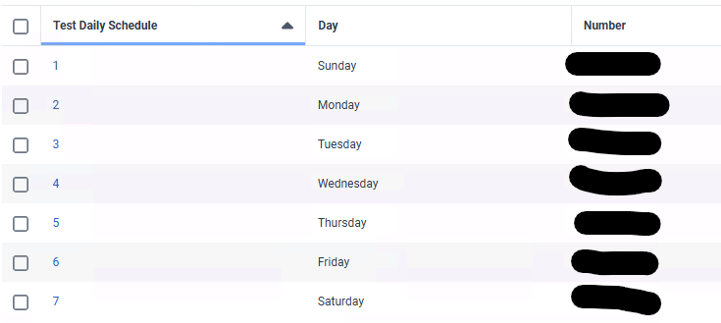
    My Data Table for reference, which the teams can update based on their rota. The result of which was put into the number for a Transfer to Number action for external transfer.


    ------------------------------
    Kieran Exley
    Senior Unified Communications Services Specialist
    ------------------------------


  • 11.  RE: Routing Call to Different Queues at Different Times

    Posted 12 hours ago

    I did something like you are trying to achieve, I ended up using Open Closed and Holiday as the 3 legs for output

    Step 1 - Create 3 schedules Day, Evening and Overnight, this is where you would set your hours of operation (Don't worry about time zone changing)

    Step 2 - Create a Schedule Group, this is where you can set your time zone which will automatically change depending on where you are for summertime etc. In here you add your Day, Evening and Overnight schedules you created (Day Open, Night Closed, Overnight Holiday)

    In your flow

    Step 1 - Add - Logical / Evaluate schedule group (select the schedule group you have created above)

    Step 2 - Transfer to ACD or ?? (not sure how you have built it) this is where you set your routing Queue A - Open, Queue B Closed, Queue C Holiday on the relevant leg

    This is a nice simple way

    Andy


    ------------------------------
    Andy Jackson
    Senior Unified Communications Engineer
    ------------------------------