Thank you Christian ...
Phaneendra...
I have to admit I had to do this in a rush and didn't have much time to think it through, haha.
I set it up directly in production, and since it worked, I didn't go back to make adjustments (due to other projects), lol.
------------------------------
Kaio Oliveira
GCP - GCQM - GCS - GCA - GCD - GCO - GPE & GPR - GCWM
PS.: I apologize if there are any mistakes in my English; my primary language is Portuguese-Br.
------------------------------
Original Message:
Sent: 07-08-2026 04:13
From: Christian Karpp
Subject: Is there a way to automatically re-enable "Make Eligible for Interactions" or Disable this
Hi,
Kaio uses 2 data actions to first set the status to Available and then back to ON_QUEUE. @Kaio Oliveira you might want to ask the condition presence.presenceDefinition.systemPresence == "ON_QUEUE" to your trigger because when you set the agents presence to Available, the routingStatus is still NOT_RESPONDING and the trigger will fire again without this condition.
Instead of changing the presence, it's simpler to change the routing status from NOT_RESPONDING to IDLE with a single data-action using API
PUT /api/v2/users/{userId}/routingstatus
{ "status": "IDLE" }
------------------------------
Christian Karpp
Principal PS Consultant
------------------------------
Original Message:
Sent: 07-08-2026 01:40
From: Muhammed Shaibant
Subject: Is there a way to automatically re-enable "Make Eligible for Interactions" or Disable this
Dear Kaio
If you don't mind, could you please share the API details that you used in the workflow? Also, I noticed that you are using two Data Actions. Could you please explain why two Data Actions are required?
------------------------------
Muhammed Shaibant
x
------------------------------
Original Message:
Sent: 07-07-2026 11:42
From: Kaio Oliveira
Subject: Is there a way to automatically re-enable "Make Eligible for Interactions" or Disable this
Hi Muhammed
-
Yes, it is possible. It is important to mention that if this happens very frequently, it is necessary to look for the cause of the problem.
You will need a trigger and a workflow.
--
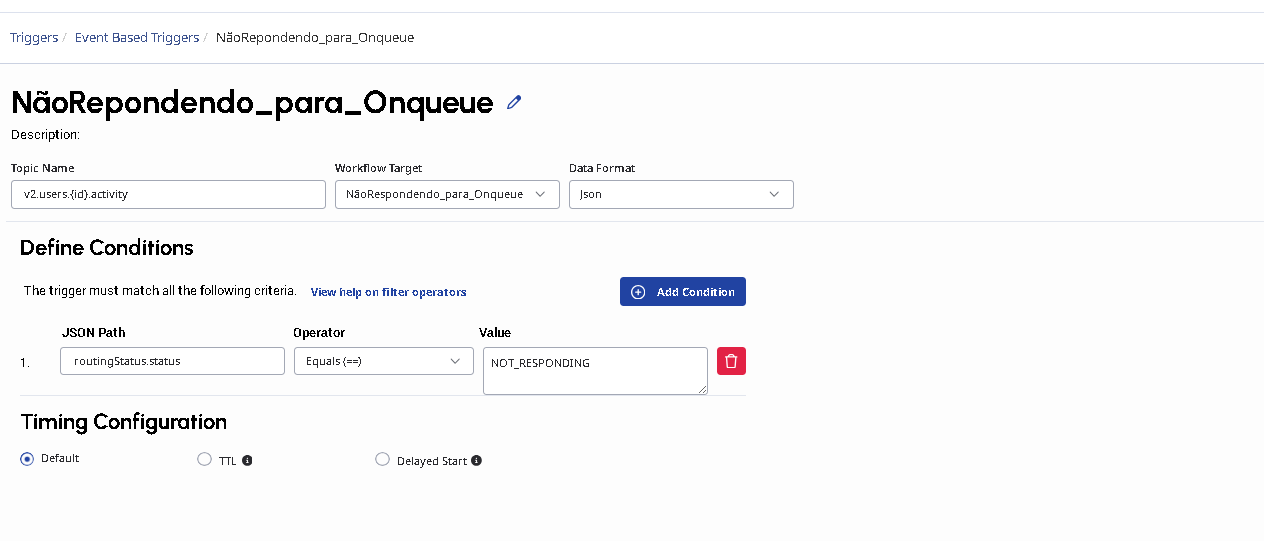
-
In the workflow, I use the Genesys APIs to return the agent to "Available" status and subsequently to "On Queue" after 2 seconds. -
-
-
------------------------------
Kaio Oliveira
GCP - GCQM - GCS - GCA - GCD - GCO - GPE & GPR - GCWM
PS.: I apologize if there are any mistakes in my English; my primary language is Portuguese-Br.
------------------------------