Original Message:
Sent: 05-04-2026 09:39
From: Elisson Fernandes
Subject: ADFS SSO
Hi yvgeni,
Just one additional detail about the SSO configuration:
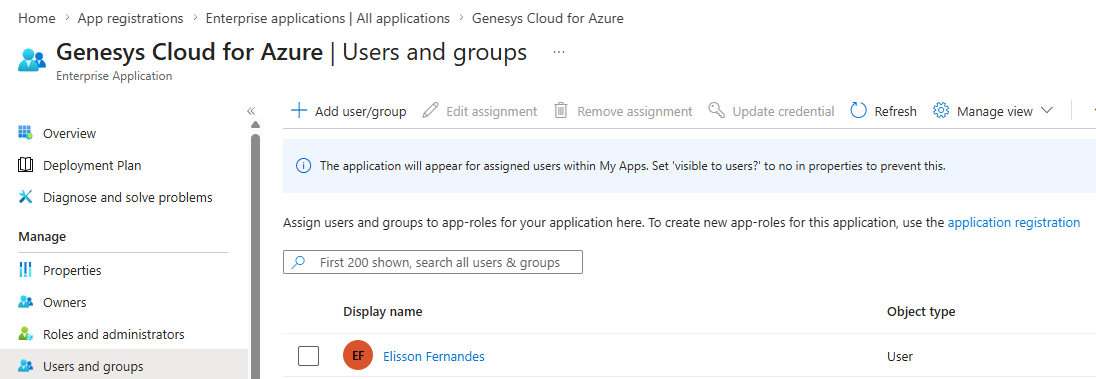
In Microsoft Entra ID, remember to add the users or groups that will use the application under Users and groups.
------------------------------
Elisson Fernandes
------------------------------
Original Message:
Sent: 05-03-2026 16:12
From: Yvgeni Liberman
Subject: ADFS SSO
Dear Elisson,
Many thanks for Your detailed explanations.
It's useful for me.
Original Message:
Sent: 5/3/2026 4:02:00 PM
From: Elisson Fernandes
Subject: RE: ADFS SSO
Hi Yvgeni,
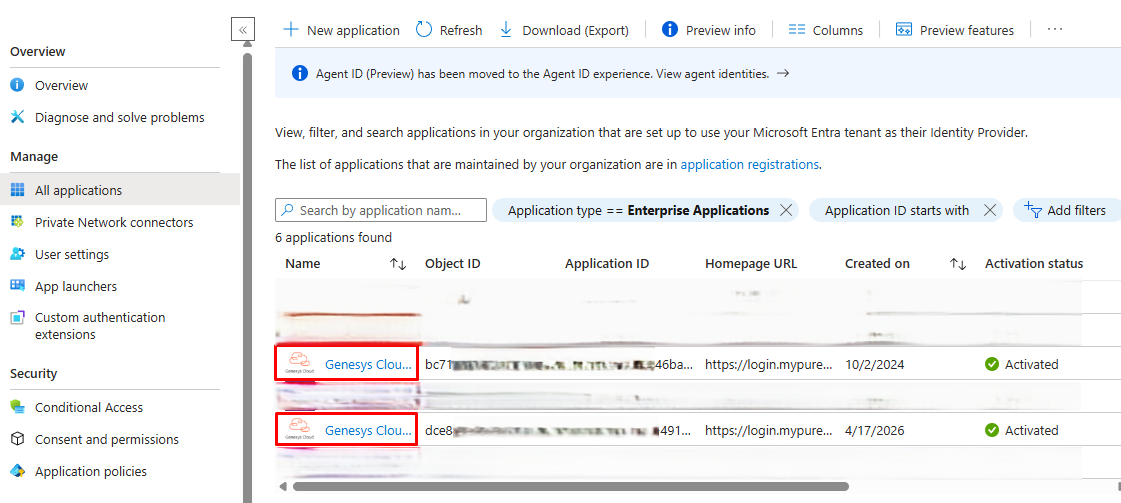
For this setup, we need to create two Genesys Cloud for Azure applications in Microsoft Entra ID, one for each Genesys Cloud organization.
Technically, both applications can have the same name, but I recommend renaming them so it is easy to identify which one belongs to each organization, especially if both orgs are in the same Genesys Cloud region.
For example:
- Genesys Cloud for Azure - Org 1
- Genesys Cloud for Azure - Org 2
After creating the application in Entra ID, open it and go to Single sign-on. Select SAML as the sign-on method.
In the SAML settings, the Identifier and Reply URL fields usually already show some examples. You just need to validate the correct URL based on your Genesys Cloud region and set it as the default.
In our case, the initial values were:
Identifier / Entity ID:
https://login.mypurecloud.com/saml
Reply URL / Assertion Consumer Service URL:
https://login.mypurecloud.com/saml
Logout URL:
https://login.mypurecloud.com/saml/logout
One important point: sometimes Entra ID keeps showing a warning saying that the Identifier field is missing, even after you already added a value. In our case, we fixed it by adding only a / at the end of the URL.
So we used:
https://login.mypurecloud.com/saml/
This value will be replaced later after we create the SSO provider inside Genesys Cloud. At this point, we only need to fill it in so we can save the configuration and generate/download the Base64 certificate.
After saving this part, go to Attributes & Claims and validate two fields: Email and OrganizationName.
For Email, you need to check which Entra ID attribute contains the same email address that exists in Genesys Cloud.
Usually, this is:
user.userprincipalname
But in some environments, it can be:
user.mail
Another important point: in some configurations, the email can have uppercase and lowercase letters, while in Genesys Cloud the email is usually lowercase. If that is the case, use a transformation and apply:
ToLowercase()
For OrganizationName, add the name of the Genesys Cloud organization.
You can also create another attribute called ServiceName and set the value to:
directory
This is optional, but it allows users to go directly into Genesys Cloud instead of seeing the page asking whether they want to access My Account, Collaborate/Communicate or Architect.
After these changes, you should be able to download the Certificate (Base64) from the Entra ID application.
Then, go to Genesys Cloud > IT and Integrations > Single Sign-On and create a new identity provider.
Enter the desired name and, in Identity Provider Name, select:
Microsoft Entra ID
You can also upload a custom logo if needed.
Now fill in the Genesys Cloud SSO fields using the information from Entra ID:
Issuer URI:
Use the Login URL from Entra ID
Single Sign-On URI:
Use the Microsoft Entra Identifier from Entra ID
Single Logout URI:
Use the Logout URL from Entra ID
Certificates:
Upload the Base64 certificate downloaded earlier
After saving the provider in Genesys Cloud, scroll down the page. Genesys Cloud will show new values, including:
Issuer URI
Assertion Consumer Service
Single Logout URI
Copy the Issuer URI shown in Genesys Cloud and go back to the Entra ID application.
In Entra ID, replace the previous Identifier / Entity ID value with the Issuer URI from Genesys Cloud.
Also copy the Single Logout URI shown in Genesys Cloud and replace the Logout URL in Entra ID with this value, then save the configuration again.
After that, the SSO configuration should be ready.
Repeat the same process for the second Genesys Cloud organization, using a separate Genesys Cloud for Azure application in Entra ID.
Before testing, just make sure that:
- Users are assigned to the correct Entra ID application.
- The email sent by Entra ID matches the email in Genesys Cloud.
- The email is lowercase if needed.
- The OrganizationName value matches the correct Genesys Cloud organization.
- The correct Base64 certificate was uploaded to the correct Genesys Cloud org.
- The Entra ID Identifier was replaced with the Issuer URI generated by Genesys Cloud.
Once all of this is done, users should be able to log in to the correct Genesys Cloud organization using Microsoft Entra ID SSO.
As an extra note, Genesys Help previously had a specific documentation article for each SSO provider, including Microsoft Entra ID. That article seems to have been removed from the Help site, so the steps above are based on what I remember from that previous documentation and from the configuration we used.
If needed, you can also check the documentation links below to help with the configuration:
------------------------------
Elisson Fernandes
Original Message:
Sent: 05-03-2026 06:06
From: Yvgeni Liberman
Subject: ADFS SSO
Hi Elisson,
Could you provide a bit more detail regarding the configuration required in Microsoft Azure?
Specifically, do we need to define two separate applications-one for each Genesys organization?
Regards,
------------------------------
Yvgeni Liberman
Solutions Architect
Mobile +972 52-6344414
Voice +972 3-9281514
e-mail yvgeni_new@itnavpro.com
Original Message:
Sent: 04-30-2026 13:21
From: Elisson Fernandes
Subject: ADFS SSO
To complement @Kaio Oliveira's response, we have Entra ID configured in two Genesys environments, and each SSO has its own application.
------------------------------
Elisson Fernandes
Original Message:
Sent: 04-30-2026 12:47
From: Kaio Oliveira
Subject: ADFS SSO
Yvgeni,
-
From AD's perspective, I can't say whether it was created in 1 or 3 applications.
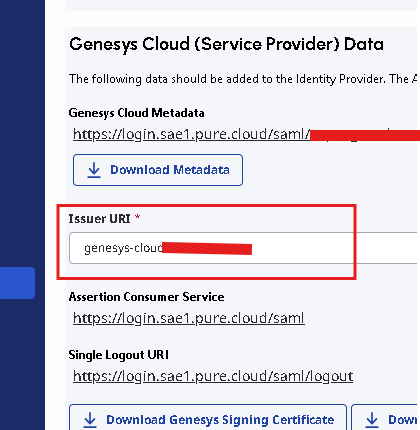
In Genesys, each configuration has its own "Issuer URI".
-
------------------------------
Kaio Oliveira
GCP - GCQM - GCS - GCA - GCD - GCO - GPE & GPR - GCWM
PS.: I apologize if there are any mistakes in my English; my primary language is Portuguese-Br.
Original Message:
Sent: 04-30-2026 09:31
From: Yvgeni Liberman
Subject: ADFS SSO
Hello Kaio,
Please clarify, are you using the Azure Entra ID?
Did you create only one application for all 3 connections, or 3 applications?
------------------------------
Yvgeni Liberman
Solutions Architect
Mobile +972 52-6344414
Voice +972 3-9281514
e-mail yvgeni_new@itnavpro.com
Original Message:
Sent: 04-30-2026 08:51
From: Kaio Oliveira
Subject: ADFS SSO
Hi Yvgeni
-
Just complementing Stephan's answer and confirming that it's possible... I've already integrated 3 organizations into the same Active Directory.
DEV
HML
PRD
------------------------------
Kaio Oliveira
GCP - GCQM - GCS - GCA - GCD - GCO - GPE & GPR - GCWM
PS.: I apologize if there are any mistakes in my English; my primary language is Portuguese-Br.
Original Message:
Sent: 04-30-2026 06:03
From: Stephan Taljaard
Subject: ADFS SSO
Good Day Yvgeni
I have not tested this myself but according to the article on resource center this is possible - https://help.genesys.cloud/faqs/is-it-possible-to-use-a-single-identity-provider-with-multiple-genesys-cloud-orgs/. The main thing is that you have a unique Replying Issuer URI for each Org.
Hope this helps.
Rergards
------------------------------
Stephan Taljaard
EMBEDIT s.r.o