Workforce Engagement Management

Sign Up

Expand all | Collapse all

📢 Upcoming - Start and end times for full-day Time Off Requests

  • 1.  📢 Upcoming - Start and end times for full-day Time Off Requests

    Posted 7 days ago
    WEMBanner

    The Time Off team are releasing start and end time estimates for full-day Time Off Requests. This update improves how full-day requests are evaluated against schedules, work plans and partial-day time-off requests.

    This will be rolled out from 22nd June 2026.

    Why this matters

    Today, full-day Time Off Requests do not always have a clear time span. This can make it harder to evaluate requests accurately when agents work overnight shifts, split shifts, or submit a mix of full-day and partial-day time off.

    With this update, Genesys Cloud can estimate start and end times for full-day requests based on the agent's schedule or work plan. This helps supervisors and schedulers better understand when the request applies, improves Time Off Limit calculations, and helps prevent overlapping full-day and partial-day requests from being approved for the same period.

    So what's new?

    Estimated start and end times for full-day requests

    When a full-day Time Off Request is created, Genesys Cloud will estimate the start and end time for the request.

    Where a published schedule exists, the request will use the scheduled shift start and end times.

    Where there is no published schedule, Genesys Cloud will use the agent's work plan to estimate the earliest possible shift start and latest possible shift end.

    If there is no shift or work plan information available, the request will continue to be treated as a full-day request.
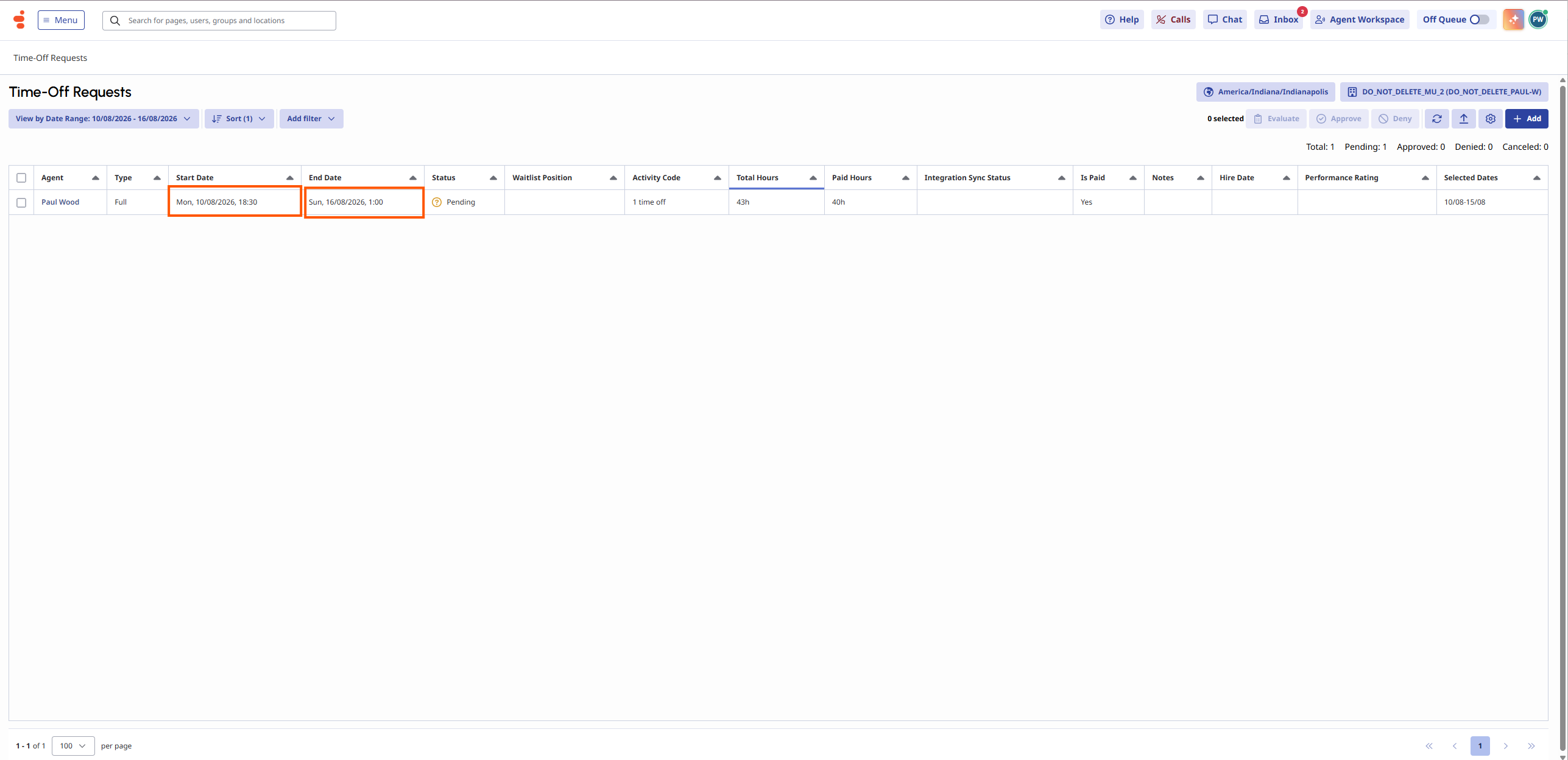
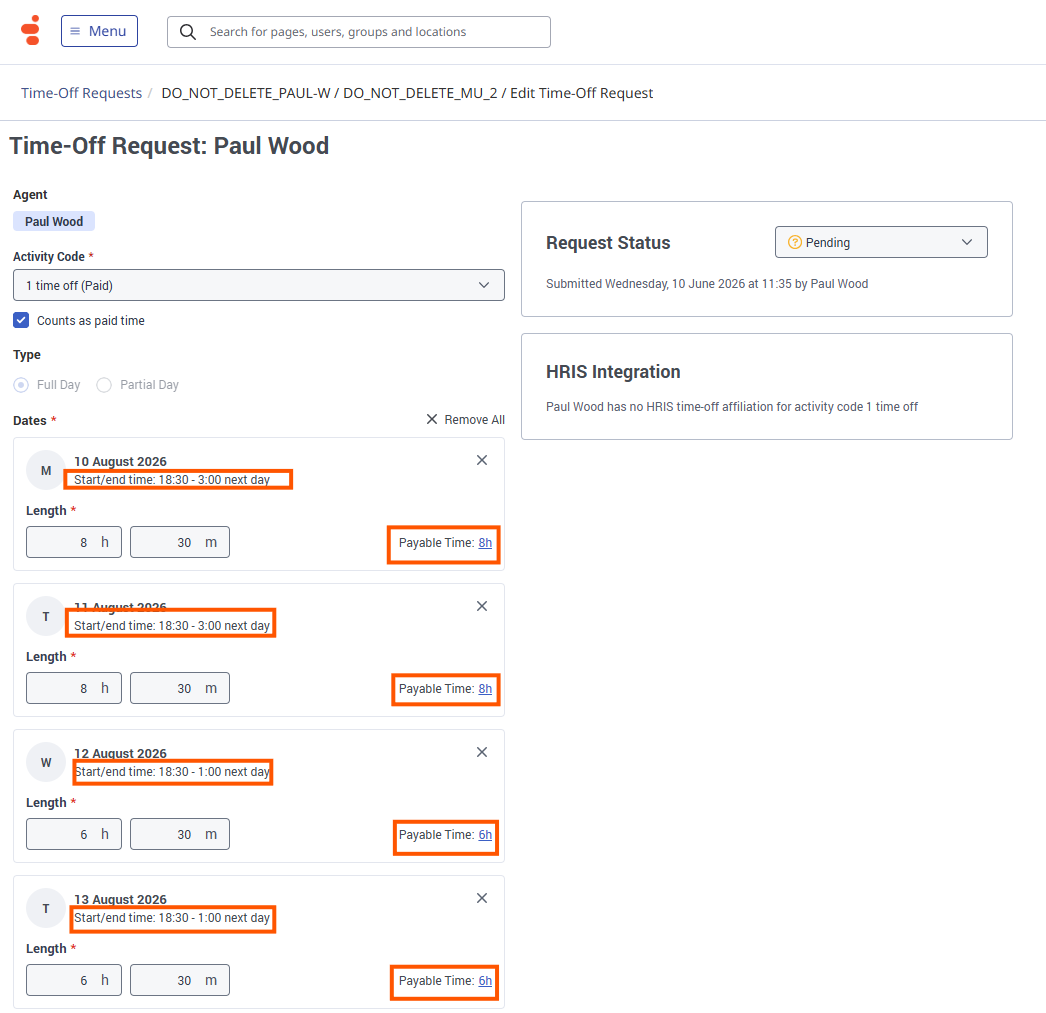
    This also supports shifts that cross the day boundary. For example, if an agent works from 8:00 PM to 4:00 AM, the full-day request can reflect that overnight time span rather than only the calendar day.

    Better handling of full-day and partial-day overlaps

    This update helps prevent a full-day request and a partial-day request from overlapping.

    If a new request overlaps with an existing time-off request, Genesys Cloud will prevent the request from being submitted or updated and show the following message:

    This request overlaps with an existing time-off request.
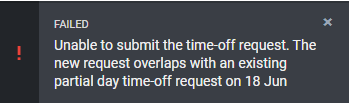
    This helps avoid scenarios where the same time period is deducted more than once or where a full-day request and partial-day request are both approved for overlapping time.

    New Business Unit configuration

    A new Business Unit setting controls whether full-day Time Off Requests use schedule-based start and end time estimation.

    To configure this option, go to:

    Admin > Workforce Management > Business Units > [Business Unit] > Scheduling tab
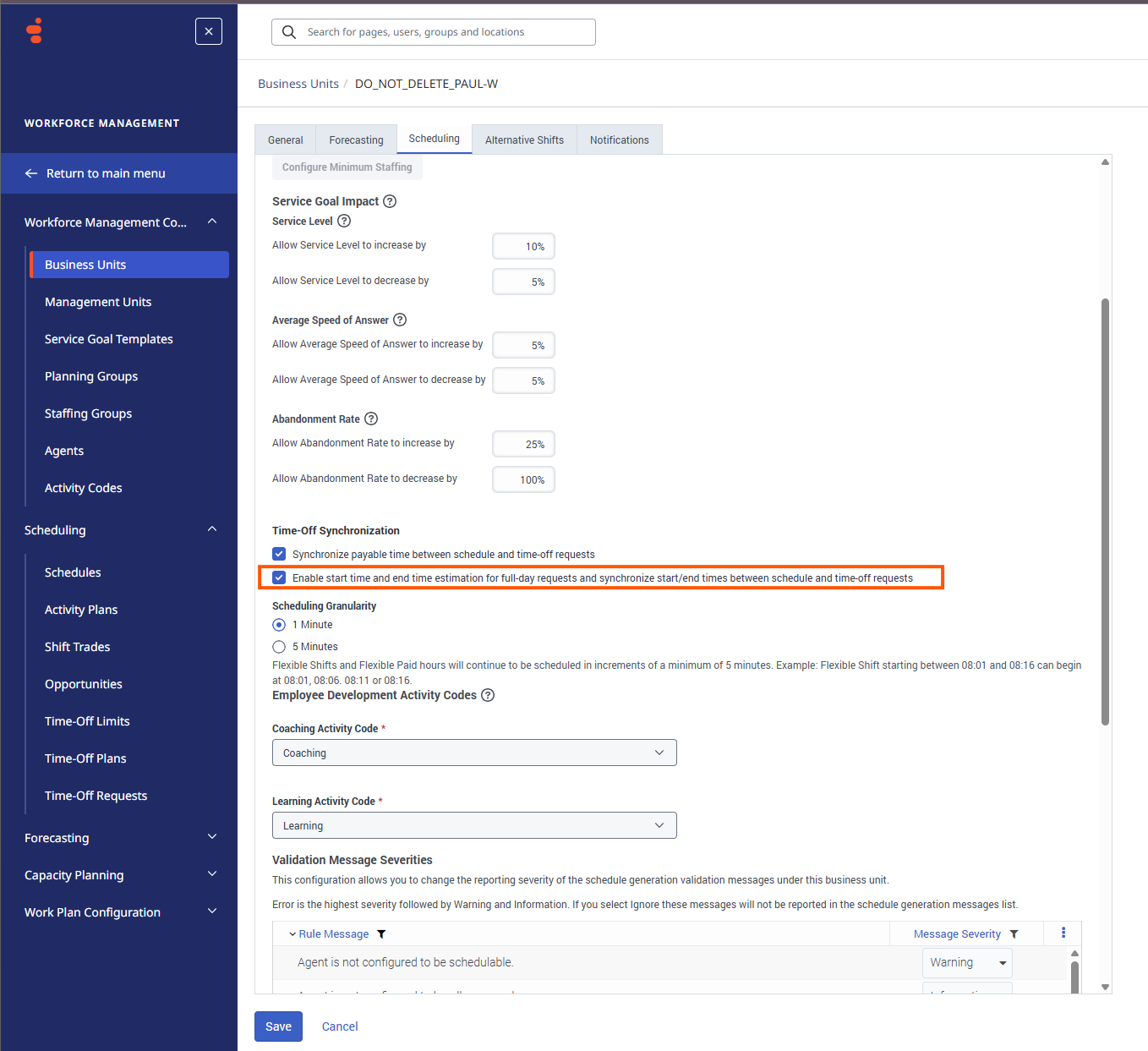
    When enabled, Genesys Cloud estimates start and end times for full-day requests and synchronises those times from the schedule where applicable.

    For new Business Units, this setting is enabled by default.

    For existing Business Units, this setting is disabled by default, so there is no immediate change to existing behaviour unless an administrator enables it.

    Supervisor visibility

    Supervisors will see the estimated start and end times for full-day requests in the Time Off Requests view.

    For multi-day requests, the list view shows the start time from the first day and the end time from the final day.

    When a supervisor submits a full-day request on behalf of an agent, Genesys Cloud will also show the estimated start and end times where they can be calculated.

    Schedule and synchronisation updates

    When the Business Unit setting is enabled, generated and published schedules can use the estimated time span for full-day time off. This helps keep the Time Off Request, schedule and Time Off Limit calculations aligned.

    Where a schedule is published after the request is approved, Genesys Cloud can update the backing Time Off Request with the scheduled time span so that the request better reflects the agent's actual working time.

    Things to know

    This update applies to full-day Time Off Requests.

    Existing Business Units will not automatically change behaviour unless the new setting is enabled.

    Estimated start and end times are calculated by Genesys Cloud and are not manually entered by agents.

    Multi-agent supervisor submissions will not show estimated start and end times as part of this release.

    Overnight and split-shift scenarios are supported.

    Paul


    #TimeOff,AbsenceManagement

    ------------------------------
    Paul Wood
    Genesys - Employees
    WFM Product Manager
    ------------------------------


  • 2.  RE: 📢 Upcoming - Start and end times for full-day Time Off Requests

    Posted 6 days ago

    Hi, @Paul Wood

    Thanks for Sharing


    ------------------------------
    Lineu Romão
    ------------------------------


  • 3.  RE: 📢 Upcoming - Start and end times for full-day Time Off Requests

    Posted 6 days ago

    Hi @Paul Wood,

    Can't wait to see this one in action, will save us hours when entering Time-Off requests.

    We were previously unable to use "Full-Day" as it marked all staff starting their shifts at Midnight GMT, regardless of their designated shift (AM (05:00 to 06:59 start), Day (07:00 - 10:59), Afternoon (11:00 - 17:59), Midnight (18:00 - 00:00), which meant the system would only pay day shift penalties.

    Just confirming the rosters are created using the confines of the work plan?

    Regards

    Wayde


    ------------------------------
    Wayde Masters
    Demand Forecasting & Resource Officer
    ------------------------------


  • 4.  RE: 📢 Upcoming - Start and end times for full-day Time Off Requests

    Posted 6 days ago

    hi @Wayde Masters

    It is worth noting that the Time Off activity will still span 00:00 - 00:00 for a full-day request, but it will have a start and end time associated with it.

    Paul


    ------------------------------
    Paul Wood
    Genesys - Employees
    WFM Product Manager
    ------------------------------


  • 5.  RE: 📢 Upcoming - Start and end times for full-day Time Off Requests

    Posted 5 days ago

    Hi @Paul Wood,

    From our perspective, that's not really an issue, as long as the Export to our Payroll System shows the nominated start time, so they get paid the correct penalties.

    We don't care if the Time-Off shows from Midnight to Midnight, if when it exports to payroll it shows 14:00 - 22:00, or 16:00 - 00:00, or 07:30 - 15:30.

    Do you happen to know how the export will show?

    Regards

    Wayde


    ------------------------------
    Wayde Masters
    Demand Forecasting & Resource Officer
    ------------------------------


  • 6.  RE: 📢 Upcoming - Start and end times for full-day Time Off Requests

    Posted 5 days ago

    Hi @Paul Wood,

    We attempted the Full-Day Time Off, and tested it on an already published week, so we could see how it impacts our Payroll Export File.

    The Agent was scheduled Monday to Thursday - 12:00 - 20:00, an Afternoon shift, which would attract an afternoon penalty payment if worked, therefore, while on leave, Australian Industrial Relation rules require them to be paid the same penalties, so that they are no worse off for going on leave.

    Friday was a Day off, then Saturday & Sunday were 10:00 -18:00 shifts.

    The Full-Day Time off correctly identified the shift as 12:00 - 20:00, but then when applied to the schedule, applied from 00:00 - 00:00

    When the Payroll Export File has been created, it has then listed the shifts as 09:30 - 17:30 (An 8 hour shift)

    09:30 = Midnight GMT + 09:30 (Our Local Time-zone in Adelaide Australia).

    The problem is that an 09:30 shift does not attract any penalties, which would result in under-paying our staff member, and then open us up to SIGNIFICANT regulatory fines for under-paying workers (Google - Woolworths, JB Hi-Fi, to see how serious our regulators are about underpayment of workers).

    The Friday shift shows as 09:30 - 09:30 - Zero hours, but preference would be for the record to not exist at all, the same as if no shift was in Genesys WEM

    Saturday and Sunday show as 09:30 - 17:30, rather than the original 10:00 - 18:00

    To correct this issue we need to make it a partial day and manually enter a start and end-time, to ensure we meet our reporting obligations.

    We really need this feature to ONLY apply the Time off to the segments as dictated by the workplan.

    Because the Export File to our Payroll system MUST reflect the correct shift ranges as determined by the work-plan, to ensure the correct payment of all penalties and allowances.

    Please let me know if you need more info to clarify requirements.

    Regards

    Wayde


    ------------------------------
    Wayde Masters
    Demand Forecasting & Resource Officer
    ------------------------------


  • 7.  RE: 📢 Upcoming - Start and end times for full-day Time Off Requests

    Posted 5 days ago

    Hi Wayde,

    Would you mind having a call with me to go over the details of the flow you are using so that I can look into this more with the team?

    If you drop me an email, paul.wood@genesys.com, we can arrange a time to suit.
    Paul


    ------------------------------
    Paul Wood
    Genesys - Employees
    WFM Product Manager
    ------------------------------


  • 8.  RE: 📢 Upcoming - Start and end times for full-day Time Off Requests

    Posted 4 days ago

    Why does the activity code still span the full day? It really should only reflect the start and end time and not show in the activity counts for the full 24 hours. 


    ------------------------------
    Lindsay Wood
    WFM Analyst
    ------------------------------


  • 9.  RE: 📢 Upcoming - Start and end times for full-day Time Off Requests

    Posted 3 days ago

    The full-day activity is there to block out the day so that nothing else can be scheduled, for environments with extremely felxible work plans it could be possible to have Leave 9:00 - 17:00 and still be scheduled a shift before 9:00 or after 17:00. As you can imagine if the employee had booked a trip and was not available to work for the full 24 hour period this would create confusion and frustraion.

    Blocking out the full day and providing the start/end times for the replaced or estimated shift provides the business with the reportability and the employee the reassurance that they have the full day booked off.

    Paul


    ------------------------------
    Paul Wood
    Genesys - Employees
    WFM Product Manager
    ------------------------------


  • 10.  RE: 📢 Upcoming - Start and end times for full-day Time Off Requests

    Posted 21 hours ago

    That situation seems like more of an exception than the rule, particularly now that Time Off Requests pick up the work plan - I'd expect the Time Off activity to replace the scheduled shift.

    In most cases, agents who have had leave approved would raise any issues where there is a scheduled shift on the same day as their approved leave.


    ------------------------------
    Scott McSorley
    ------------------------------


  • 11.  RE: 📢 Upcoming - Start and end times for full-day Time Off Requests

    Posted 10 hours ago
    Edited by Anupama Kumar 10 hours ago

    Hi,

    Tested and when the schedules are published, it still picks 00:00 - 0:00 hrs, and only the shift duration is getting updated as per paid hours which was the situation even earlier. So, what's the change from the old setup?

    Regards,

    Anupama


    ------------------------------
    Anupama Kumar
    Workforce Officer
    ------------------------------


  • 12.  RE: 📢 Upcoming - Start and end times for full-day Time Off Requests

    Posted 10 hours ago

    The Time Off Limits are only calculated based on the start/end time, rather than the full 24 hours.

    For historical reporting, the Time Off Request is updated with the start/end time of the shift that was replaced. This is a legal requirement in some regions to demonstrate that the shift being replaced was in line with the shifts for the week/planning period. 

    When requesting a "full-day" it is assumed that the employee will not be available to work for the BU Calendar date of the request.

    To honour this, the Time Off request is still added to the schedule as a full-day 00:00 - 00:00 (BU time) marker, with the start and end times added to the details for better limit calculations and insights for the Admin/Supervisor.

    In very flexible scheduling environments or 24/7 operations, there are scenarios where marking "just the shift" as Time Off could result in a shift being created before/after the period marked as Time Off. This could result in confusion and frustration as the employee could be away and not able to attend any shift that day, not just the hours that they would have been scheduled for.


    ------------------------------
    Paul Wood
    Genesys - Employees
    WFM Product Manager
    ------------------------------