When i generate a new schedule it works, when I click run now it wont work but at least that could be because of the design and when running future schedules it seems to be adding it :-)
Original Message:
Sent: 07-22-2026 07:59
From: Mike Morris
Subject: Activity Planner and Daily Occurances
Thanks for the quick repsonse @Paul Turner, I have set it only for the one indvidiual told it to reoccur every day (but this section gets funny as you have to leave at weeks then set it to either 0 or 1 day and then flick it back to days.
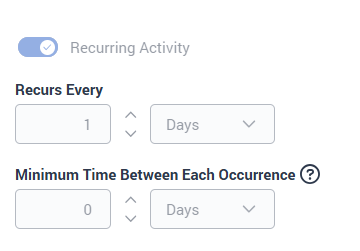 I have tried the minimum time between each occurance to 1 day too and nothing seems to work. When it finally saves it creates no occurances when you run it.
The error message is just the Generic error message that says Activlty Planner could not save due to an error.
The agent is free at the time for sure as the breaks are hardcoded for this agent as well, so in theory it should just put it in.. but as you say I think as I am telling it when to do it, it fails.
------------------------------
Mike Morris
Manager - BCD
------------------------------
Original Message:
Sent: 07-22-2026 07:39
From: Paul Turner
Subject: Activity Planner and Daily Occurances
Hey @Mike Morris
Activity Plans aren't primarily designed for creating fixed recurring schedule entries. Their main purpose is to find the best available time for an activity within a window while respecting your scheduling constraints.
That said, you can achieve the behaviour you're looking for by using Session Availability to constrain when sessions are allowed to be scheduled.

For your scenario, you could configure:
- An attendee rule that targets the individual agent.
- A daily recurrence over the required three-month period.
- Session Availability that only allows sessions between 7:00 AM and 8:00 AM, Monday to Friday.
With Session Availability restricted to that one-hour window, Activity Plans will only attempt to schedule the activity during that time.
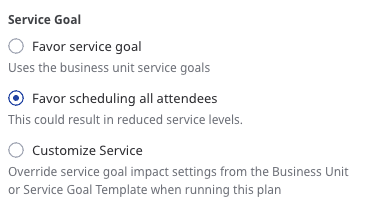
If your goal is for the activity to be created regardless of service goal impact, I'd also recommend setting the service goal strategy to Favor scheduling all attendees. This allows Activity Plans to prioritise scheduling the activity over maintaining optimal service goals. If you'd prefer the activity to be scheduled only when staffing conditions are optimal, you can leave the default service goal behaviour in place instead.
The main thing to be aware of is that Activity Plans still won't force a session into the schedule if another constraint prevents it, such as the agent already being unavailable during that period or another scheduling conflict.
If you're receiving an error while creating the Activity Plan, rather than the sessions simply remaining unscheduled, could you share the exact error message or a screenshot of the configuration? That sounds like it may be a separate issue, and we'd be happy to help identify what's causing it.
Cheers,
------------------------------
Paul Turner
Senior Product Manager
Genesys - Employees
------------------------------