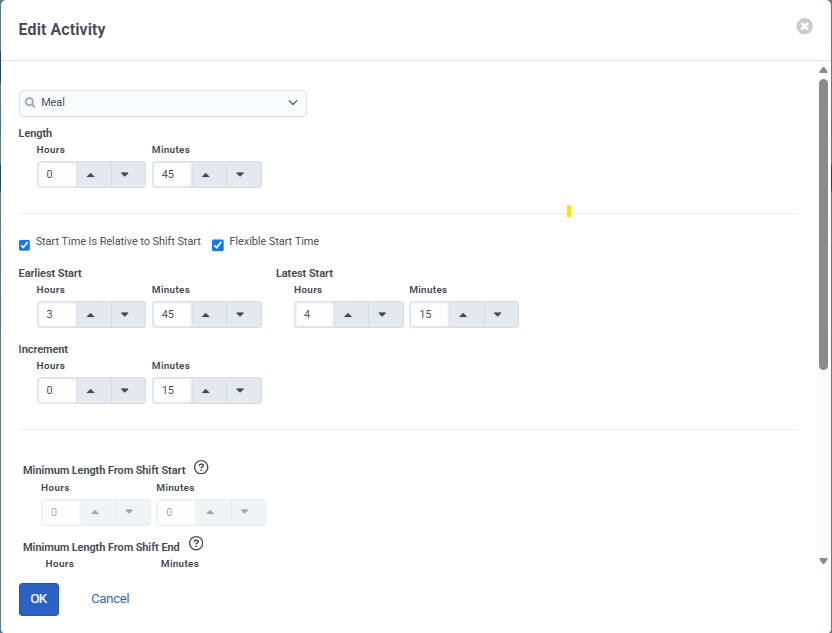
Looking at the screenshots you've shared, and the schedule you showed in your first post. The meals appear to be placed in the correct time slot. It looks like the earliest start is 11:45 which is the earliest your schedule is showing.
If you have schedules using these work plans that have placed them earlier than that time I would recommend raising a support ticket at that stage so it can be investigated.
Original Message:
Sent: 07-22-2026 01:29
From: Petek Caranzi
Subject: Activity Plans
Hi Paul
Thank you for the explanation. That makes sense and aligns with what I am seeing in the scheduling results.
I will test this with a new Activity Plan during the next monthly planning cycle and configure the start time increment to 15 minutes. Hopefully this will allow the activity to be scheduled at the intended time.
Regarding the meal placement question, I have attached two screenshots of one of the configurations. I currently have three Work Plans (early, middle, and late shift). The configuration is identical across all three Work Plans, with the only difference being that the shift start times are moved later for the middle and late variants.
Please let me know if you need any additional screenshots or information. I appreciate you taking a closer look at this.
Kind regards,
Petek Caranzi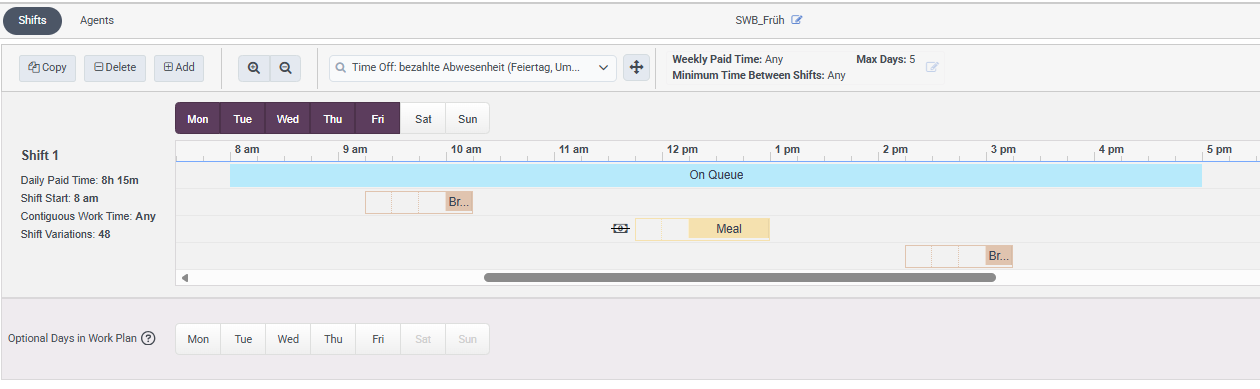
------------------------------
Petek Caranzi
Business Development Specialist
------------------------------
Original Message:
Sent: 07-17-2026 10:21
From: Paul Turner
Subject: Activity Plans
Hi Petek,
Thank you for reaching out. I can certainly help with the first scenario relating to Activity Plans.
From what you've shared, it looks like you've uncovered an edge case where the scheduling window is exactly the same length as the activity, but the configured start time increment doesn't align with the required start time. By default, the start time increment is 30 minutes, so Activity Plans will only evaluate start times on the hour and half hour. In your case, the only valid start time is 1:45 PM, which doesn't align with that increment.
Rather than creating no session, it appears the scheduler is selecting the nearest available start time instead. I believe this is unintended behaviour, as I would expect the system to reject the session when no valid start time exists within the configured constraints. I'll log this internally for investigation.
In the meantime, you should be able to resolve this by updating the Start time increment under Scheduling Settings to 15 minutes. That will allow Activity Plans to evaluate 1:45 PM as a valid start time and, provided suitable schedule availability exists, the activity should be scheduled as expected.
Regarding your second question about Work Plans, could you share a little more information about your configuration? Based on your description, I would expect meal placement to remain within the boundaries defined by the applicable Work Plan definition, so I'd like to understand how your shifted Work Plans and meal rules are configured. If you can share screenshots of the Work Plan definitions and the resulting schedule, I'll be happy to take a closer look.
Cheers,
------------------------------
Paul Turner
Senior Product Manager
Genesys - Employees
------------------------------
Original Message:
Sent: 07-14-2026 02:03
From: Petek Caranzi
Subject: Activity Plans
Hi Robert
I have the same time zone configured. The time zone is defined at the Business Unit level.
Thanks
------------------------------
Petek Caranzi
Business Development Specialist
------------------------------
Original Message:
Sent: 07-13-2026 15:52
From: Robert Tonyka
Subject: Activity Plans
Hi Petek,
I see in your schedule "Zürich" Time zone. Do you have the same one in the Business Unit? This could cause the issue.
Thanks,
------------------------------
Robert Tonyka
Sr. Principal PS Consultant
------------------------------