Thank you Paul, we will try to adjust the Plans so the recurrence can do its job :)
Original Message:
Sent: 12-17-2025 09:58
From: Paul Wood
Subject: Activity Plans - Recurring Help for Bi Weekly Meetings
No, this is based on the initial schedule date and recurrence period. For example, you set the initial start date as the 5th January for a 2-week recuurence the system/Activity Plan will know that there is a new occurrence on the 5th Jan, 19th Jan, 2nd Feb....
No, when generating a schedule, Activity Plans are run at the end and use the start and end dates of the schedule period to calculate the occurrence periods. We also look forward and backwards to existing occurrences that have already been scheduled to balance the newly created sessions ot ro complete any partially covered occurrences from previous schedule generations.
For new sessions and sessions where you are looking for the optimal schedule, yes, Activity Plans does this automatically. The complexity arises when we are trying to replicate a historical cadence that was created before an Activity Plan or where there are fixed scheduling windows like:
- sessions must be in week X
- sessions must be on set days
- sessions must be scheduled during set time windows
Can I still correct existing Activity Plans by adding the specific date, generating the schedule, publishing it, and then adding the day of the week, or does this only work for new Activity Plans?
You can edit the Session Availability constraints as often as you need; these will only affect future Activity Plan runs. If you need to reschedule an occurrence, you should delete the occurrence and run the Activity Plan manually. This will run the Activity Plan with the new constraints over all current and future published schedules.
No, there have been no changes to the initial functionality.
Yes, some scenarios can be complicated to configure, and we are constantly reviewing these and looking at how we can enhance the functionality to help simplify things. As mentioned above, the complexity comes when additional constraints are applied to the scheduling of activities rather than looking for the optimal schedule solution.
------------------------------
Paul Wood
Product Manager for Genesys Cloud Workforce Management
------------------------------
Original Message:
Sent: 12-17-2025 08:18
From: Silvia Schuts
Subject: Activity Plans - Recurring Help for Bi Weekly Meetings
Hi Paul,
Thank you for your quick response. I published the schedule and then removed the specific date and added the day of the week with a fixed time. After that, I generated a new schedule for two weeks later (2-week recurrence), and the meeting is scheduled again. So this seems to be the solution.
By the way, I did not change the max. number of sessions, so it looks like the recurrence ignores that setting.
I do have a few remarks/questions about how this works:
Does the Activity Plan only understand the recurrence cadence once the schedule has been published?
If I schedule four weeks in one go, do I then need to add two specific dates?
Shouldn't the Activity Plan be able to determine the cadence based on the start date in combination with the recurrence setting?
Can I still correct existing Activity Plans by adding the specific date, generating the schedule, publishing it, and then adding the day of the week, or does this only work for new Activity Plans?
Has anything changed in the way this works? I've never explained it to customers like this, and I can't recall (until yesterday) a customer saying it doesn't work.
In general, I find this a very cumbersome way of configuring it.
Thanks in advance for your time.
Regards, Silvia
------------------------------
Silvia Schuts
Workforce Management Specialist
Original Message:
Sent: 12-16-2025 12:48
From: Paul Wood
Subject: Activity Plans - Recurring Help for Bi Weekly Meetings
Hi @Silvia Schuts,
From the screenshot and scenario you have posted, I can see 2 possible issues:
- The dated Session Availability
- This will prevent all future sessions from being scheduled, as this constraint is effectively saying "and only schedule sessions at this 1 specific time". Your options here are:
- Now that the 1st session has been scheduled and the schedule published, delete the Session Availability. The recurrence rule will now enforce the cadence of the session.
- Replace the dated Session Availability with a generic " Day of week and time of day" constraint like " Tuesday between 3:30 - 4:00PM"
- The time frame that you want the session to be scheduled within
- Tuesday 3:30 -4:00 PM, might not have the service goal capacity or agent availability to schedule the session.
- Where possible, try to use broader constraints, even if it's something like Tuesday 12:00 - 5:00 PM. This will give the schedule engine more flexibility and ensure more opportunities for the session to be scheduled
edit
Apologies, I missed this initially.
You have the Maximum Number of Sessions set to 1.
This will limit the whole Activity Plan to 1 scheduled session.
If the session is scheduled in the 1st occurrence, then the Activity Plan will effectively become obsolete for future occurrences as the maximum number of sessions for the whole Activity Plan has already been set.
The best practice to ensure only 1 meeting per occurrence is scheduled is to set the Minimum Group size to 1 more than half of the number of attendees. From your example, I would set the minimum group size to 11 and the maximum group size to 20. This way, if it is not possible to schedule all of the attendees, the Activity Plan can't look for additional sessions.
Using your original settings of 1/20, the Activity Plan could return sessions for any combination of 1 up to 20 attendees, resulting in a maximum number of sessions per occurrence of 20.
I hope this helps,
Paul
------------------------------
Paul Wood
Product Manager for Genesys Cloud Workforce Management
Original Message:
Sent: 12-16-2025 10:03
From: Silvia Schuts
Subject: Activity Plans - Recurring Help for Bi Weekly Meetings
Hi Paul,
I'm testing this and I can't get the recurrence to work. The first time I select a specific date, and it gets placed in my schedule (for 1 week).
Now I want to create the next schedule period (2 weeks later). What should I do in the session availability? I want the meeting to be fixed on Tuesday from 3:30 PM - 4:00 PM. Trying to add the day of week and remove the specific date didn't work.
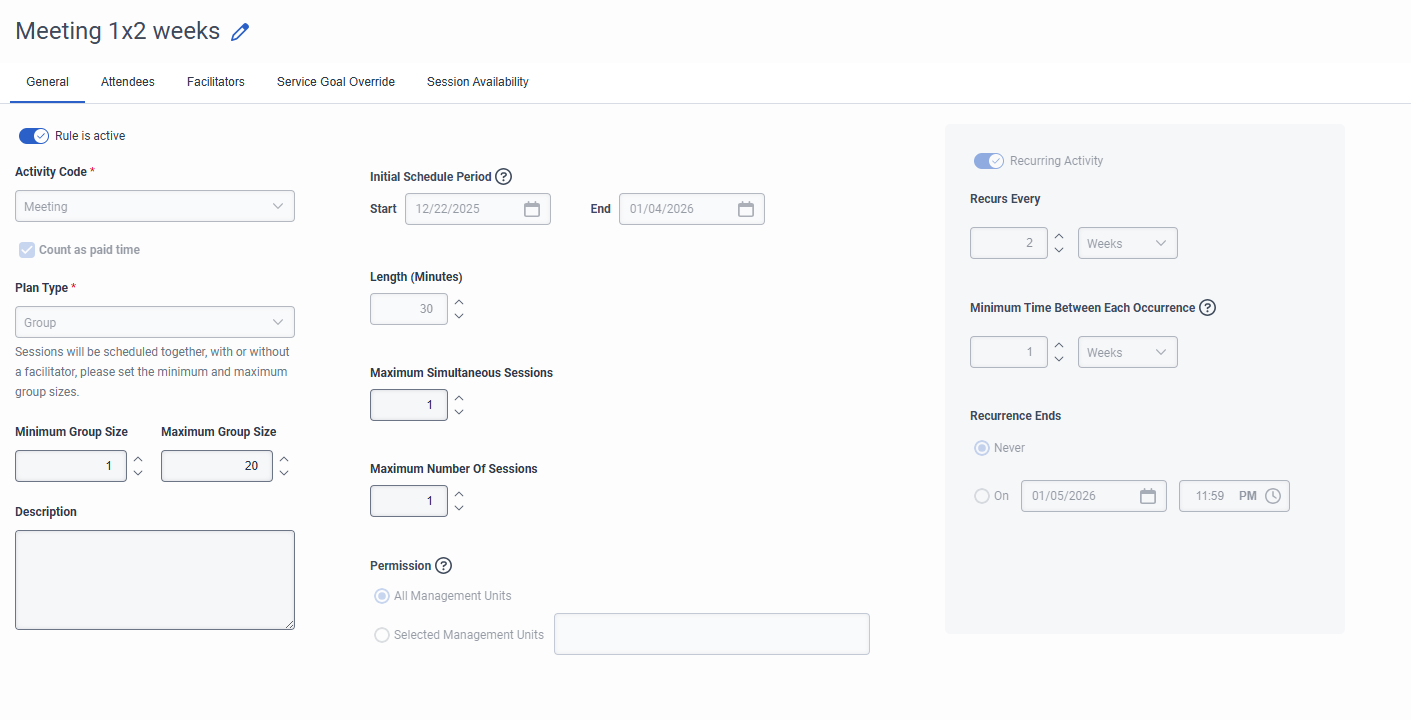
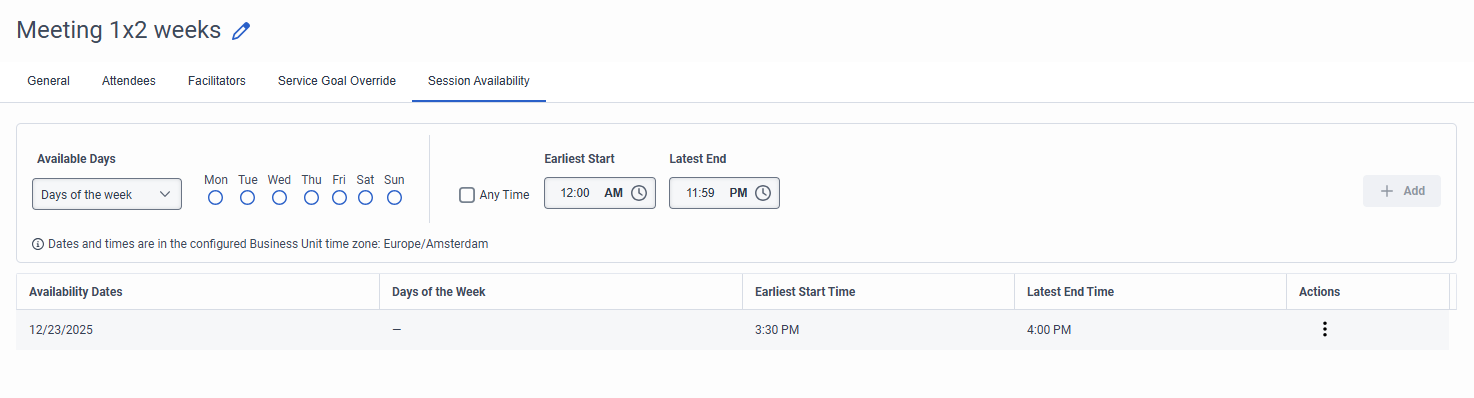
Is anything in the functionality changed? In my experience it used to work fine. And it seems to only work with completely new activity plans?
Kind Regards,
Silvia
------------------------------
Silvia Schuts
Workforce Management Specialist
Original Message:
Sent: 07-11-2025 18:04
From: Paul Wood
Subject: Activity Plans - Recurring Help for Bi Weekly Meetings
Yes, using Activity Plan will solve this. The key is the recurrence settings and initial Session Availability configuration if you want to continue with a specific cadence.
Following the key steps below should provide you with outcomes in line with any manually scheduled bi-weekly meetings you may have:
- General Tab
- Set "Recurs Every" to 2 Weeks
- Set "Minimum Time between Each Occurrence" to 1 week
- Session Availability
- Set Available Days to:
- Specific Date - and select the date that you want the 1 session to be scheduled on, to replicate any previous cadence
set all other settings in line with what you want to schedule, who you want to attend and who you'd like to facilitate the session(s)
After running the Activity Plan for the first time, to will need to remove/update the Session Availability constraints. There are 3 optional configurations for ongoing Session Availability:
- Following the 1st scheduled sessions, allow Activity Plans to create future sessions in line with the other constraints.
- Delete all of the Session Availability constraints.
- This provides the optimal solution
- Following the 1st scheduled sessions, force sessions to be scheduled on a set day of the week.
- Delete all of the Session Availability constraints.
- Add a new Session Availability using the Days of Week option and selecting the day you would like the meeting to be scheduled on.
- Check the "Any Time" option
- This will look for the best time for the meeting on the day that you have stipulated
- This provides some optimisation but only for the day selected.
- Following the 1st scheduled sessions, force sessions to be scheduled on a set day of the week at a set time.
- Delete all of the Session Availability constraints.
- Add a new Session Availability using the Days of Week option and selecting the day you would like the meeting to be scheduled on
- Enter the Earliest Start and Latest End times
- This provides no Schedule Optimisation
I hope this helps,
Paul
------------------------------
Paul Wood
Product Manager for Genesys Cloud Workforce Management
Original Message:
Sent: 07-11-2025 13:47
From: Steven Moore
Subject: Activity Plans - Recurring Help for Bi Weekly Meetings
Paul,
Was there ever any traction on this? I have been trying to accomplish this with Work Plan Rotations, but have been unsuccessful.
-Steve
------------------------------
Steven Moore
Director of CX
Original Message:
Sent: 02-03-2025 05:02
From: Paul Wood
Subject: Activity Plans - Recurring Help for Bi Weekly Meetings
@Jacqueline Turner @Wayde Masters
if you let me know a couple of times that you are free I'd be happy to jump on a call to help you work these through and to understand your challenges better so that they can be considered in our future enhancements.
Paul
paul.wood@genesys.com
------------------------------
Paul Wood
Product Manager for Genesys Cloud Workforce Management