Scripts are only aviable within conversations. You can set the script on queue-level or in Architect "set screen pop" action. The Script always is displayed in the middle of the screen when the agents gets offered a conversation. About scripting - Genesys Cloud Resource Center
You can trigger data actions via script. Automated or via pressing a button. So accessing a data table is no problem. You can even create "custom actions" in scripts. There you can combine logical descisions, data actions, attribute manipulation etc.
Original Message:
Sent: 09-17-2025 09:52
From: Marko Konieczny
Subject: Add a phone number to favorites in Genesys Cloud
Hi Christoph,
Thank you very much for the screenshots. Could you also share how an agent can use the script within the Genesys UI where they normally work? For example, is the script automatically displayed when a voice interaction comes in, or can the agent also launch the script without an active interaction - for instance, when they want to place an outbound call to one of their favorites?
Additionally, would it be possible for the script to trigger a call via a data action to a data table where the phone numbers are stored?
Thanks again for your support.
With kind regards
Marko
------------------------------
Marko Konieczny
Solution Architect
------------------------------
Original Message:
Sent: 09-17-2025 06:16
From: Christoph Domaschke
Subject: Add a phone number to favorites in Genesys Cloud
Hi Marko,
I was out of order for some while. So please excuse my late response:
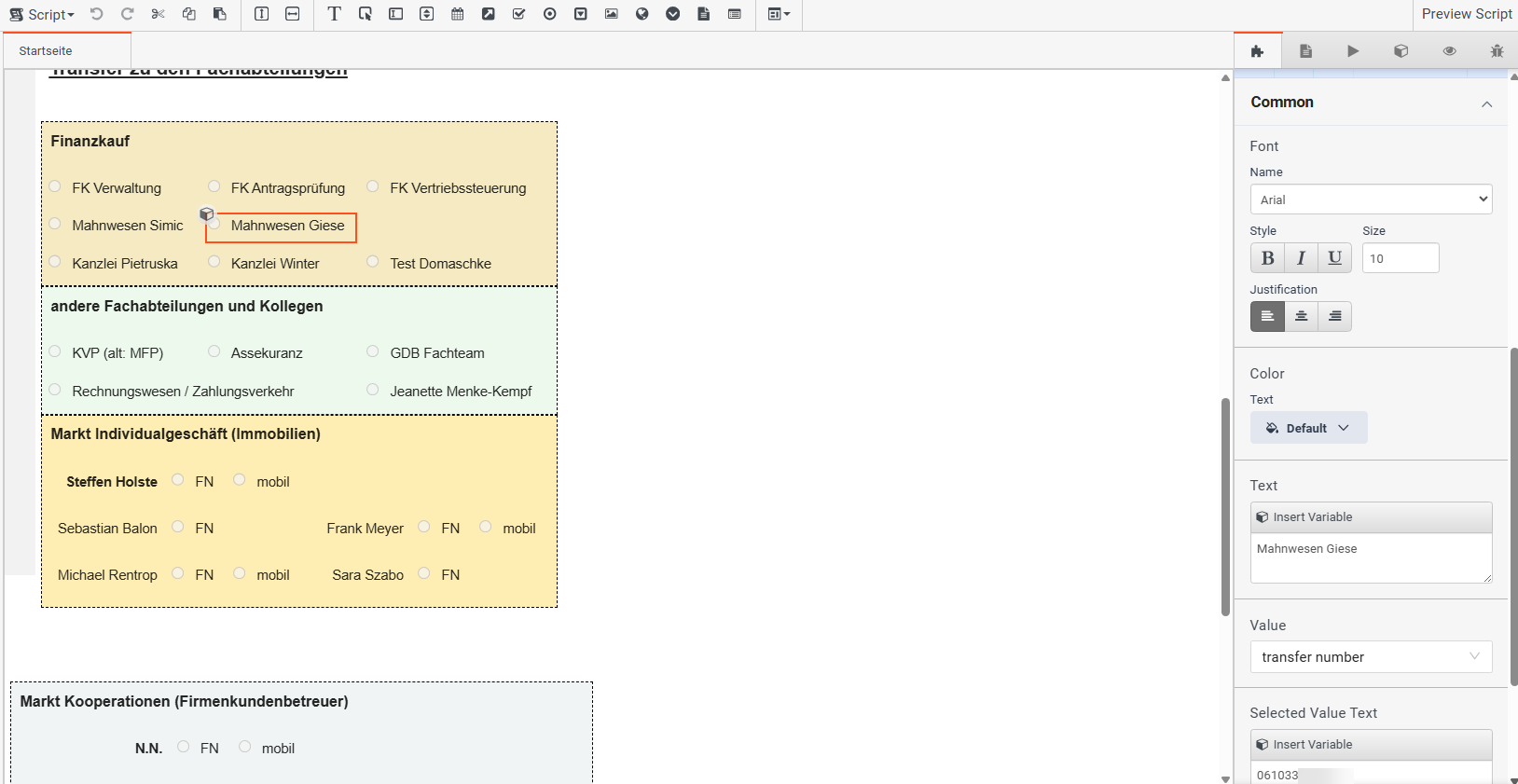
Thats how my favorites work: Radiobuttons which manipulate a variable ("transfer number").
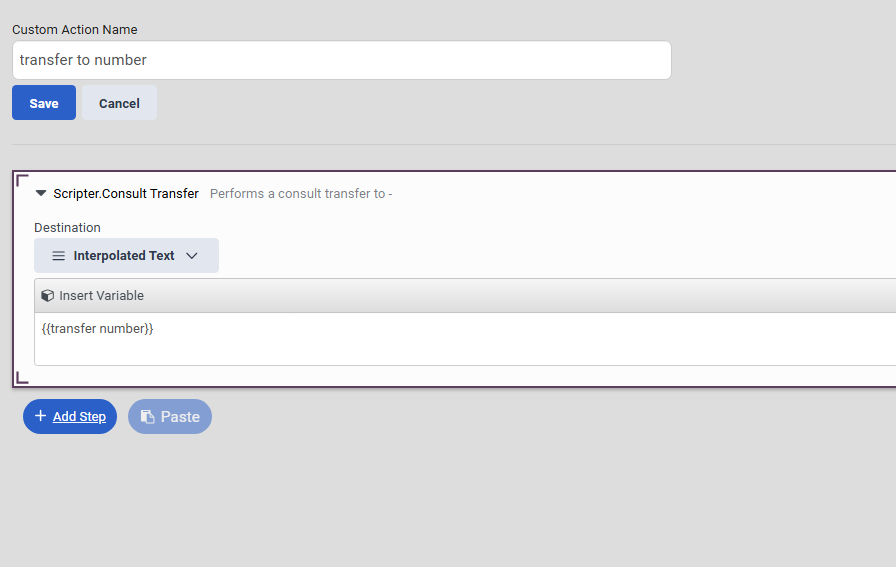
And that is the action behind the "call"-button:
------------------------------
Christoph Domaschke
Leiter Service Center (Cronbank)
Original Message:
Sent: 08-19-2025 09:16
From: Marko Konieczny
Subject: Add a phone number to favorites in Genesys Cloud
Hi Christoph
Thanks, for this response and sorry for my late response but I was now on vacation.
But is it possible that you share a screen shot of what you made with favorites in a script?
Thanks
Greetings Marko
------------------------------
Marko Konieczny
Solution Architect
Original Message:
Sent: 07-28-2025 07:33
From: Christoph Domaschke
Subject: Add a phone number to favorites in Genesys Cloud
Hi Marko,
I am sorry for the delay of my answer. I had been on vacation.
In my case I stored the favorites direct in the script. As long every agent using that script has the same favorites, the effort is okay. Or do you need flexible favorites, depending on some variables?
------------------------------
Christoph Domaschke
Leiter Service Center (Cronbank)
Original Message:
Sent: 07-18-2025 04:42
From: Marko Konieczny
Subject: Add a phone number to favorites in Genesys Cloud
Hi All,
It's been a while since this post was published, but we are currently in the process of migrating to the cloud and are looking for a way for our employees to use favorites - not the Collaboration favorites, but rather a way to save frequently dialed numbers, such as external partners or companies.
Are there any new ideas or solutions available in Genesys for this use case, or are the alternatives mentioned in this post still the only available options?
@Christoph Domaschke
And regarding your idea to use a script - where do you store the favorites?
Are they stored in an external file, or do you use External Contacts, which you retrieve via the Genesys API using a Data Action within the script?
Thanks in advanced.
With kind regards Marko
------------------------------
Marko Konieczny
Solution Architect
Original Message:
Sent: 01-20-2023 09:45
From: Christoph Domaschke
Subject: Add a phone number to favorites in Genesys Cloud
@Shane Duncan:
I will try:
1. Create a script, that appears if the call comes in.
In that script:
2. create a string-variable "transfer number"
3. place as much radio-buttons as needed. In every radio-button fill in:
- Text: the name of the destination
- Value: the variabe "transfer number"
- insert variable: the number you want to transfer to
4. place a button for "connect". there you fill in:
- Click Action: Scripter.Consult Transfer with the variable "transfer number".
That's all. For details to scripts please read the excellent documentation from genesys cloud. The keywords you have to look for are listed above. If you have further questions while setting this up, please let me know.
------------------------------
Christoph Domaschke
CRONBANK AG
Original Message:
Sent: 01-20-2023 08:41
From: Shane Duncan
Subject: Add a phone number to favorites in Genesys Cloud
@Christoph Domaschke could you provide steps to create this? We have a PBX group that has a list of 20+ frequently transferred numbers. This trick would save them 1000s of clicks.
------------------------------
Shane Duncan
Ballad Health
Original Message:
Sent: 01-10-2023 02:30
From: Christoph Domaschke
Subject: Add a phone number to favorites in Genesys Cloud
I had a similar problem with a lot of different teams we had to call frequently. I solved this with a script in Genesys. Add a button to a script and choos as click action "transfer to number" (for consulted transfer). It's a one-click-solution. I choosed a field of radio buttons, where the agent can choose the destination and than click the button "dial" to perform the action. Works pretty fine.
------------------------------
Christoph Domaschke
CRONBANK AG