Workforce Engagement Management

 View Only

Sign Up

  • 1.  Agent Performance Stats

    Posted 04-19-2023 14:57

    Hey All!
    Our Contact Center Managers want more awareness of agent performance including how much time (in total and on average) they are on queue vs off queue.
    The Agent Status Summary and Agent Status Detail view both provide the option to see the amount of time spent On Queue and Off Queue time with a break down of time spent base on the primary status selected.
    The way the data is presented currently sums up all the time spent in On Queue/ Off Queue when selecting a time frame longer than 24 hours.

    Example (timeline = previous 3 months):


    Is there a way to get the average daily on queue and off queue time similar to average handle time or average ACW time?


    #Workforce Management
    #Performance Management
    #Gamification

    ------------------------------
    Melissa Callender
    Senior Operations Specialist
    Ontario Teachers' Pension Plan
    ------------------------------


  • 2.  RE: Agent Performance Stats

    Posted 04-20-2023 08:55

    Hello!

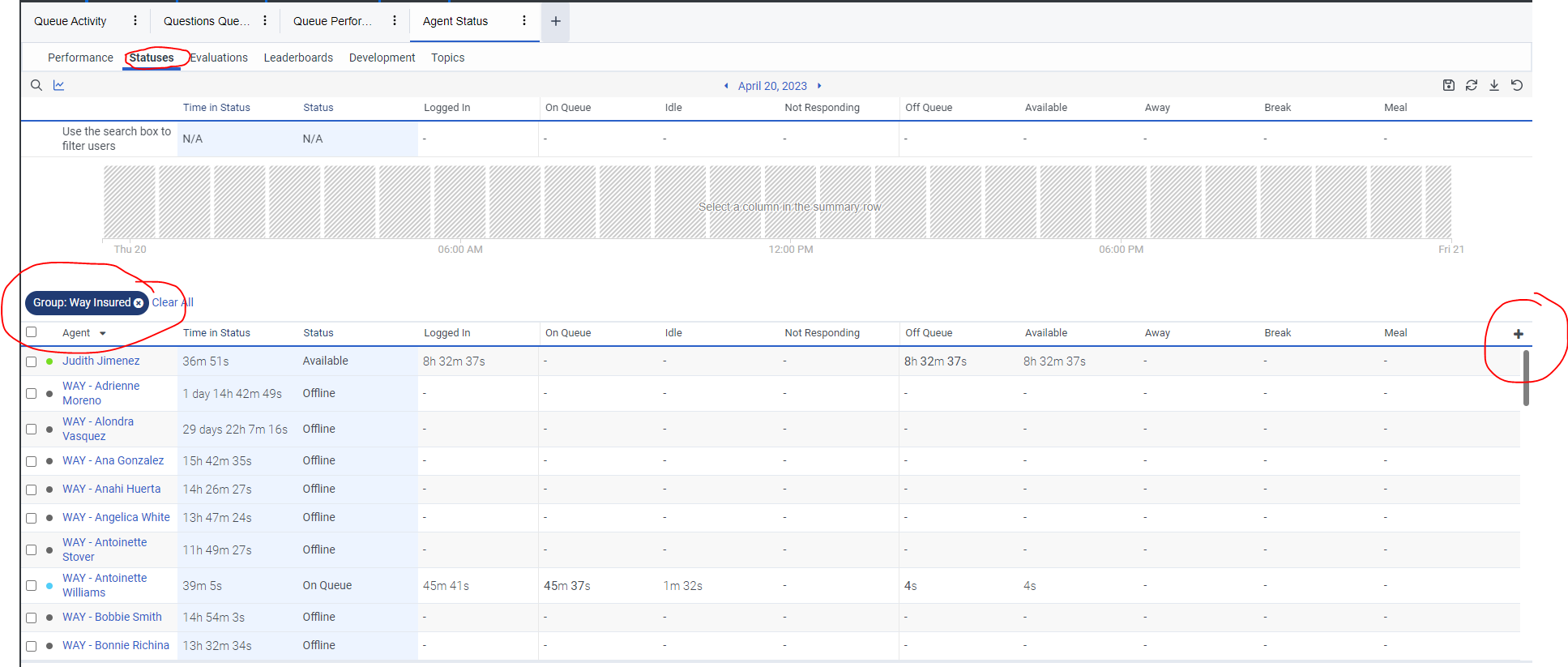
    One way to get to this would be to pull the report by group, assuming you created a group to more easily get to reports, if not, I would do that, it makes it much easier.   The go to Agent Performance, click on the Status column, go to the plus sign to add more metrics, select On Queue, Off Queue, I would also add On Queue % and Off Queue %.      You can then proceed as you would with any report.   Once you get report, you would have the data.   I believe this is what you are looking for, but if not, let me know.    I am another Genesys user, not a Genesys person.


    ------------------------------
    Judy Jimenez, Call Center Operations Manager
    CURE Auto Insurance
    ------------------------------


  • 3.  RE: Agent Performance Stats

    Posted 04-25-2023 16:43
      |   view attached

    Jumping in with a a related topic.
    First I must say that getting a strong understanding of presence, status, routing status, and activity indicators,can be challenging!

    That said,As I understand it;
    On Queue
    Not Responding
    Interacting
    Communicating
    Idle
    are Routing Status, but I scratch my head that "Off Queue" is part of Routing Status, since it is somewhat stand alone; i.e. an Agent Can be "Off-Queue" & Not Responding, Idle or Communicating.
    Then Status,  I explain to non-technical users that these are the statuses that user can select themselves:
    Available
    Busy
    Away
    Break
    Meal
    Meeting
    Training
    Out of Office

    Next,  The the oddballs:
    Idle (Away)
    System Away
    Where do these fit in the scheme of things?

    All this is compounded by the following metrics are not available on the Agent Status reports:  Out of Office, Idle (Away), System Away

    Now the question, that I really need an answer to:
    Of the entites I have mentioned;  which of these sum up to equal "Logged In" time? 
    I have summed the following: Not Responding, Interacting, Communicating, Idle, Available, Busy, Away, Break, Meal, Meeting, Training  and for the vast majority of users,  the sum is greater then the "Logged In" time,  and there is no distinguishable pattern that would indicate which metric to remove from the equation.

    Conversely the sum of on-Queue & Off-queue tie out exactly to Logged in time.  Sample attached

    TYIA


    ------------------------------
    Pete Schroeder
    HMC3 LLC
    Senior Contact Center Engineer
    ------------------------------

    Attachment(s)


  • 4.  RE: Agent Performance Stats

    Posted 04-25-2023 16:52
    As a note, Not Responding is actually considered On Queue.   I, personally, do not agree because calls can not route to me if I am in Not Responding, but as you look to add things up you might want to consider that.


    --
    Judy Jimenez, Workforce Management Coordinator
    CURE Auto Insurance 
    214 Carnegie Center, Suite 301 
    Princeton, NJ 08540 
    1-800-535-2873, ext 7405
    Fax: 609 297 5725


  • 5.  RE: Agent Performance Stats

    Posted 04-25-2023 17:27

    Judith,

    Thanks for the feedback.   Unfortunately that does not account for any of the discrepancies


    ------------------------------
    Pete Schroeder
    HMC3 LLC
    Senior Contact Center Engineer
    ------------------------------


  • 6.  RE: Agent Performance Stats

    Posted 04-21-2023 18:04

    @Melissa Callender I agree with the below response that you may want to add the On Queue % & Off Queue %.

    From there, you might consider leveraging the granularity option that is available in the "schedule export" which would allow you to determine your "interval" vs. the full 3-month period you have selected. 
    To have granularity as an option, I would recommend filtering to the agents you're interested in. Once you've filtered and see each of the agents you're interested in, next to the last filter option, click "view as group." This may not seem user-friendly in the view format, but when you go to schedule your export (in the top right corner), you'll now have a granularity option to determine your interval and under Advanced Options, you can select "split filters." 


    ------------------------------
    Shelby Cronk
    ConvergeOne, Inc.
    ------------------------------


  • 7.  RE: Agent Performance Stats

    Posted 04-26-2023 08:49

    Pete -

    You mention Idle and have (Away) listed next to Idle - but Idle is when they are waiting for a call, so I would think that should NOT be Away.   Also, System Away - I am not sure what that is, but perhaps you customized a status, we did that as well.    Maybe that is not set correctly, you have to tell the system to count that time or exclude.   Not sure if this helps.


    Idle (Away)

    System Away


    ------------------------------
    Judy Jimenez, Call Center Operations Manager
    CURE Auto Insurance
    ------------------------------