Hi,
Happy to share.
In our case, we created a Boolean variable (for example, ActionCompleted) which is initially set to FalseValue. Once the action completes successfully, we use a Set Variable action to update:
ActionCompleted = TrueValue
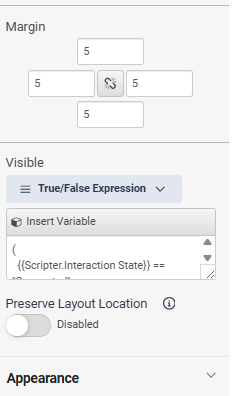
The component's Visible property then checks:
(
{{Scripter.Interaction State}} == "Connected" or
{{Scripter.Interaction State}} == "Disconnected" or
{{Scripter.Interaction State}} == "Held"
)
and
({{ActionCompleted}} == {{FalseValue}})
and
({{LookupResult}} == "Found")
and
({{ActionType}} != "")
Once ActionCompleted is set to TrueValue, the expression evaluates to False, so the component is automatically hidden.
My thought was that a similar pattern might work for your callback options if they're exposed as script variables. For example, after one option is selected, you could use a Set Variable action to update a Boolean variable and use that variable in the Visible expression to hide the alternative option.
I haven't tested this with the Schedule Callback component specifically, so I'm not sure whether those options are exposed in the same way, but it may be worth exploring.
Hope this helps.
------------------------------
Phaneendra
Technical Solutions Consultant
------------------------------
Original Message:
Sent: 07-16-2026 08:23
From: Muhammed Shaibant
Subject: Agent Script - Route Callback vs Take Ownership
Dear Phaneendra,
Thank you for sharing the detailed information.
As you suggested, I tried implementing it; however, it is not working on my end. If you don't mind, could you please share the True/False expression that you configured in the Visible field?
It would be very helpful for me to compare it with my configuration.
Thank you in advance.
------------------------------
Muhammed Shaibant
x
------------------------------
Original Message:
Sent: 07-16-2026 02:26
From: Phaneendra Avatapalli
Subject: Agent Script - Route Callback vs Take Ownership
Hi Muhammed,
First of all, thank you for sharing this.
One thing that may be worth trying is using the Visible property together with your own Boolean variables.
We've used this approach in our scripts by creating Boolean variables (for example, TrueValue and FalseValue) and using them in the Visible expression to show or hide components based on previous selections.
If the Route callback to me if possible and Take ownership options can be controlled through script variables rather than being internal to the Schedule Callback component, you may be able to make them mutually exclusive by controlling their visibility.
I haven't tested this with the Schedule Callback component specifically, but it may be worth exploring. I've attached a screenshot of the Visible property for reference.
Hope this helps.
------------------------------
Phaneendra
Technical Solutions Consultant
------------------------------