Hi Martin Black,
This can be configured in several flexible ways.
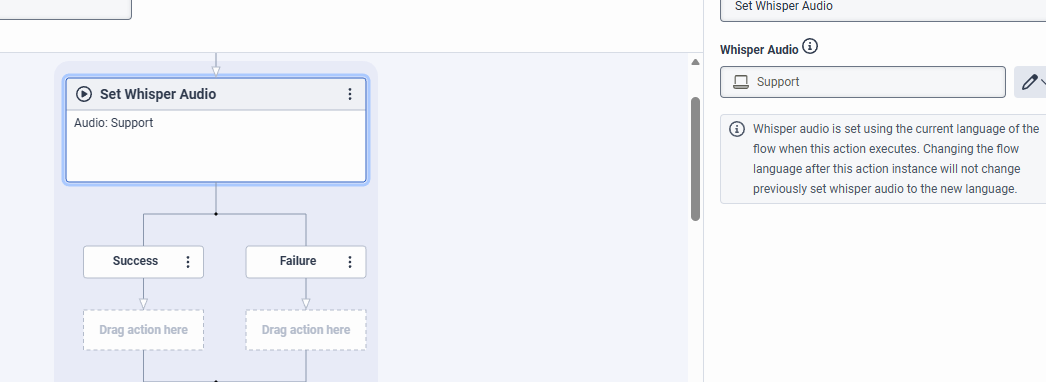
You can use Whisper Audio in Architect to play a message identifying the option selected by the caller: Set Whisper Audio Action
For example, you can use a TTS (Text-to-Speech) message with the native engine of the platform. However, I recommend recording a specific prompt instead, as it provides clearer and more accessible audio for agents.
It's also possible to pass this information as an input using the Set Screen Pop action, as long as the script is set up to receive it: Set Screen Pop Action
In the Set Screen Pop action, map the script input variable to Option so the agent can see which menu option was selected.
Example:

In the IVR flow:
Option 1 (Sales): Set Participant Data or Update Data → Attribute/Variable Name: option → Value: "Sales"
Option 4 (Support): Set Participant Data or Update Data → Attribute/Variable Name: option → Value: "Support"
Example:
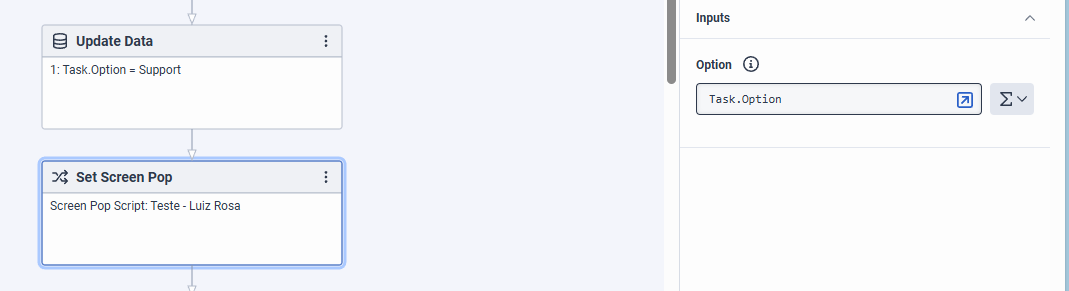
Note: In the case of Participant Data, the variable name used in the script must exactly match the attribute name defined in the flow (Option in this example) for the data to be retrieved correctly.
Another option is to store the value in Participant Data and retrieve it directly in the script, without using a Screen Pop.
You can also combine these approaches if needed, for example, using a Whisper Audio along with Participant Data to provide both audible and visual context to the agent.
Hope this helps.
------------------------------
Luiz Rosa
Full stack developer
------------------------------