Genesys Cloud - Main

 View Only

Sign Up

  Thread closed by the administrator, not accepting new replies.
  • 1.  Assigning Roles / Divisions using People Bulk Import via csv file

    Posted 09-08-2023 12:20
    No replies, thread closed.

    Hello Community!

    Regarding "people_import_example.csv" column:  "roles_divisions",  I can not find any documentation regarding the syntax of this field.  So I am left with using the examples as a guide.
    Thru testing I have come to the conclusion that you can assign 1 Role to multiple divisions OR multiple Roles to 1 Division, but NOT both, nor anything else more complex.

    Below is a overview of tests I tried and the results.   If anyone is aware of what can and can not be done with "roles_divisions" field or know of documentation,and are willing to share, I would greatly appreciate it!

    People Bulk Import via csv file

    people_import_example.csv   raw from GCcx Admin > People container

    Name

    roles_divisions

    division

    User-1

    admin: [Antarctica; Cell Division]

    Home

    User-2

    Communicate - Admin, Developer: [Antarctica]

    Home

    I attempted the following, based on syntax shown in  people_import_example.csv, exported from the People Container of admin.
                user-1 was correct,
                user-2 role: Quality Evaluator configured correctly, but Quality Administrator was assigned only to Home", not what was expected

    Name

    roles_divisions

    division

    User-1

    Outbound Agent: [Division_1; Division_2]

    Home

    User-2

    Quality Administrator, Quality Evaluator: [Division_1; Division_2]

    Home

    Did I do something wrong, or assigning 2 roles to more than 1 division each, not supported?

    Ideally  for user -2  I would like to assign all of the following:
                Quality Evaluator: [Division_1; Division_2]
                Quality Administrator: [Division_1; Division_2]
                Supervisor: [Division_1; Division_2; Division_3]

    Is this possible?

    TYIA


    #PlatformAdministration
    #SystemAdministration

    ------------------------------
    Pete Schroeder
    HMC3 LLC
    Senior Contact Center Engineer
    pete.schroeder@hmcthree.com
    ------------------------------


  • 2.  RE: Assigning Roles / Divisions using People Bulk Import via csv file

    Posted 09-08-2023 13:09
    No replies, thread closed.

    i can share what we did:

    roles: vfAgent and vfAgentManager

    divisions:message, Z2_PD, ST_MI

    The following example about role field in the csv

    .....,"vfAgent:[message;Z2_PD;ST_MI],vfAgentManager:[Z2_PD;ST_MI]",.....

    it works fine


    ------------------------------
    EnricoPreite
    Vodafone Omnitel NV
    ------------------------------


  • 3.  RE: Assigning Roles / Divisions using People Bulk Import via csv file

    Posted 09-08-2023 14:49
    No replies, thread closed.

    @Enrico Preite  Thanks for the quick response!

    A couple clarifying questions:

    1. do any of your division or Roles names  have a "space" in them?
    2.  is there a space before or after the comma, semi-colon, colon or square bracket?   I used a space after each delimiter, maybe that is my problem?

    Thank you for your experience


    ------------------------------
    Pete Schroeder
    HMC3 LLC
    Senior Contact Center Engineer
    pete.schroeder@hmcthree.com
    ------------------------------


  • 4.  RE: Assigning Roles / Divisions using People Bulk Import via csv file

    Posted 09-08-2023 17:46
    No replies, thread closed.

    Pete,

    As a general principle, I try to avoid spaces in names for anything (Variables, Participant Data Attributes, Queues, Roles, Files, etc.) I tend to find that having spaces can confuse some systems and you end up having to put quotation marks around things, which then causes other issues and so on. (Especially when trying to access thing programmatically, or using scripts.)

    I either recommend CamelCase or Using_Underscores 😜


    ------------------------------
    Paul Simpson
    Eventus Solutions Group
    ------------------------------


  • 5.  RE: Assigning Roles / Divisions using People Bulk Import via csv file

    Posted 09-08-2023 18:07
    No replies, thread closed.

    Paul,

    I could Not agree more!   Habits  from the old days, when filenames could only be 8 characters long with no special characters, no spaces.

    My concern is with many of the Genesys Defaults "Roles" have spaces in their names.


    ------------------------------
    Pete Schroeder
    HMC3 LLC
    Senior Contact Center Engineer
    pete.schroeder@hmcthree.com
    ------------------------------


  • 6.  RE: Assigning Roles / Divisions using People Bulk Import via csv file

    Posted 09-09-2023 03:42
    No replies, thread closed.

    You are right!

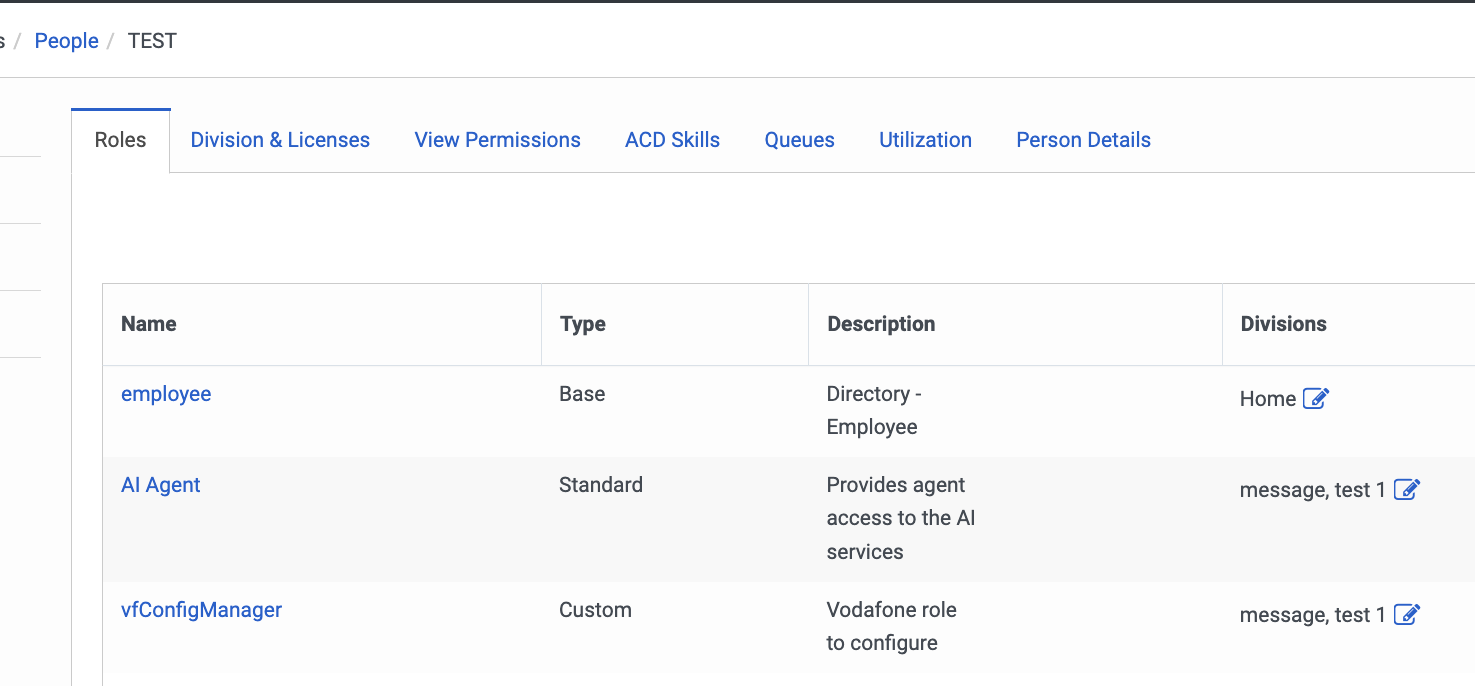
    i tried on my enviroment. The following row works fine:

    name,email,phone_work,extension,title,department,email_manager,location_work,roles_divisions,queues,division,skills,hire_date
    TEST,test@test.com,,,,,,,"vfConfigManager: [message;test 1],AI Agent: [message;test 1]",,test 1,,


    ------------------------------
    EnricoPreite
    Vodafone Omnitel NV
    ------------------------------


  • 7.  RE: Assigning Roles / Divisions using People Bulk Import via csv file

    Posted 09-09-2023 09:45
    No replies, thread closed.

    @Enrico Preite

    Good News,  Thank you for testing, you saved me some time!  I appreciate it.   I am going to move forward with that.   I will add comments if anything noteworthy comes up.

    Again Thank You


    ------------------------------
    Pete Schroeder
    HMC3 LLC
    Senior Contact Center Engineer
    pete.schroeder@hmcthree.com
    ------------------------------


  • 8.  RE: Assigning Roles / Divisions using People Bulk Import via csv file

    Posted 10-08-2023 05:21
    No replies, thread closed.

    Thanks, I checked this format and it works, by the way if you want to assign Role to all Divisions in the Org, you can use the following format:

    vfAgent:[*],vfAgentManager:[*]

    Best regards, Shahar.


    ------------------------------
    Shahar Leonard
    ITNAV-Pro Ltd.
    ------------------------------