Made no difference, reason is there's a change in the browser chromium since release 136.
https://developer.chrome.com/release-notes/136
I don't know exactlye what it is but think has something to do with and how the Genesys code is using it.
Audio Output Devices API: setDefaultSinkId()
This feature adds setDefaultSinkId() to MediaDevices, which enables the top-level frame to change the default audio output device used by its subframes.
Origin Trial | ChromeStatus.com entry | Spec
https://github.com/MicrosoftEdge/MSEdgeExplainers/blob/main/SetPreferredSinkId/explainer.md
For now i can use a workaround and disable the Microphone of the webcam or use the Windowsclient which uses an older chromium build.
------------------------------
Jan van de Hulsbeek
IT Admin
------------------------------
Original Message:
Sent: 05-22-2025 11:31
From: George Ganahl
Subject: Audio Microphone changes to Logitech Webcam C925 since Genesys updates May 5, 2025
Presuming you are using Windows...did you happen to try the Windows Settings thing? I'm just curious whether that made a difference.
------------------------------
George Ganahl GCCX-AI, GCP, GCSME, ICCE, ICHD, etc.
Technical Adoption Champion
Genesys
------------------------------
Original Message:
Sent: 05-22-2025 06:14
From: Jan van de Hulsbeek
Subject: Audio Microphone changes to Logitech Webcam C925 since Genesys updates May 5, 2025
I received a response from Genesys stating that several issues have arisen since the update of Google Chromium to version 135. According to their analysis, the cause lies in errors in the Chromium engine itself. These findings have now been shared with Google, but they are awaiting a new release in which this will be resolved.
As a temporary workaround, they recommend using the Genesys Desktop App or Firefox.
The Desktop App runs on an older version of Chromium (version 133), is fully optimized for Genesys, and therefore experiences no problems.
------------------------------
Jan van de Hulsbeek
IT Admin
Original Message:
Sent: 05-14-2025 11:34
From: Jason Kleitz
Subject: Audio Microphone changes to Logitech Webcam C925 since Genesys updates May 5, 2025
Hello Jan,
This Resource Center article goes over the various ways to get in contact with Customer Care. I would recommend opening up a case using the My Support Portal.
------------------------------
Jason Kleitz
Online Community Manager/Moderator
Original Message:
Sent: 05-14-2025 10:49
From: Jan van de Hulsbeek
Subject: Audio Microphone changes to Logitech Webcam C925 since Genesys updates May 5, 2025
Hi Jason,
How can i best contact the UI support team so i can open a case?
------------------------------
Jan van de Hulsbeek
na
Original Message:
Sent: 05-14-2025 09:27
From: Jason Kleitz
Subject: Audio Microphone changes to Logitech Webcam C925 since Genesys updates May 5, 2025
Hey Jan,
I'm sorry to hear that you are still having that issue. I would recommend opening a case with our UI support team. Please let me know your case number so that I can monitor the progress.
------------------------------
Jason Kleitz
Online Community Manager/Moderator
Original Message:
Sent: 05-14-2025 02:55
From: Jan van de Hulsbeek
Subject: Audio Microphone changes to Logitech Webcam C925 since Genesys updates May 5, 2025
Hi Jason,
Logout and login doesn't work
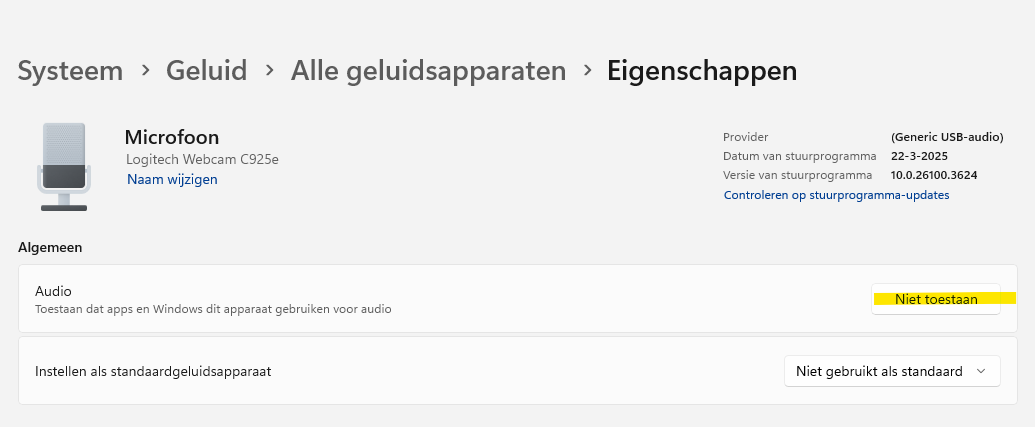
At the moment I turn off the microphone of the webcam.
------------------------------
Jan van de Hulsbeek
na
Original Message:
Sent: 05-13-2025 16:44
From: Jason Kleitz
Subject: Audio Microphone changes to Logitech Webcam C925 since Genesys updates May 5, 2025
Hello Jan,
Could you try to log out of Genesys Cloud and then log back in? Once you do that, are you able to save your audio profile? Does the issue still happen after that?
------------------------------
Jason Kleitz
Online Community Manager/Moderator