For our Org, I uploaded the default ringing sound for Genesys and then had it setup as a Whisper Sound in the Queue Configuration. It seemed to work well. The default beep tone is very feint compared to the normal ringtone.
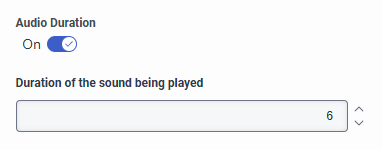
I also noticed this feature recently, in the Queue Configuration under the Voice tab, is this related to the default Auto Answer tone? I've tried to set it to a longer length with no success, so I'm wondering what this is related to?
------------------------------
Robert Niblock
Contact Centre Technology Analyst
------------------------------
Original Message:
Sent: 04-01-2026 12:53
From: Cameron Tomlin
Subject: Auto-Answer
Hello Tim,
Auto-Answer is fairly straightforward to enable, but there are a few things to be aware of. When it's turned on, agents no longer receive a traditional ringing alert-instead, they hear a short tone and the interaction connects automatically. If you've configured whisper audio at the queue level, that will play before the agent is connected, giving them context about the interaction; otherwise, they'll just hear the default tone. For voice, this tone is built-in and not customizable, while some digital channels (like email) do allow you to adjust how long the alert sound plays.
From a setup and experience perspective, a few things are important. Enabling persistent connections on the agent's phone helps improve performance and makes Auto-Answer more responsive. Since there's no ongoing alert, agents should ideally be wearing headsets so they don't miss the brief tone. You can also control which channels Auto-Answer applies to, but keep in mind that features like alerting timeout don't apply here, since interactions connect immediately.
Hope this helps!
------------------------------
Cameron
Online Community Manager/Moderator
------------------------------