Original Message:
Sent: 09-29-2025 15:54
From: Jason Tedjosoesilo
Subject: 🚀 Automate Workflows with Triggers Based on Topics, Sentiment & Empathy
Of course, glad to help!
Here's just one approach for creating the email you'd like. I would note that a lot of the Replace functionality was used to clean up the presentation.
The Notification Body structure there was:
Append(
Append(
Append(
Append(
Append(
Append(
"Low overall sentiment was detected in a conversation.\n\nOverall Score: ",
Replace(
JsonStringify(GetJsonObjectProperty(Flow.jsonData, "sentimentOverallScore")),
"\"", ""
)
),
"\nTrend Score: "
),
Replace(
JsonStringify(GetJsonObjectProperty(Flow.jsonData, "sentimentTrendScore")),
"\"", ""
)
),
"\n\nQueues involved:\n\n"
),
Replace(
Replace(
Replace(
Replace(
Replace(
Replace(
Replace(
Replace(
Replace(
JsonStringify(State.queues),
"[", ""
),
"]", ""
),
"},{", "\n\nQueue ID: "
),
"{\"id\":\"", "Queue ID: "
),
"\",\"name\":\"", "\nQueue Name: "
),
"\"}", ""
),
"\"", ""
),
",", ""
),
"}", ""
)
),
Append(
Append(
"\n\nInteraction Link:\nhttps://apps.inindca.com/directory/#/analytics/interactions/",
Replace(
JsonStringify(GetJsonObjectProperty(Flow.jsonData, "conversationId")),
"\"", ""
)
),
"/admin"
)
)
We also have a simpler email formatting found in the Developer Documentation here.
------------------------------
Jason Tedjosoesilo
Software Development Engineering Developing Technical
------------------------------
Original Message:
Sent: 09-29-2025 15:32
From: Jonathan Nolan
Subject: 🚀 Automate Workflows with Triggers Based on Topics, Sentiment & Empathy
Thank you Jason!! I'm trying to learn this piece of it so appreciate the help. One last thing, was is the expression for the Notification Body of the Send Email?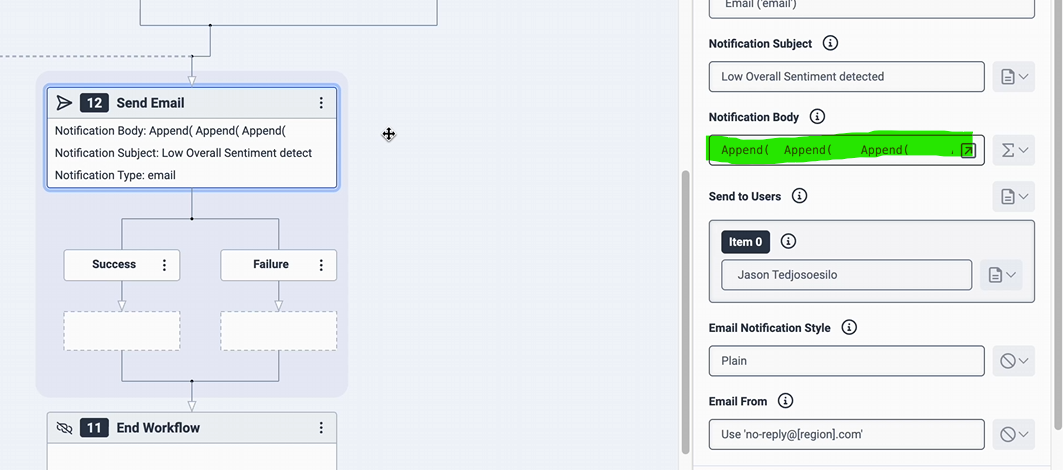
------------------------------
Jonathan Nolan
President
Original Message:
Sent: 09-29-2025 14:59
From: Jason Tedjosoesilo
Subject: 🚀 Automate Workflows with Triggers Based on Topics, Sentiment & Empathy
Hi @Jonathan Nolan,
On those highlighted formulas, we have
- For count check:
State.queueIdx < Count(GetJsonObjectProperty(Flow.jsonData, "queueIds")) - For Find Queue By ID:
ToString(GetAt(GetJsonObjectProperty(Flow.jsonData, "queueIds"), State.queueIdx)) - For Update Data:
AddJsonArrayItem(State.queues, JsonParse(JsonStringify(State.Queue)))- This is assuming you have the
State.queues array variable initialized
Screenshot below for assigning: State.queues
------------------------------
Jason Tedjosoesilo
Software Development Engineering Developing Technical
Original Message:
Sent: 09-29-2025 14:42
From: Anik Dey
Subject: 🚀 Automate Workflows with Triggers Based on Topics, Sentiment & Empathy
Adding @Jason Tedjosoesilo to share the highlighted green.
------------------------------
Anik Dey
Genesys - Employees
Original Message:
Sent: 09-29-2025 13:40
From: Jonathan Nolan
Subject: 🚀 Automate Workflows with Triggers Based on Topics, Sentiment & Empathy
Hello Anik,
I understand that. But, in trying to follow along with the video, you don't show us the expressions, highlighted in green. That is what I'm looking to get.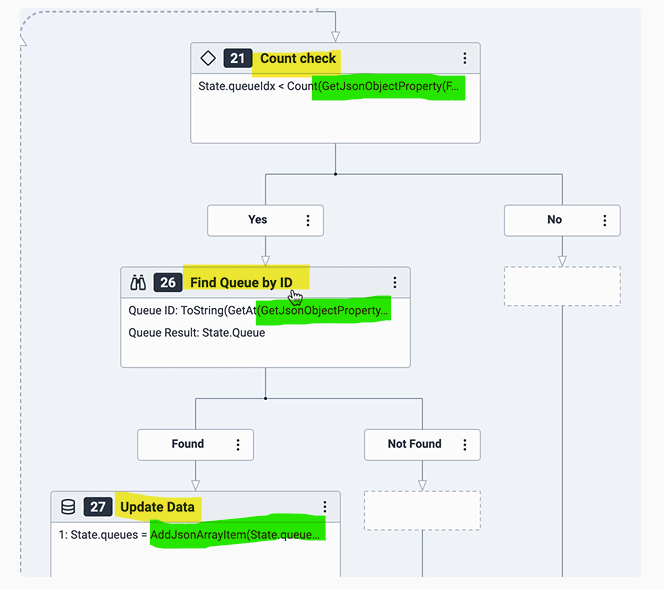
------------------------------
Jonathan Nolan
President
Original Message:
Sent: 09-29-2025 13:35
From: Anik Dey
Subject: 🚀 Automate Workflows with Triggers Based on Topics, Sentiment & Empathy
Those actions should be part of the Toolbox found for Workflow type in Architect.
------------------------------
Anik Dey
Genesys - Employees
Original Message:
Sent: 09-26-2025 16:28
From: Jonathan Nolan
Subject: 🚀 Automate Workflows with Triggers Based on Topics, Sentiment & Empathy
Hello @Anik Dey, just looking for the formulas in the highlighted sections in the screenshot. Thank you!
------------------------------
Jonathan Nolan
President
Original Message:
Sent: 09-22-2025 13:28
From: Jonathan Nolan
Subject: 🚀 Automate Workflows with Triggers Based on Topics, Sentiment & Empathy
Hello Anik,
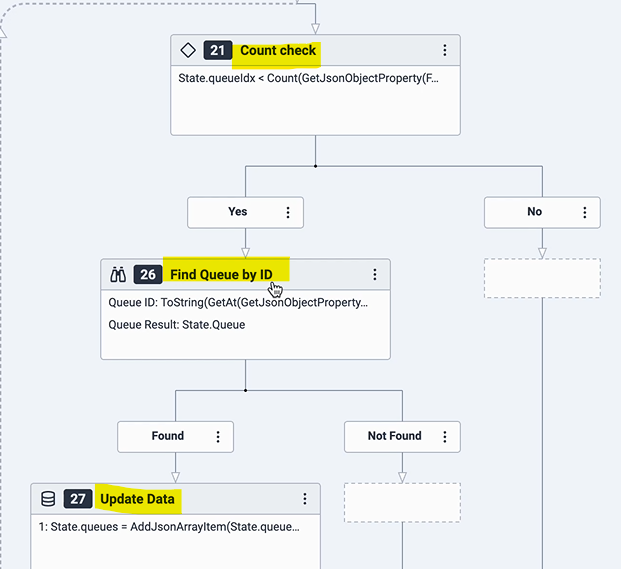
Thank you for those. I have been on those and got that for the email response. But what I'm talking about, which I do not see on those pages, is the content of the below highlighted:
------------------------------
Jonathan Nolan
President
Original Message:
Sent: 09-22-2025 13:15
From: Anik Dey
Subject: 🚀 Automate Workflows with Triggers Based on Topics, Sentiment & Empathy
You can see some of the expressions in these 2 pages:
https://developer.genesys.cloud/analyticsdatamanagement/speechtextanalytics/topics-notifications
https://developer.genesys.cloud/analyticsdatamanagement/speechtextanalytics/sentiment-notifications
------------------------------
Anik Dey
Genesys - Employees
Original Message:
Sent: 09-22-2025 10:42
From: Jonathan Nolan
Subject: 🚀 Automate Workflows with Triggers Based on Topics, Sentiment & Empathy
In following along with this, are you able to provide screenshots of the complete expressions within the modules? It would be helpful so that I can perform the same type to make sure I'm not missing anything. Thank you!
------------------------------
Jonathan Nolan
President