Hey Ryan,
First of all, no need to apologize! Let's figure this out!
Well, if you have everything hardcoded, and you are not getting that email from notifications, I can only assume that your trigger is not actually triggering.
Do you have any prior evidence that your trigger was actually triggering? (And therefore running the Workflow after)
----------
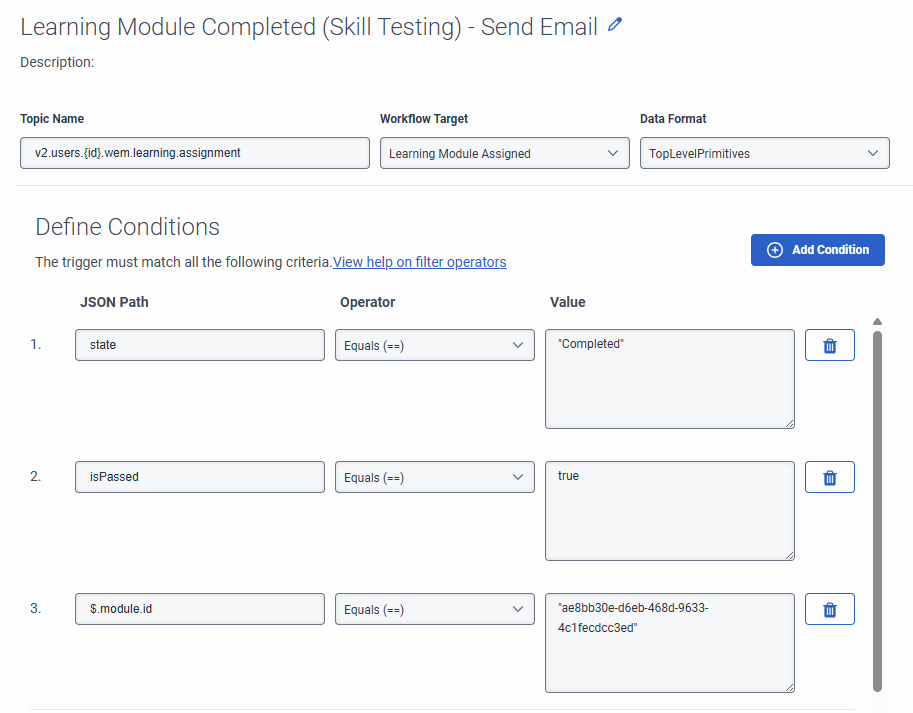
Taking a look at the trigger on your screenshot for instance, I'm not sure that you need the double quotes for the string values (So, where you have "Completed" for example, I believe it's just Completed).
Maybe both ways can work. But I know that I haven't used double quotes in the past. Maybe try removing it to see if the trigger triggers.
Same thing for the "module.id" condition.
-----------
Now, if you are absolutely sure that your trigger was working before, then hard coding the Data Action parameters should be enough for you to test it. (Try to hard code the agent id as well, to make sure the data action itself is working on the workflow)
I believe this seems to be the best way for you to progress with your tests indeed. First make it work hard coded, and then we can work with the Flow.jsonData variable to actually get the data you need. (which would basically be the agent id)
-----------
Now, regarding the JSON variable.
I would suggest 2 things.
First of all, send an email notification you again (before the data action), and just write the whole variable in the email body.
This way you can confirm for sure that the variable is working correctly and that you have the agent id value in there.
If that works, then we can also confirm where in the JSON that value is stored.
From the schema, I'm guessing it might be: "Flow.jsonData.user.id", instead of the "Flow.jsonData.agentId" that you tried to use. (Maybe that's the only correction needed)... Yeah, now that I'm looking at it better, that's probably the only thing going wrong.. And that's also the reason why your email notifications are not being sent, it's because you are trying to access a JSON attribute that does not exist (agentId), and because of this the Workflow breaks instantly and stops executing, so it doesn't reach the email notifications.
To summarize: Try changing your variable to "Flow.jsonData.user.id". That might do it.
------------------------------
Marcello Jabur
------------------------------
Original Message:
Sent: 02-20-2026 09:19
From: Ryan Reynolds
Subject: Automatic Queue Assignment Following Learning Module Completion
Hi Marcelo,
Firstly, thanks for your detailed reply, it is very much appreciated!
I've been working on this over the last few days and have a bit of an update.
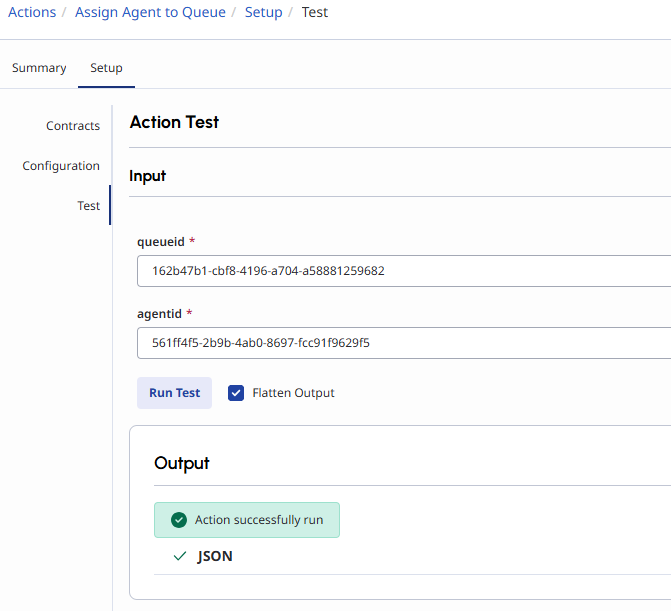
I've managed to create a data action, and when testing it manually, it works! It successfully adds the user to the queue when using the test tool in the data action screen.
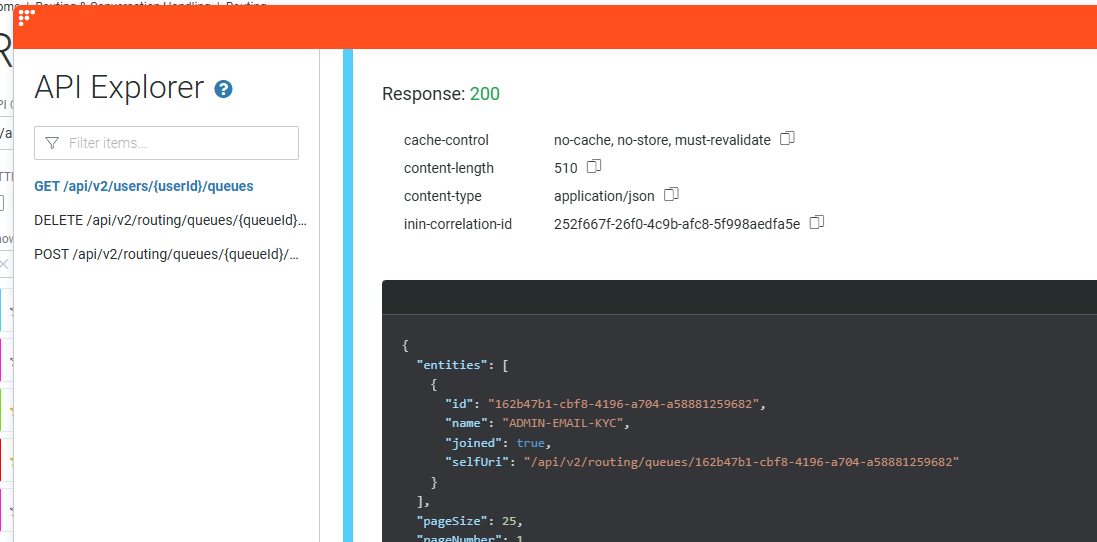
 I can check this using GET/api/v2/users/{userId}/queues which shows the queue was indeed added:
The thing I am now struggling with is getting the workflow to work. Apologies, as I said, my architect knowledge is very limited so I assume i'm doing something wrong.
I have a call data action with my inputs ready to go. I've created Flow.jsonData as you suggested and referenced to it in the agentid input. I have also (for now) hard coded the queueid too.
With everything lined up, I complete the learning module with a pass mark, which activates the trigger, which activates the workflow but the trail goes cold there unfortunately.
Here's where I'm at with it:
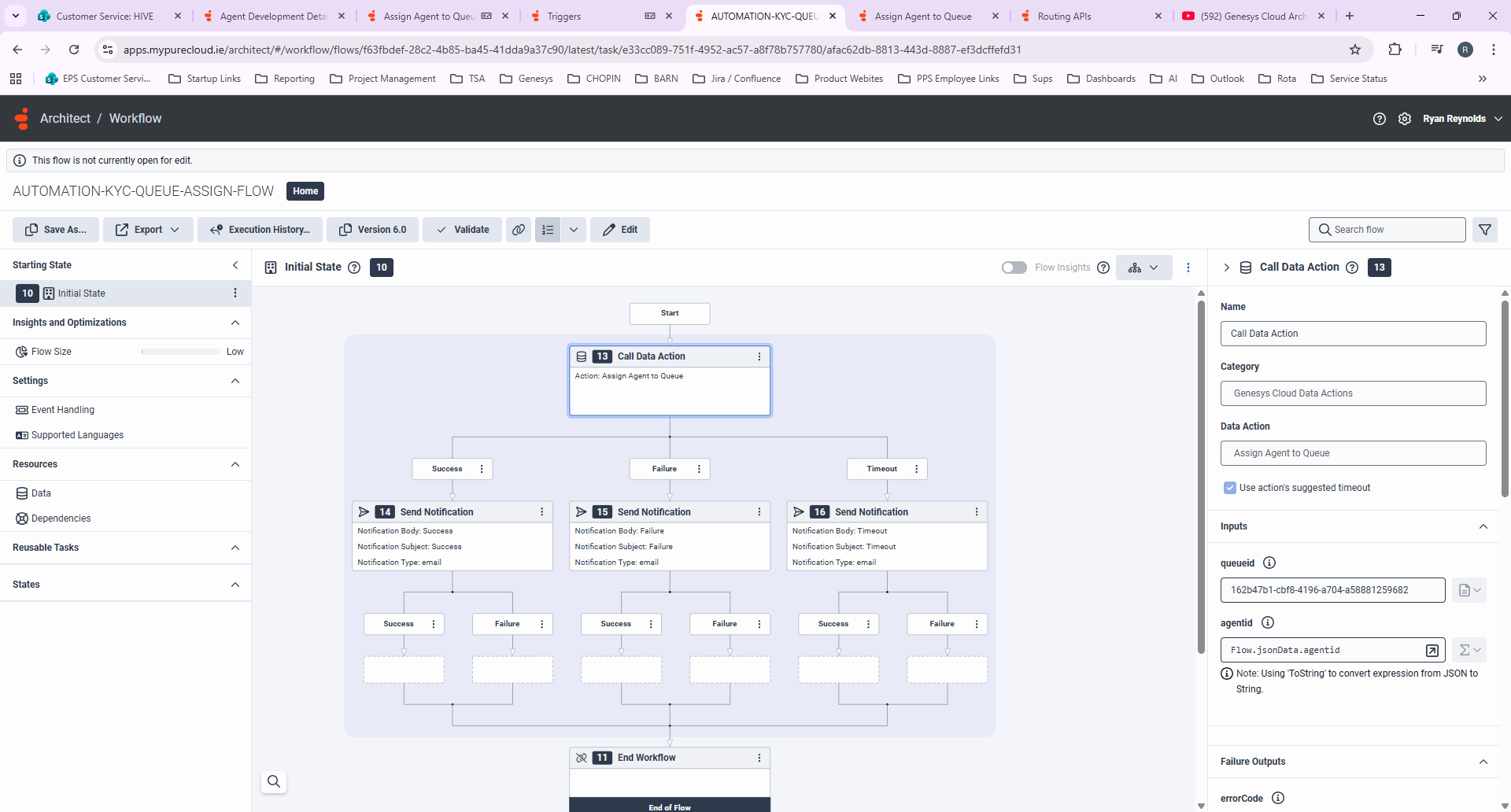
I've put an email notification in each outcome path for now so I know when it has run the workflow and which path it takes, however an email never arrives when testing everything together.
I even tried hardcoding both the agentid and queueid just to test if it works without a variable but that did not do anything either. No email is sent, so I'm assuming there's something wrong with how the workflow is configured.
Any ideas?
------------------------------
Ryan Reynolds
Projects and Technical Team Leader
------------------------------
Original Message:
Sent: 02-13-2026 13:17
From: Marcello Jabur
Subject: Automatic Queue Assignment Following Learning Module Completion
Hey Ryan, how are you?
If you have the Trigger working already, I guess that's the hardest part, or at least the one I wasn't sure if it worked.
Regarding your next steps, here is what you can do:
1) On your trigger, change the "Data Format" from "TopLevelPrimitives" to "Json".
2) On your workflow, create a variable of type JSON, called "jsonData", as described here: Overview of triggers View summary - Genesys Cloud Resource Center
3) With the aboves steps done, you will have a variable on your Flow named Flow.jsonData containing all the data from the triggered event.
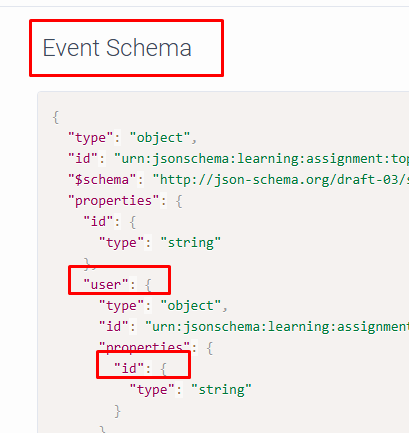
The schema/format of that data can be found in your Trigger on the right side:
---------
4) Now you need to access the attributes/properties of you JSON to get to the User ID.
5) From what I can see in the Event Schema above... I believe the user ID will be found on this variable: "Flow.jsonData.user.id", but I can't say for sure, you would have to test a little, but it seems to be the case.
----------
6) If you are able to get the userId, now comes the update to the queues part.
7) For that you will use APIs, and to execute those APIs you need to create them using Data Actions, and then finally you just execute those Data Actions on your Workflow.
8) I believe the API you will use should be this one: POST /api/v2/routing/queues/{queueId}/members

You should create the above API in a Data Action.. If you need help doing that, let me know.
After you have your Data Action, you can execute it on the workflow with 2 inputs:
- queueId (which you could either have hard coded on the workflow, or set dynamically through a data table or something like that..)
- userId (which will come from the event triggered, and will be present on your Flow.jsonData variable)
Let me know if that helps.
------------------------------
Marcello Jabur
Original Message:
Sent: 02-13-2026 09:20
From: Ryan Reynolds
Subject: Automatic Queue Assignment Following Learning Module Completion
Hi Kaio,
Thanks for your reply.
For additional context, we do not currently have these training modules in an external system, we plan to build these modules using SCORM and host them within Genesys Development and Feedback modules feature. Meaning we can pull directly from the Genesys Learning module API: v2.users.{id}.wem.learning.assignment
This is currently where I am at in the process. I've set up a trigger that is activating when a specific module is passed inside Genesys.
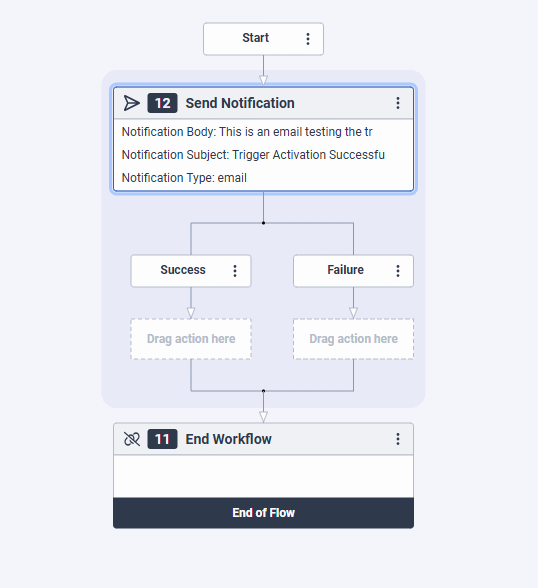
The workflow i've set up is just a send email action so that i could test it was working correctly, but this is where I am stuck. Unsure how I set up a more advanced workflow to capture the ID of the agent that passed the module and then apply the queue or skill to that agent. (my architect knowledge is quite limited right now). I'm learning as i go with this one!
------------------------------
Ryan Reynolds
Projects and Technical Team Leader
Original Message:
Sent: 02-13-2026 09:03
From: Kaio Oliveira
Subject: Automatic Queue Assignment Following Learning Module Completion
Hi Ryan,
I confess I didn't quite understand how this "training module" would work in Genesys.
Considering it's an external system and if it has APIs, an external customization could be created that interacts with the Genesys APIs.
Very broadly speaking, this customization could consume the APIs of your training module, and upon completion of topic 1, it would call the Genesys APIs (passing the agent's email as a parameter, for example; obviously, you'd need a `finduser` to find the agent's ID) and add the queue and skill corresponding to topic 1.
It could even consume an API to find a data table of the Genesys; there would be a mapping of Topic x Queue x Skill.
------------------------------
Kaio Oliveira
Sr Systems Analyst
GCP - GCQM - GCS - GCA - GCD - GCO - GPE & GPR - GCWM