Original Message:
Sent: 07-30-2026 10:11
From: Cameron Tomlin
Subject: Azure Graph API Integration Logs
Hello Mamadou,
The absence of EMAIL-* and INTEGRATION-* events in your Operational Console is generally a positive sign. Operational Console events are designed to surface actionable issues, so event types only appear when Genesys Cloud detects a condition that requires attention. If you're seeing other event categories, such as Architect, Conversation, or Telephony events, but no email or integration events, it typically means that no email or integration-related errors have been detected during the available event history.
Based on what you've described-some mailboxes continue to receive emails successfully, the integration test completes successfully, but certain mailboxes have stopped receiving emails-the issue is unlikely to be with the Genesys Cloud integration itself.
If the platform were detecting email or integration failures, you would generally expect corresponding Operational Console events to be generated. Instead, this points toward something specific to the affected mailboxes or the Microsoft environment, such as mailbox permissions, Exchange Online application access policies, conditional access policies, or another Azure/Exchange configuration issue that is preventing access without generating an integration error in Genesys Cloud.
As a next step, I'd recommend reviewing the Azure AD and Exchange Online configuration for the affected mailboxes, including mailbox permissions, application access policies, conditional access policies, and any relevant Exchange Online logs. Those checks are the most likely place to identify why only a subset of mailboxes is affected.
Hope this helps!
Cheer,
------------------------------
Cameron
Online Community Manager/Moderator
------------------------------
Original Message:
Sent: 07-30-2026 05:18
From: Mamadou DIOP
Subject: Azure Graph API Integration Logs
Hello Cameron,
Thank you for your help. But in my org I see only events below. The events suggested are missing.
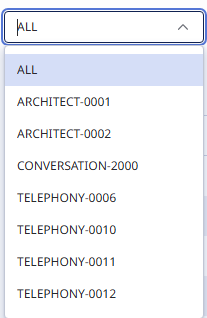
Does that mean there are no events relating to integrations or emails?
Thanks
------------------------------
Mamadou DIOP
CERITEK
------------------------------
Original Message:
Sent: 07-29-2026 16:17
From: Cameron Tomlin
Subject: Azure Graph API Integration Logs
Hello Mamadou,
Yes, there are logs available that can help troubleshoot Azure Graph API email integration issues.
A good place to start is the Operational Console (Admin > Troubleshooting > Operational Console), where you can review operational events from the last 10 days. Filtering for email or integration-related events can help identify issues with specific mailboxes.
Some events to look for include:
- EMAIL-0008 – Mailbox unavailable
- EMAIL-0010 – Email permission error
- INTEGRATION-0001 – Integration in error state
- INTEGRATION-0004 – Email integration authentication error
- INTEGRATION-0005 – Email integration configuration issue
If the integration test succeeds but certain mailboxes still aren't receiving email, the issue is often specific to those mailboxes. Common causes include missing licenses, Exchange Online application access policies, or permissions preventing the integration from accessing the mailbox.
The Operational Console should provide more detailed error information to help narrow down the root cause.
Hope this helps!
------------------------------
Cameron
Online Community Manager/Moderator
------------------------------