Very odd behavior, indeed. I have opened a case and will see where it goes. Since the bot is literally just filling the slots and exiting, it should never fail to return to the common module. I created a dummy participant data completed=true to write immediately after the bot call and it never writes if called from the common module.
Tandem Diabetes Care, Inc.
Original Message:
Sent: 08-06-2026 13:12
From: Marcello Jabur
Subject: bot calls in Inbound Flow not behaving the same in a common module flow
Hi Vikki,
This seems like a bug!!! I think you should report this through a Customer Care case if you are able to.
I just tested here and experienced the same behaviour.
Any "Date" output variables (From Bot Flows) are returned to Inbound Flows as "String". But on Common Module they are return as "Dates".
Very odd...
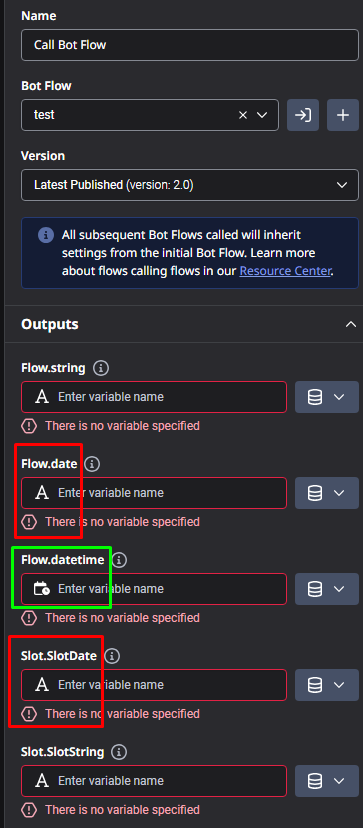
Notice above how other variable types like "DateTime" don't seem to have the same issue.
But... bugs aside.. You probably just have to take the variable type change into consideration for something that you are doing after coming back from the Common Module. Maybe you are probably trying to execute some expression that is expecting a string (as this was the behaviour you had before when using Inbound Flow), and now that the variable became a "Date" type for the Common Module you might need to change something on those expressions.
EDIT: Well, I just read your edit, and you removed the variable completely, fixing the issue. But that seems even weirder that it was causing an issue if you were not using the variable at all.
I would say this is 100% a bug (either on the Common Module returning it as a Date, or on the Inbound Flow returning it as String... I would think the Inbound Flow should be returning it as a "Date", in the same way that it is still returning a "DateTime" variable as "DateTime"... But your issue seems to only happen when you use the Common Module, which in theory is the one without the bug.... so very odd haha...)
------------------------------
Marcello Jabur
------------------------------
Original Message:
Sent: 08-06-2026 12:31
From: Vikki Papesh
Subject: bot calls in Inbound Flow not behaving the same in a common module flow
Thank you. The bot flow exits normally and will write participant data when called directly from the inbound flow, but not from the common module. I did notice an aberration, though.
Calling the bot in the inbound call flow, the Slot.Birthdate (using builtin:date) is a string variable.
Calling the SAME bot from the common module, the slotBirthdate is a date variable:
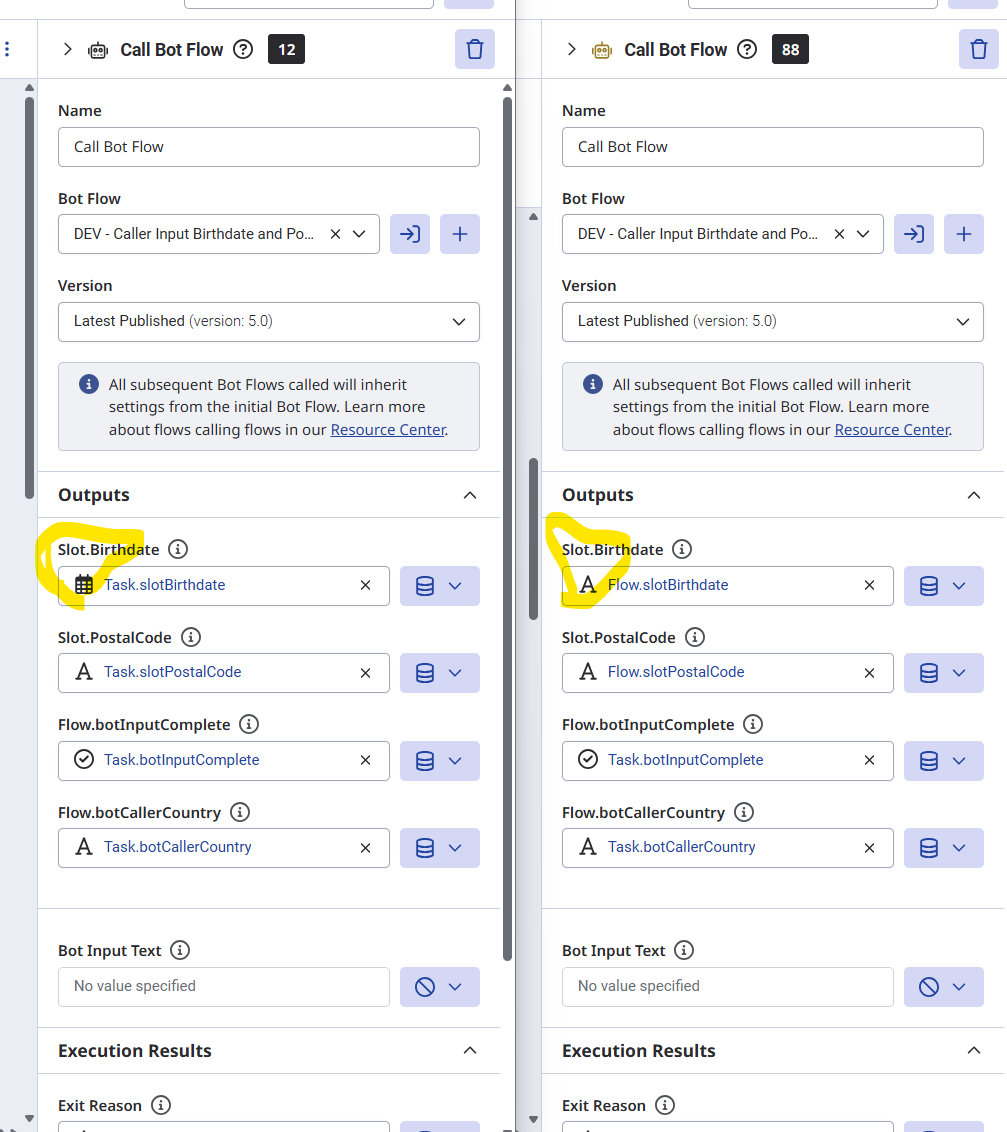
I removed slotBirthdate from the bot, and it now completes in the common module as well. This appears to be the root cause, but why would a built-in variable appear as type "Date" when called from one flow type and as type "String" from another flow type, and why would it fail when I am not asking it to do anything with the data at the time it fills the slot and fails?
------------------------------
Vikki Papesh
Principal Genesys Cloud Developer
Tandem Diabetes Care, Inc.
------------------------------
Original Message:
Sent: 08-06-2026 05:47
From: Phaneendra Avatapalli
Subject: bot calls in Inbound Flow not behaving the same in a common module flow
Hi Vikki,
Just adding to what Johan has already said, I'd also check whether the Bot Flow is returning successfully before the disconnect occurs.
A few things that might help narrow it down:
- Are you capturing the Bot Flow Exit Reason, and if so, what value is being returned?
- Are all of the bot output slots mapped back to Common Module variables with matching names and data types?
- If you're setting or reading participant data after the bot returns, are those attribute names also aligned with the variables you're mapping?
- As a quick isolation test, does the same behaviour occur with a very simple bot that returns a single string slot? If that works, try adding one or two more slots incrementally to see if the issue is related to a specific slot or mapping.
Since you've confirmed the same bot works when called directly from the inbound flow, it sounds like the issue is occurring specifically when control returns to the Common Module. Hopefully the execution replay Johan mentioned will help pinpoint exactly where it's failing.
------------------------------
Phaneendra
Technical Solutions Consultant
------------------------------