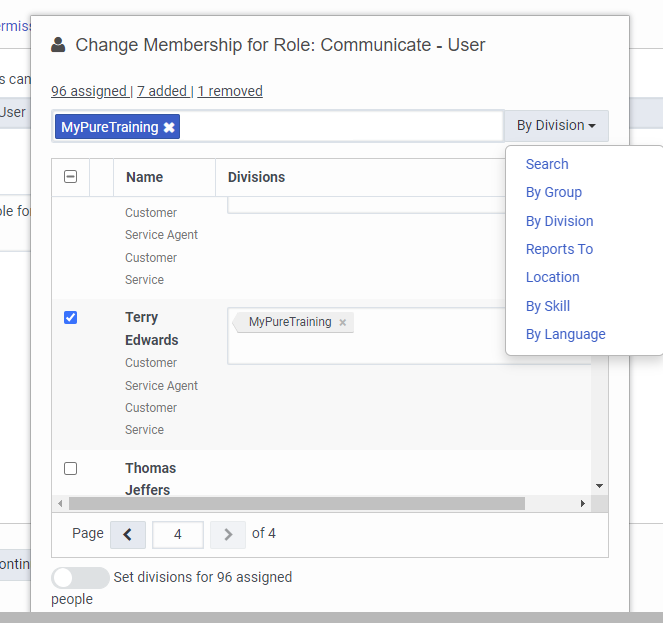
That said...if you click on a specific Role under Admin>People & Permissions>Roles / Permissions, then Change Membership, you can add/remove a bunch of users at once. The drop-down Search options let you pull up users by Group, Division, Reports To, Location, Skill, and Language which aids in deciding which users you want. Ticking the checkbox in the header of the returned list of users selects/deselects all found, and then you can select/deselect individuals in the list.
------------------------------
George Ganahl GCP (Genesys Cloud), CCXP
Principal PS Consultant
Genesys
------------------------------
Original Message:
Sent: 07-10-2023 14:24
From: Paul Simpson
Subject: Bulk Permission Assignment/Removal
Notwithstanding George's workaround unfortunately, unlike PureConnect, the Roles<->Users relationship can only be viewed / managed from the User's end. It seems to me that seeing what Users have a Role as well as what Roles a User has would be useful.
There are other "relationships" (I believe the correct term is "dependencies") that are only visible from one end in Genesys Cloud. (Group membership is another example, as is Skill assignment.) Oddly, Queue membership is "bidirectional".
I suggest you check the Ideas site and, if there isn't already an Idea for this, create one!
------------------------------
Paul Simpson
Eventus Solutions Group
------------------------------