Ok. Well, if you can find PCAP files for the outbound call attempts, check to see if the outbound SIP messaging is correct...perhaps the transformation is not happening properly at the Trunk (or perhaps a different trunk is chosen somehow).
If you cannot get SIP logs, you might have to get an assist from Support.
George Ganahl GCCX-AI, GCP, GCSME, ICCE, ICHD, etc.
Original Message:
Sent: 05-21-2025 12:28
From: Dianne Gabriel
Subject: Call Recording challenges for Internal calls and Internal transfers
Yes

From the simulated calls screenshots I posted above, it looks like the transformation is working.
------------------------------
Dianne
------------------------------
Original Message:
Sent: 05-21-2025 12:17
From: George Ganahl
Subject: Call Recording challenges for Internal calls and Internal transfers
Did you set up the External Trunk address transformation when trying to send the call while it's still configured as a DID for Routing?
------------------------------
George Ganahl GCCX-AI, GCP, GCSME, ICCE, ICHD, etc.
Technical Adoption Champion
Genesys
Original Message:
Sent: 05-21-2025 11:28
From: Dianne Gabriel
Subject: Call Recording challenges for Internal calls and Internal transfers
Hi George,
Thanks for this! Followed your example but I'm still facing errors.
When I assign the DID, the simulation doesn't hit the external trunk: 
When I remove the DID from any assignment, it would hit the trunk but the call is still not being recorded:
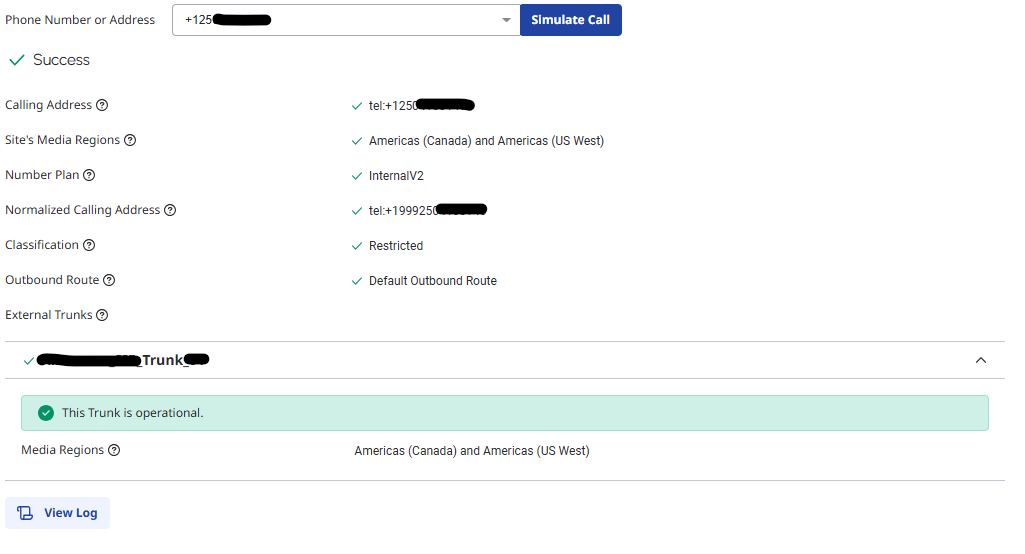
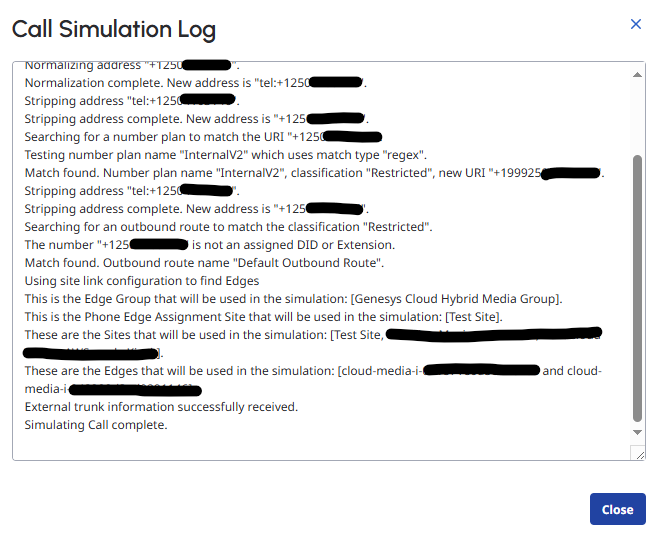
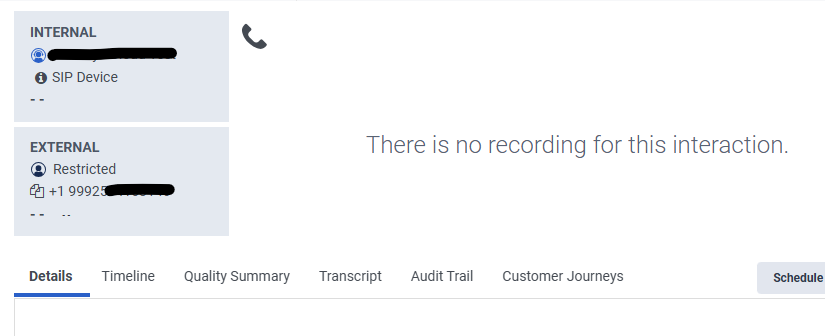
When I tried to log the error from the Architect flow, this is what I got: No answer; sipCode='404'.
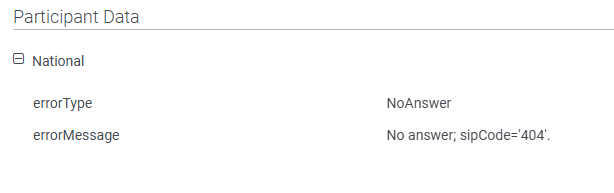
Not sure if I'm missing something but this doesn't seem like the right behaviour. I'm curious what other elements you've configured (call routing, Architect flow, etc) and ultimately how you're placing the call to enable the recording.
Thank you!
------------------------------
Dianne
Original Message:
Sent: 05-05-2025 21:16
From: George Ganahl
Subject: Call Recording challenges for Internal calls and Internal transfers
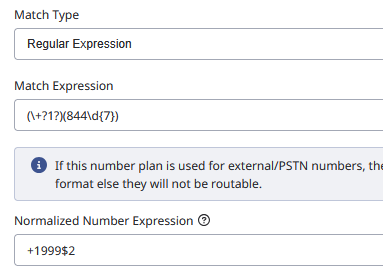
The way to get around it is to pre-pend something on the number using the Number plane then strip it back off in the External Trunk>Identity>Called Number settings.
Something like my primitive example below

------------------------------
George Ganahl GCCX-AI, GCP, GCSME, ICCE, ICHD, etc.
Technical Adoption Champion
Genesys
Original Message:
Sent: 05-02-2025 10:32
From: Robert Wakefield-Carl
Subject: Call Recording challenges for Internal calls and Internal transfers
This is correct. Any number programmed into the DID table will not exit the platform and be treated as an internal call. The only way is to send a call to an SBC and have it send it back to a number programmed into Genesys.
------------------------------
Robert Wakefield-Carl
ttec Digital
Sr. Director - Innovation Architects
Robert.WC@ttecdigital.com
https://www.ttecDigital.com
https://RobertWC.Blogspot.com
Original Message:
Sent: 05-02-2025 03:35
From: Kevin Young
Subject: Call Recording challenges for Internal calls and Internal transfers
Hi Shane,
As far as I am aware you cannot force a DID to go over the external trunk when it is defined as an internal range, i.e not from your BYOC provider. Even external facing DIDs would still be kept 'internal' afaik. The only way we achieve this is to have DIDs provisioned externally, not defined in GC, then forwarded back to a DID that is defined. Would love to be proven wrong on this, but that's my experience.
------------------------------
Kevin Young
TTEC Digital, LLC
kevin.young@ttecdigital.com
Original Message:
Sent: 05-01-2025 10:06
From: Shane Jenkins
Subject: Call Recording challenges for Internal calls and Internal transfers
Thanks for the awesome responses so far! Really great information.
I do have a quick follow-up for Scenario # 1 (Internal calls to a flow not getting recorded).
We tried setting up a Number Plan w Classification for a specific number. Set the Classification on an Outbound Route to hit an External Trunk.
When we test it doesn't seem to be working and when we Simulate Call, it does show hitting the proper Number Plan and Classification that we created.
However in Simulate Call, the last two lines (Outbound Route and External Trunk) both show as N/A (Internal Call).
Is there a step we're missing to force this internal DID out an External Trunk? We are BYOC, in case that matters any. It seems like it simply won't allow us to route a number assigned to a flow outward toward an external trunk.
Thanks again,
------------------------------
Shane
Original Message:
Sent: 05-01-2025 05:11
From: Kevin Young
Subject: Call Recording challenges for Internal calls and Internal transfers
For Scenario 2, Change the transfer to queue to a transfer to DID (any made up internal one will do) that has an inbound call flow that will secure pause. This way the call flow will be guaranteed to execute, whereas an in queue flow is not, depending on agent availability.
------------------------------
Kevin Young
TTEC Digital, LLC
kevin.young@ttecdigital.com