Patrick, thanks for the reply. That did the trick.
Lesley, thanks for that comment about the API, makes it even better.
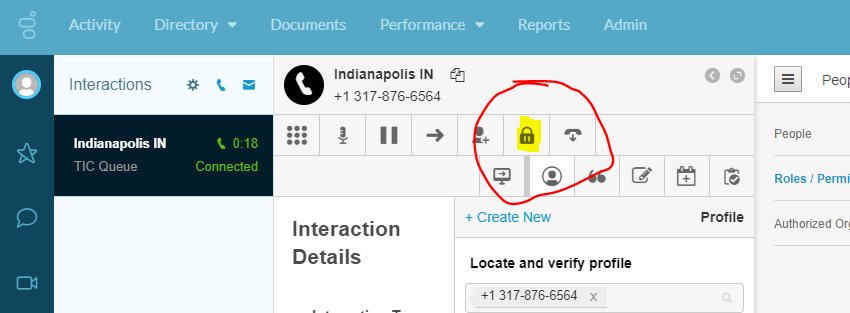
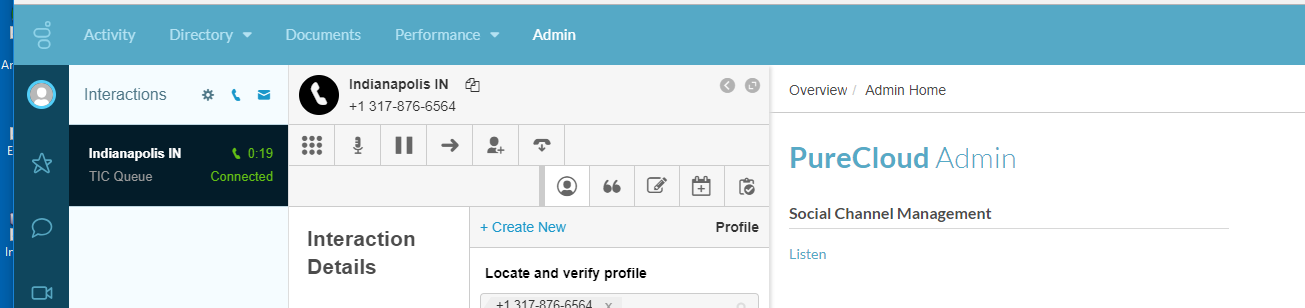
By the way, PureCloud Support said this couldn't be done, hiding the Secure Pause button.
I had already created a custom role called "TIC Agents" copied from the "PureCloud User" role. I had taken that Secure Pause permission away from the TIC Agent role, but my first tests that failed, I realize now, was because the permission was there in other Roles I was using with my test account. I setup my test account like I have for the agents, with just the "employee" and 'TIC Agent" roles. Worked perfectly.
Secure Pause button
No Secure Pause
------------------------------
Greg Beal
ConvergeOne
------------------------------
Original Message:
Sent: 06-08-2018 10:53
From: Lesley Vereen
Subject: Can we Hide the Secure Pause button
A correction regarding the permission for the Secure Pause - that permission is actually only for the button on the agent desktop. Removing that permission will not have any impact on the use of APIs to programmatically pause recordings because there is no permission check with the API.
------------------------------
Lesley Vereen
Sr Product Manager - PureCloud
Genesys
------------------------------
Original Message:
Sent: 06-07-2018 11:09
From: Patrick Rada
Subject: Can we Hide the Secure Pause button
They could be picking up the permission from another role. You may want to consider creating custom roles to control what permissions are assigned. It's more work, but you're in control of what happens. Copy the PureCloud User role and remove the secure pause permission. Assign ONLY that role (and the required employee role) to the user. That should eliminate the lock. If that works, you just have to track down which role is adding in the permission.
However, be aware that if you want to programmaticly control the secure pause feature (in scripts for instance), that permission is required. Scripts and API calls on behalf of the user appear to require that permission (and the lock be visible) even if the user should never be touching it.
------------------------------
Patrick Rada
Keypath Education LLC