Hi Ragheb
-
1 - You can check this information in the "agent status".
But to listen, you must go directly to the interaction via the "interaction" or "activity queue" menu where you can monitor in 3 ways:
a - listen only;
b - listen and speak only to the agent;
c- listen and speak to both the agent and the customer.
-
2 - Your statement is correct... monitoring refers to interaction.
-
3 - Unfortunately not.
The agent status contains cumulative status data (total ---- sum) and not current status data.
There is only 1 field called "time in routing status" it resets the counter whenever an interaction starts and resets again when the interaction ends... but I didn't see any other data to identify when it was the beginning or the end.
-
-
When I need to check, I always go to queue activity, which is also bad because I need to know the agent's queue.
-
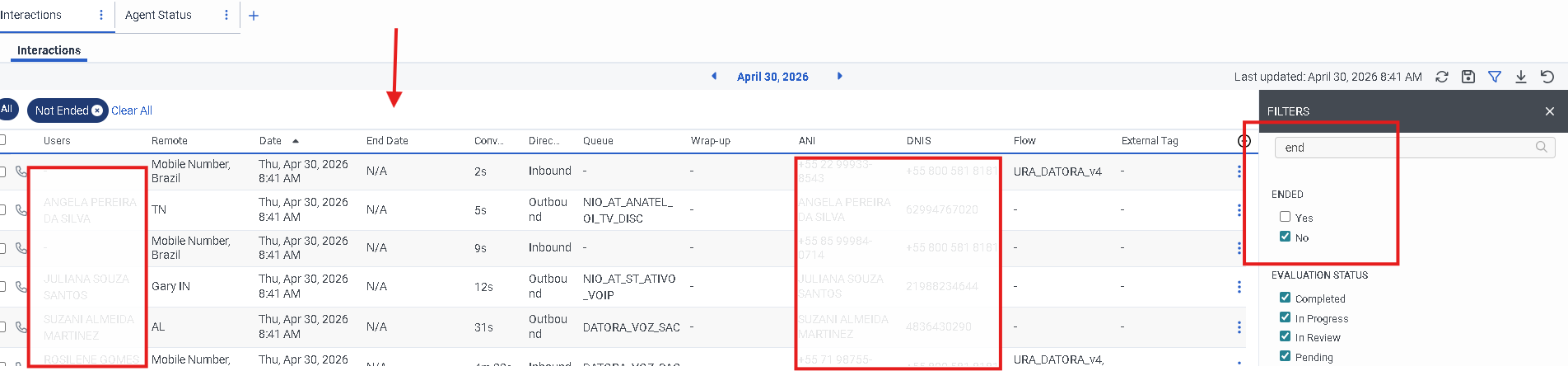
4 - In the "interactions" menu, add the "End date" column, which shows "n/a" meaning it is still in progress.
You to can filter by "Ended = no".
-
 -
-5 - Basically what I mentioned in item 1.
Interal, it's just a listen ; there's no way to interfere with the call.
-
-
-
External you can both monitor and interfere.
-
I believe that this difference exists because we can adjust the permission level.
-
-
note: Although the documentation states that Internal monitors the agent and External monitors the customer, in practice this is not what happens.
In both internal and external monitors, it is possible to listen to both the customer and the agent.
-
I hope this answers your questions.
------------------------------
Kaio Oliveira
GCP - GCQM - GCS - GCA - GCD - GCO - GPE & GPR - GCWM
PS.: I apologize if there are any mistakes in my English; my primary language is Portuguese-Br.
------------------------------