Workforce Engagement Management

 View Only

Sign Up

  Thread closed by the administrator, not accepting new replies.
  • 1.  📢 Coming Soon: Import Employee Decision Metrics in Workforce Management

    Posted 07-06-2026 05:40
    No replies, thread closed.

    Hi Community,

    We're excited to share that a new Workforce Management capability is targeted for release during the week commencing July 27th.

    This upcoming feature will make it easier for WFM administrators to manage employee decision metric values directly in Genesys Cloud by importing them through the UI using a CSV file.

    With this release, administrators will be able to import performance values and custom tie-break values, helping support consistent ordering for schedule bidding and other WFM decision-making workflows.

    What's coming

    Admins will be able to:

    • Upload employee decision metric values from a CSV file

    • Use a downloadable CSV template to help format the import file correctly

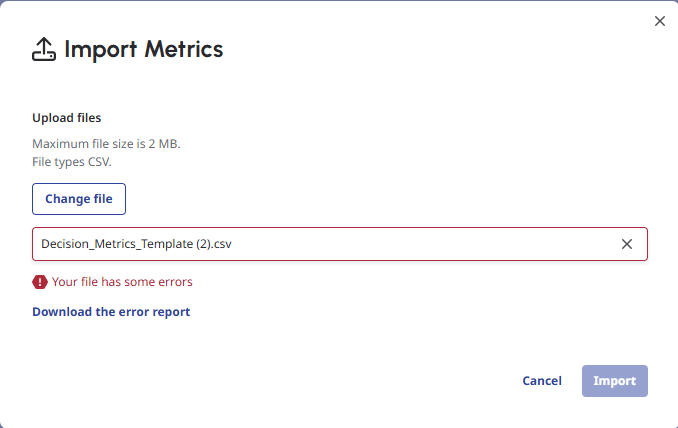
    • Validate import files before processing

    • View the latest decision metric values in a sortable and filterable grid

    • Search and filter by Management Unit or named agent

    • Manage access through the Workforce Management > DecisionMetrics permission

    Where to find it:
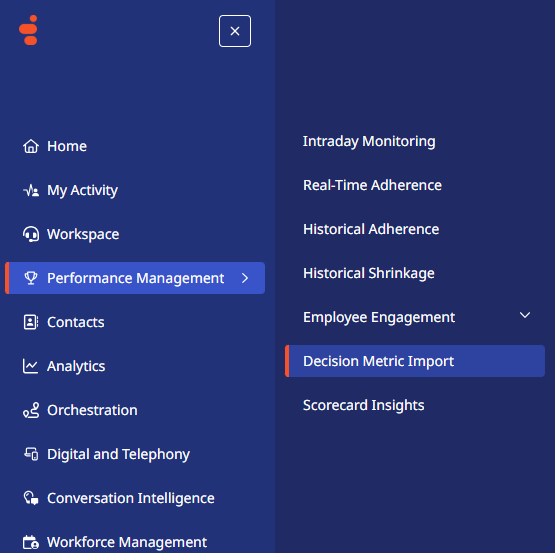
    Landing Page:
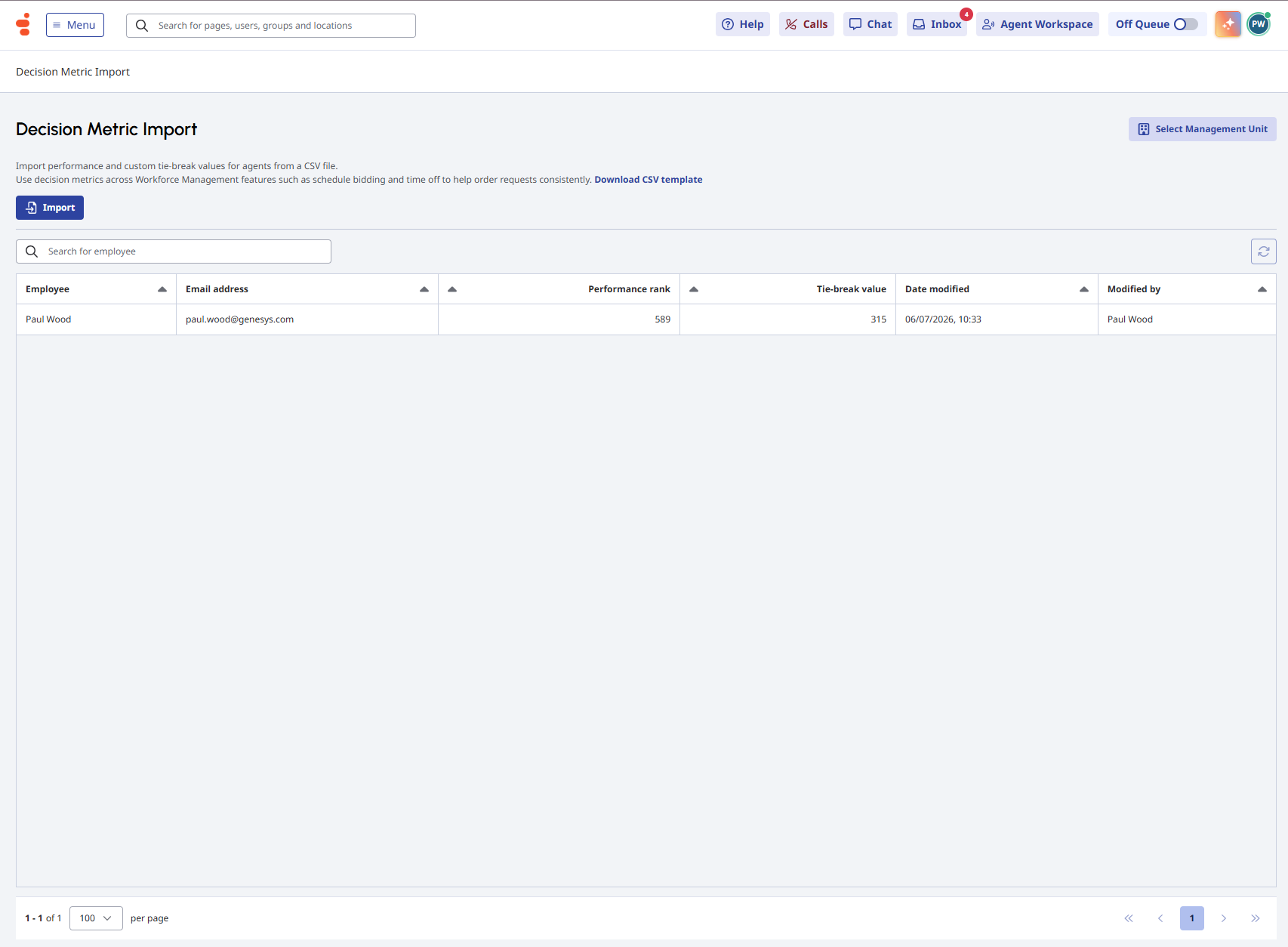
    Upload Validation:
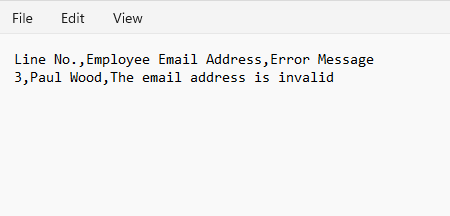
    With downloadable error report:
    Why this matters

    Today, updating performance and tie-break values requires API interaction, which can create extra work for administrators and a dependency on technical teams. This new UI-based workflow is designed to help WFM teams bulk update decision metric values more efficiently, reduce manual effort, and improve visibility into the data used for bidding priority and request processing.

    Important update for current API users

    This release will also change how and where decision metric values are stored and retrieved.

    Newly imported decision metric values will use the new decision metric storage path and the new decision metric APIs. If you currently update decision metric values through the existing API update method, please plan to migrate your integration to the new endpoints.

    Schedule bidding will use the newly imported decision metric values when available, with existing venue-based data available as a fallback where no new import has been made.

    Before you import

    The CSV file should include employee email address, performance value, and tie-break value. Decision metric values are managed at the Business Unit level, and users who are not included in the import file remain unchanged.

    More details will be available in the Resource Centre closer to release.

    #WorkforceManagement #WEM #ScheduleBidding


    #ScheduleGeneration
    #ScheduleManagement

    ------------------------------
    Paul Wood
    Genesys - Employees
    WFM Product Manager
    ------------------------------


  • 2.  RE: 📢 Coming Soon: Import Employee Decision Metrics in Workforce Management

    Posted 07-10-2026 09:42
    No replies, thread closed.

    Hi Paul, 

    Could you give us an example of a use case for this feature? I didn't quite understand its purpose. I apologize for that.


    ------------------------------
    Karine Alves
    Project manager
    ------------------------------


  • 3.  RE: 📢 Coming Soon: Import Employee Decision Metrics in Workforce Management

    Posted 07-10-2026 09:55
    No replies, thread closed.

    Hi @Karine Alves, 

    The initial use will be to rank/sort Schedule bid requests so they can be processed in a specific order. 

    As more automated scheduling functions are added, we'll aim to use the same details to order those requests as well.

    Paul


    ------------------------------
    Paul Wood
    Genesys - Employees
    WFM Product Manager
    ------------------------------


  • 4.  RE: 📢 Coming Soon: Import Employee Decision Metrics in Workforce Management

    Posted 08-28-2026 15:20
    No replies, thread closed.

    Hi Paul, 

    I had a couple of questions regarding the bid:

    In reference to the screen shot you shared in another comment, when setting up the bid if I'm using the decision metrics import, should I select Performance and Custom for the metrics and tie-breaker? If not, what do you recommend I choose?

    When assigning the tie-breaker value on the decision metrics import, is a lower or higher value used to determine the tie-breaker? For example, let's say I have two agents who've selected the same work plan, but the system only needs one of them; if Agent A is ranked 4th with a tie-breaker value of 10 and Agent B is ranked 4th with a tie-breaker value of 11, which agent will receive the selected work plan?

    My organization does not have gamification turned on, so no metrics have been otherwise configured for our agents. 

    Thank you!


    ------------------------------
    Nicole Varnet
    Forecasting & Scheduling
    ------------------------------


  • 5.  RE: 📢 Coming Soon: Import Employee Decision Metrics in Workforce Management

    Posted 09-02-2026 09:52
    No replies, thread closed.

    Hi Nicole, 

    Yes, if you have imported the values, you can use them or a combination of the imported and hire date to allocate employee bids in your preferred order. 

    When selected the sort ordering for the decision metric is:

    1. In the Decision Metrics section, select your options. You cannot make the same selection in both fields.
      • In the Agent Ranking field, select one of the following:
        • Hire date: Bids are processed based on the agent hiring date. Bids are sorted and processed in ascending order (longest first). For example, when only one slot is available and two agents place bids for the same slot, then whoever has an earlier hire date gets preference for this bid.
        • Performance: The system adds an integer value for this field based on the selected agent's bid. You can sort the agents based on their performance (top performer/highest value first).
      • In the Tie-Breaker field, select the option. Based on the selection made in the previous field, the fields for selection appear in this field.
        • Randomly Assign: The system assigns a random number to each agent and sorts the bids in ascending order.
        • Performance: The system sorts the bid based on performance.
        • Custom: The system sorts the custom selection in ascending order.

    Taken from the resource centre article:

    https://help.genesys.cloud/articles/add-new-bid/

    At the moment, we haven't integrated with Gamification, so the only performance value available for ranking automated requests is the Custom Perforamance value imported via the Decision Metrics flow.

    Paul


    ------------------------------
    Paul Wood
    Genesys - Employees
    WFM Product Manager
    ------------------------------


  • 6.  RE: 📢 Coming Soon: Import Employee Decision Metrics in Workforce Management

    Posted 08-28-2026 18:42
    No replies, thread closed.

    A really useful feature.


    ------------------------------
    Camila Meneghini
    ------------------------------