Workforce Engagement Management

 View Only

Sign Up

📢 Coming soon - Work Team level permissions for Time Off

  • 1.  📢 Coming soon - Work Team level permissions for Time Off

    Posted 4 hours ago
    WFM banner

    New work team condition for time-off request permissions

    The Time Off team is releasing a new Work Team condition for selected time-off request permissions. This enhancement gives administrators more granular control over which time-off requests supervisors and schedulers can access.

    With this update, administrators can limit a supervisor's or scheduler's access to time-off requests for only the work teams they support. This helps organizations align time-off request visibility and management with real operational responsibilities.

    Permission conditions

    To configure this access, go to Admin > People and Permissions > Roles/Permissions, and then select the role that you want to update.

    On the Permissions tab, search for Time-Off Requests permissions. After this release, supported permissions include the option to add a condition to the following permissions:

    • Workforce Management > Time-Off Requests > Add
    • Workforce Management > Time-Off Requests > Edit
    • Workforce Management > Time-Off Requests > View

    In the row for the permission that you want to restrict, click Add Conditions.

    On the conditions page, configure the condition as follows:

    • Condition Type: Work Team
    • Operator: Equals
    • Value: Select the appropriate work team
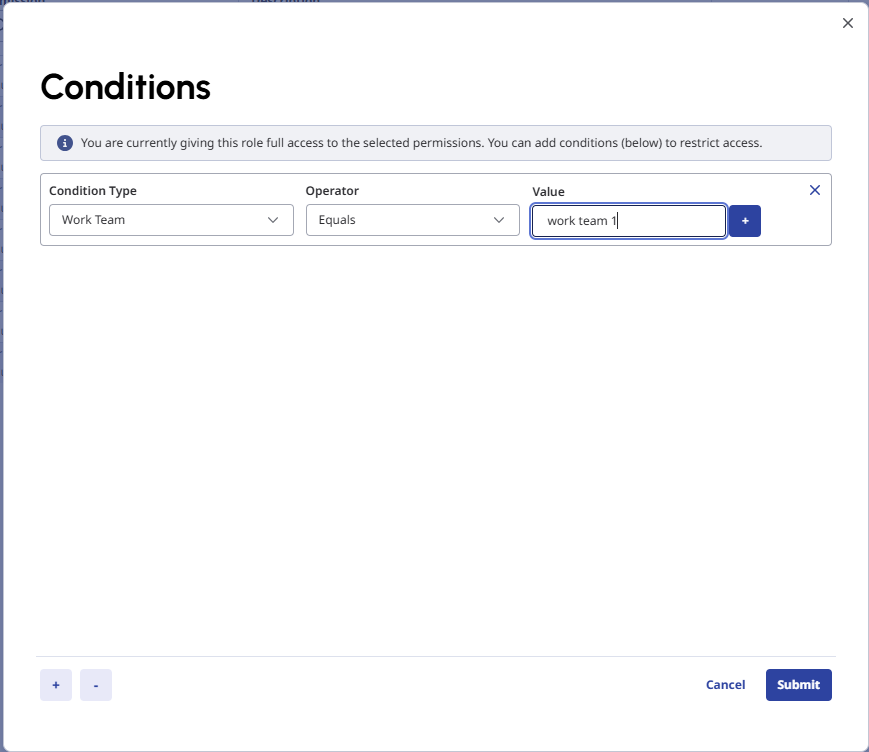
    You can add multiple work team conditions to a permission, up to a maximum of 10 work teams per permission.

    After you save the role, users assigned to that role can add, edit, or view time-off requests only for the configured work teams, based on the permissions and conditions assigned to them.

    Paul

    #TimeOff,AbsenceManagement

    ------------------------------
    Paul Wood
    Genesys - Employees
    WFM Product Manager
    ------------------------------