Hi Abhinesh, how are you?
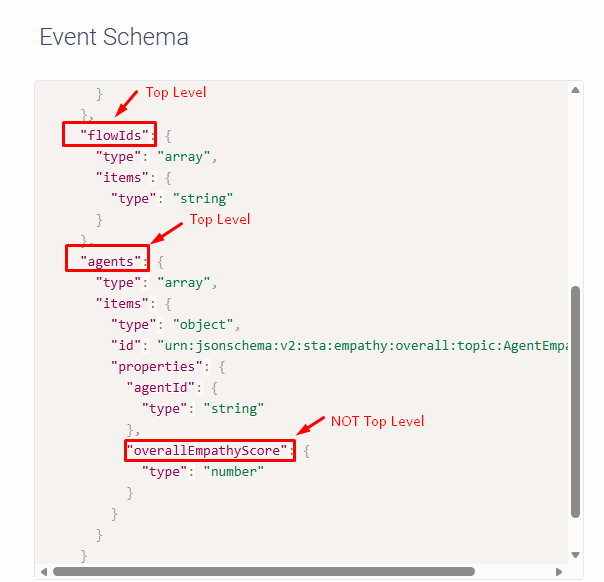
I don't think you will be able to retrieve that information using "TopLevelPrimites" as the data format, because that attribute is not part of the "top level" of the Json:
--------------
To retrieve this, you will have to use "Json" as the Data Format.
For that, you will have to create an input variable on your workflow named "Flow.jsonData" of TYPE Json. (As mentioned here: Overview of triggers View summary - Genesys Cloud Resource Center)
You will then have to work with the JSON variable, which is not that easy to do at first, so you might need some practice with it.
You can basically access the JSON attributes through the variable.
So your variable will be named "Flow.jsonData", and you will be able to access the attributes like this:
Flow.jsonData.conversationId
Flow.jsonData.agents[0].overallEmpathyScore (This would be the 0 index of your Agents array)
------------------------------
Marcello Jabur
------------------------------
Original Message:
Sent: 02-23-2026 08:39
From: Abhinesh Gupta
Subject: Conversation ID in workflow
Hi All,
Thank for your answers.
Now I am working in Empathy trigger and want to get the emapthy score in workflow.
I am using Flow.overallEmpathyScore as a input variable but I am getting no data as the value in workflow.
What should we use to get empathy score in genesys workflow.
Using top level primitive in data type.
------------------------------
Abhinesh Gupta
------------------------------
Original Message:
Sent: 02-18-2026 21:16
From: Marcello Jabur
Subject: Conversation ID in workflow
Hey Abhinesh,
To also add to what Kaio and Mateus have already said.. Make sure your trigger "Data Format" field is actually set to "TopLevelPrimitives" as shown in Mateus's screenshot above.
If it's set as "Json", you have to create an specific variable in a different way to get the data from the event.
But if you only need the conversationId (or any other attributes present on the schema top level), you just create a variable with the EXACT name of the attribute, and define it as "input to flow", as they mentioned above.
------------------------------
Marcello Jabur
Original Message:
Sent: 02-18-2026 18:49
From: Mateus Nunes
Subject: Conversation ID in workflow
Hi Abhinesh,
+1 to Kaio's point - the key is that the variable must be defined as an Input to Flow (not a regular flow variable), so the trigger can pass the event payload into the workflow.
Also, depending on the trigger topic, you can use additional fields (conversationId, participantId, sessionId, etc.). You can always find the available fields on the right side under Event Schema (see screenshot).
------------------------------
Mateus Nunes
Tech Leader Of CX at Solve4ME
Brazil
Original Message:
Sent: 02-18-2026 06:53
From: Kaio Oliveira
Subject: Conversation ID in workflow
Hi Abhinesh,
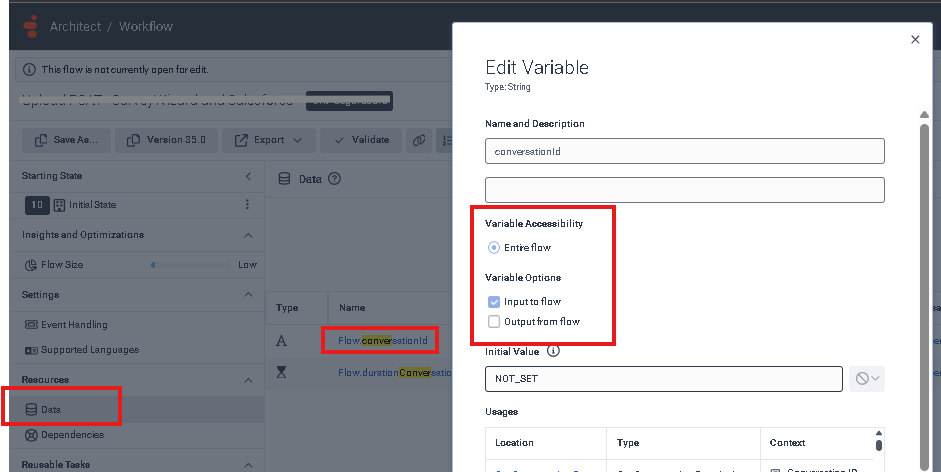
Check your workflow to make sure you've set flow.conversationId to "Input to flow".
------------------------------
Kaio Oliveira
GCP - GCQM - GCS - GCA - GCD - GCO - GPE & GPR - GCWM
PS.: I apologize if there are any mistakes in my English; my primary language is Portuguese-Br.