You are correct, the script mentioned in my screenshot is the one I am hoping to trigger. And this script is selected in the 'call' section of the queue too. The main thing we are trying to achieve is having the script pop when the consultant initiates the callback (outbound call) to call the customer back. I will do some testing and see if I can get some more information.
Thanks again.
Original Message:
Sent: 05-05-2026 02:41
From: Phaneendra Avatapalli
Subject: Custom Script wont pop for outbound
Hi Robert,
Thanks, that helps clarify things. I'm assuming the script shown in your screenshot is the one you're expecting to see not only for the voicemail interaction, but also when agents call the customer back?
Just to highlight the key difference:
- Voicemail (ACD): The caller leaves a message → it's delivered to the agent as a voicemail interaction (with playback/transcription). If the agent calls back, that becomes a separate outbound call.
- Callback: The caller requests a callback → the platform dials the customer and connects it to the agent as a live voice interaction tied to the queue.
Since you're using Transfer to Voicemail, the script you select there applies to the voicemail interaction itself, not the return call. When the agent calls the customer back, the script is resolved again. In this case (because it's a voicemail return call), it behaves like a standard outbound/callback interaction and will use the queue's assigned script, or fall back to the default/generic callback script if none is set.
Given you mentioned the generic callback script is appearing, it would be worth checking what script is actually assigned at the queue level (Voice tab). If that field is empty, I'd suggest selecting your desired script there and testing again, as the return call will use (or fall back to) that script.
If your goal is to use the same script across inbound, outbound, and callbacks, setting it at the queue level (Voice tab) is the simplest approach. You can also explicitly set or screen-pop the same script in Architect as you're already doing.
Hope this helps.
------------------------------
Phaneendra
Technical Solutions Consultant
------------------------------
Original Message:
Sent: 05-05-2026 02:11
From: Robert Brown
Subject: Custom Script wont pop for outbound
So it looks like it is set up as "transfer to voicemail" as per the below. Sorry I am not quite sure which option this is compared to the ones you have listed.
And the callbacks come through the same queue as our inbound/outbound calls (below is what it looks like as an interaction).

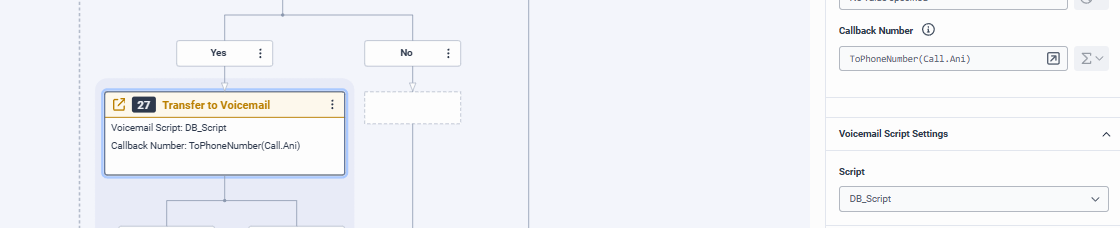
Not sure if this info help you guide me to a solution but appreciate the response either way.
------------------------------
Robert Brown
Member Advocate
Original Message:
Sent: 05-05-2026 01:47
From: Phaneendra Avatapalli
Subject: Custom Script wont pop for outbound
Hi Robert,
Just to check are you using the standard in-queue Create Callback (built-in) option in Architect, or creating the callback via a different method (e.g. data action / API / custom logic)?
The reason I ask is that how the callback is created can impact how it's routed and which script gets resolved. If it's not using the standard in-queue callback, it may not follow the same queue/script behaviour and could fall back to the generic callback script.
It may also be worth confirming the actual queue that delivers the callback (via Performance → Interactions), as that's what ultimately determines the script shown to the agent.
In our setup in Genesys Cloud, we're using the standard callback approach and are able to show a different script for callbacks while using a separate script for inbound on the same queue. So if everything is aligned, it should work as expected.
Hope this helps.