Good to know it's all working thank you for confirming.
Original Message:
Sent: 04-14-2026 04:59
From: Neil Jones
Subject: Data Action Failure on Integer Collection
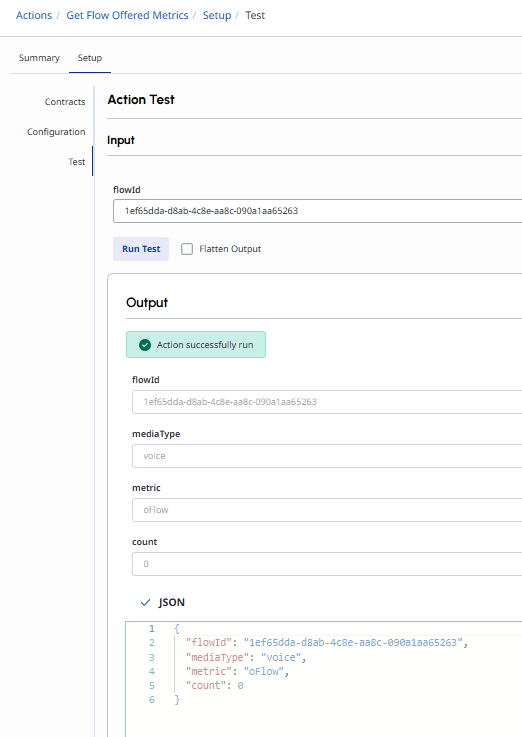
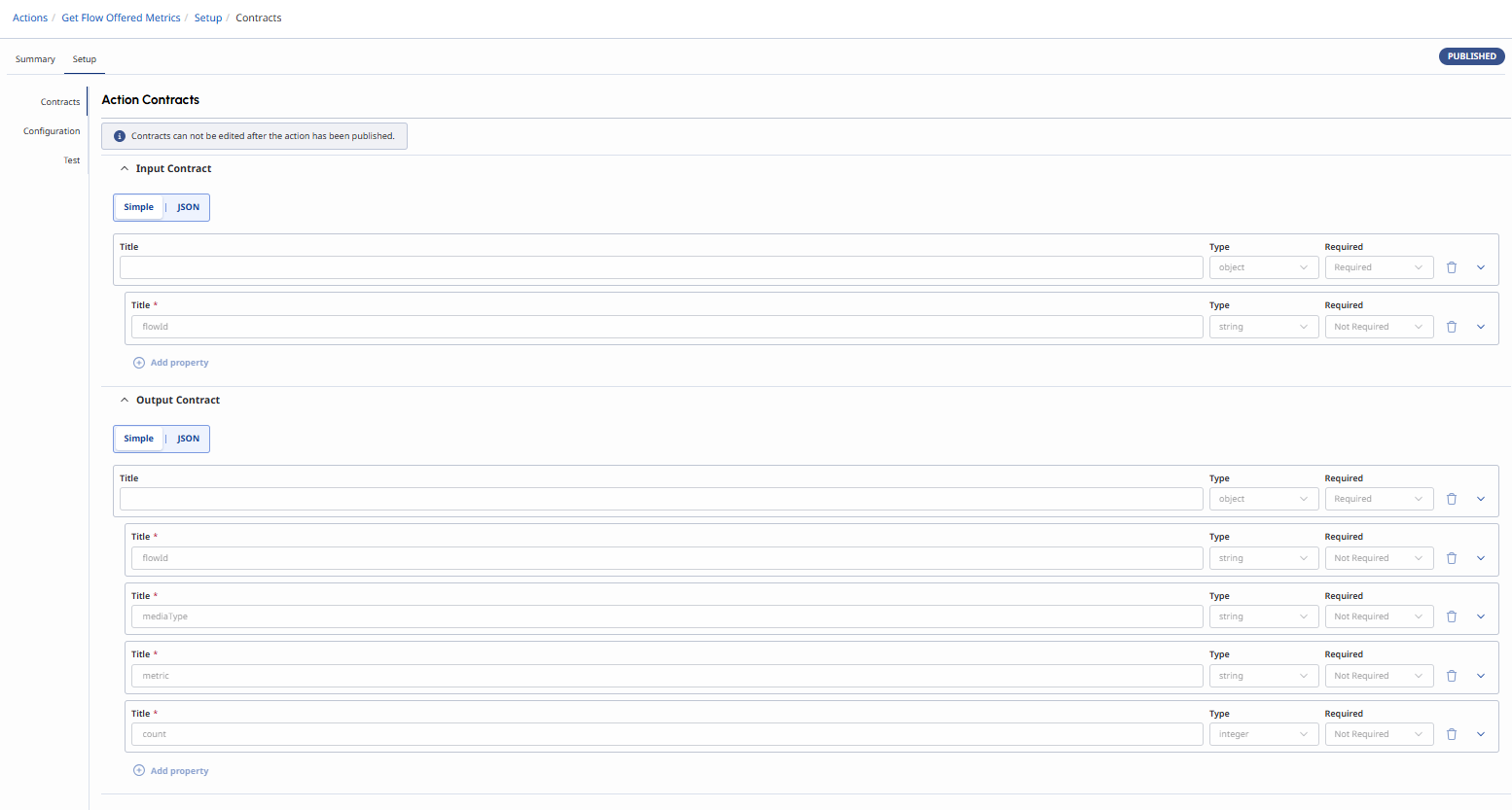
Thank you so much for you help - all working as expected both data action in isolation & via architect flow.
As you said just needed to update the output contracts once the comma error was rectified - see below...
Appreciate all your help.
Regards,
------------------------------
Neil Jones
Voice Comms Lead
Awaze Uk
neil.jones@awaze.com
------------------------------
Original Message:
Sent: 04-14-2026 04:46
From: Phaneendra Avatapalli
Subject: Data Action Failure on Integer Collection
Hi Neil,
This screenshot is helpful. The response itself now looks flat and valid, so I don't think the problem is the successTemplate anymore.
The remaining Flatten Output error looks more like the output contract/schema still contains the earlier nested array structure. Even though the returned JSON is now just flowId, mediaType, metric, and count, the action tester seems to still be validating a schema with nested arrays when Flatten Output is selected.
So the next thing I would check is the output contract and make sure it has been simplified to only these fields:
- flowId = string
- mediaType = string
- metric = string
- count = integer
If the contract still contains the old results / data / stats array structure anywhere, I think that would explain the flatten error.
Hope this helps and hopefully someone from community might add more to this.
------------------------------
Phaneendra
Technical Solutions Consultant
Original Message:
Sent: 04-14-2026 04:22
From: Neil Jones
Subject: Data Action Failure on Integer Collection
Hi,
Thanks for all your help...
I've adjusted the success template to "successTemplate": "{\"flowId\":${flowId},\"mediaType\":${mediaType},\"metric\":${metric},\"count\":${count}}" and no errors and response is correct. TBH I think if I use this new data action in my architect flow it will still fail as when running with the 'flatten output' field selected I receive an nested array error.
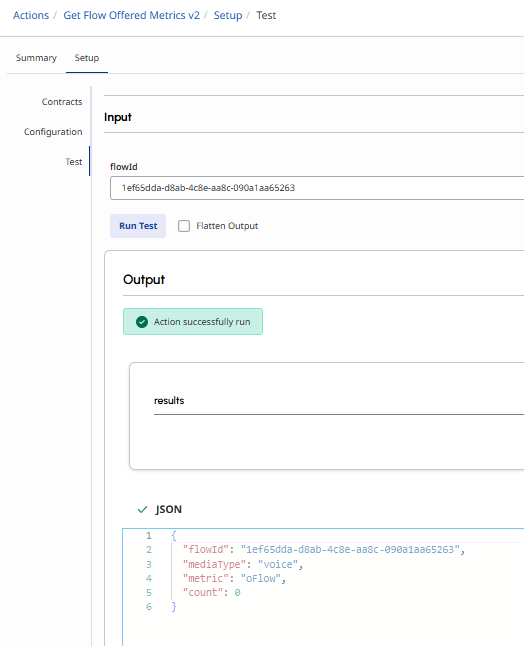
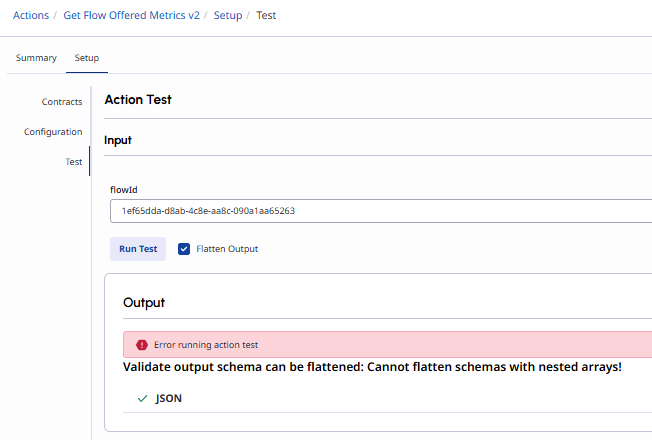
Full response is:
{
"translationMap": {
"flowId": "$.results[0].group.flowId",
"mediaType": "$.results[0].group.mediaType",
"metric": "$.results[0].data[0].metric",
"count": "$.results[0].data[0].stats.count"
},
"translationMapDefaults": {},
"successTemplate": "{\"flowId\":${flowId},\"mediaType\":${mediaType},\"metric\":${metric},\"count\":${count}}"
}
Regards,
------------------------------
Neil Jones
Voice Comms Lead
Awaze Uk
neil.jones@awaze.com
Original Message:
Sent: 04-14-2026 03:05
From: Phaneendra Avatapalli
Subject: Data Action Failure on Integer Collection
Hi Neil, can you try below
{
"translationMap": {
"flowId": "$.results[0].group.flowId",
"mediaType": "$.results[0].group.mediaType",
"metric": "$.results[0].data[0].metric",
"count": "$.results[0].data[0].stats.count"
},
"translationMapDefaults": {},
"successTemplate": "{\"flowId\":\"${flowId}\",\"mediaType\":\"${mediaType}\",\"metric\":\"${metric}\",\"count\":${count}}"
}
------------------------------
Phaneendra
Technical Solutions Consultant
Original Message:
Sent: 04-14-2026 03:01
From: Neil Jones
Subject: Data Action Failure on Integer Collection
Thank you Kaio.
Did fix the immediate json error, but sadly the data action still fails.
Regards,
------------------------------
Neil Jones
Voice Comms Lead
Awaze Uk
neil.jones@awaze.com
Original Message:
Sent: 04-13-2026 10:28
From: Kaio Oliveira
Subject: Data Action Failure on Integer Collection
Hi Neil
I Believe your count needs to be in quotation marks even if it's an integer.
"translationMap": {
"flowId": "${rawResult.results[0].group.flowId}",
"mediaType": "${rawResult.results[0].group.mediaType}",
"metric": "${rawResult.results[0].data[0].metric}",
"count": "${rawResult.results[0].data[0].stats.count}" <<<<<<<<<<<< HERE
},
"translationMapDefaults": {}
------------------------------
Kaio Oliveira
GCP - GCQM - GCS - GCA - GCD - GCO - GPE & GPR - GCWM
PS.: I apologize if there are any mistakes in my English; my primary language is Portuguese-Br.
Original Message:
Sent: 04-13-2026 10:10
From: Neil Jones
Subject: Data Action Failure on Integer Collection
Hi,
Thank you for responding. Most likely my syntax but the response map json is giving an error ?
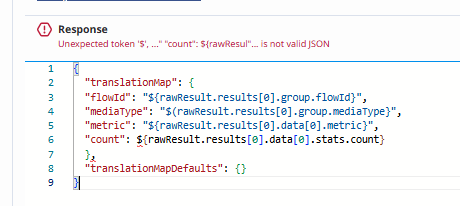
Regards,
------------------------------
Neil Jones
Voice Comms Lead
Awaze Uk
neil.jones@awaze.com
Original Message:
Sent: 04-10-2026 05:18
From: Phaneendra Avatapalli
Subject: Data Action Failure on Integer Collection
Hi Neil,
From what I can see and understand from the screenshots, it doesn't look like the integer value itself is the issue. The Data Action test succeeds, and the count value for the oFlow metric is valid.
It looks more like a response structure / collection issue. The Analytics API response includes nested arrays under results and data, so fields like metric and stats.count are part of a collection. If Architect is trying to map those directly into single-value variables, that can fail even though the API response itself is fine.
If you keep the current response structure, you may need to use GetAt() or similar collection handling in Architect to access the first item in those arrays. The cleaner option, though, would be to flatten the Data Action response in the success template and only return the exact fields you need.
For example, instead of returning the full nested response structure, the success template could return something like:
{
"flowId": "${rawResult.results[0].group.flowId}",
"mediaType": "${rawResult.results[0].group.mediaType}",
"metric": "${rawResult.results[0].data[0].metric}",
"count": ${rawResult.results[0].data[0].stats.count}
}
If you go that route, I would also update the output contract to match the flattened response, for example
- flowId = string
- mediaType = string
- metric = string
- count = integer
That should make the Architect mapping much cleaner and more reliable.
Hope this helps and hopefully someone from community might add more to this.
------------------------------
Phaneendra
Technical Solutions Consultant