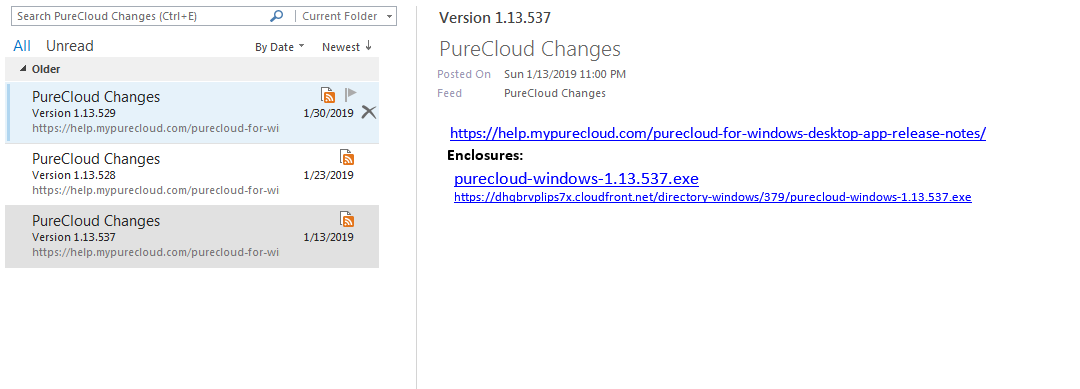
Talking to a developer in charge of the RSS thread, he says the date appears to be in a format that Outlook doesn't understand. He didn't suggest a way to fix it...so, I wouldn't view the RSS feed as a reliable source of info regarding the release date.
It will tell you when a new release of the desktop app comes out, then you can go to the Release Notes page for desktop and see the actual date and what it contained.
As a By-The-Way, the desktop app prompted to do an update today. That was not actually the desktop app itself getting updated, but the Web App getting an update. So, the desktop app itself did not change, since it is the wrapper around the web app which runs within it...just to be confusing.
------------------------------
George Ganahl CCXP, GCP
Principal Technology Consultant
Genesys
------------------------------
Original Message:
Sent: 07-08-2019 10:21
From: Jason Rogers
Subject: Desktop App new version notification
I have done that but it doesn't look how i expect it to look.
I'm not sure if there are some Outlook settings that I've got wrong but you'll see in the image I'll post that Outlook thinks version 1.1.3.537 was posted on Jan 13, 2019 whereas the support page correctly reports it as being published on May 22, 2019.
Email notification of these releases as well as the media tier/Edge releases would be helpful.
------------------------------
Jason Rogers
Ontario Teacher's Pension Plan
------------------------------
Original Message:
Sent: 07-05-2019 08:45
From: George Ganahl
Subject: Desktop App new version notification
When a new version comes out you will receive a message in the feed with a link to the Release Notes for the Desktop App and a link to the latest .exe for download of the latest version.
------------------------------
George Ganahl CCXP, GCP
Principal Technology Consultant
Genesys