Hi Sheryl
I have a very similar scenario.
When the call reaches the agent, it queries a data action and in turn queries a data table.
-
Data table:
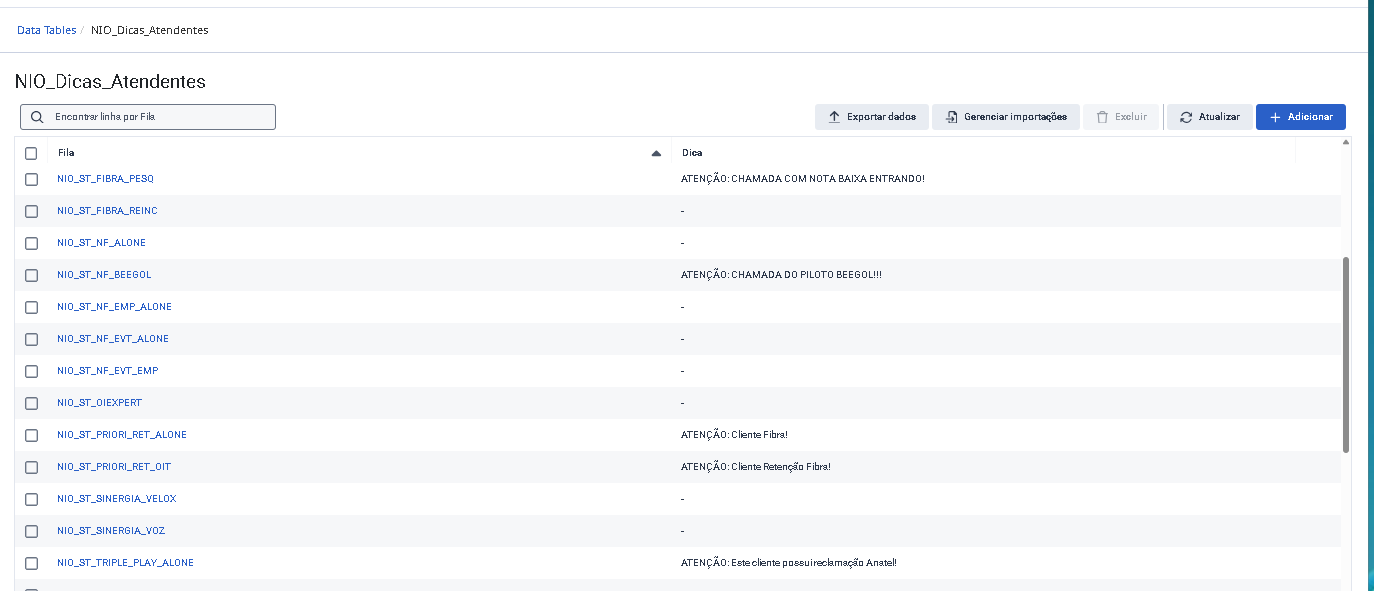
-
data action:
GET /api/v2/flows/datatables/ID OF THE DATA TABLE/rows/${input.queueName}?showbrief=false
-
response:
{
"translationMap": {},
"translationMapDefaults": {},
"successTemplate": "${rawResult}"
}
-
contract:
input
{
"type": "object",
"properties": {
"queueName": {
"type": "string"
}
}
}
-
output
{
"type": "object",
"properties": {
"Dica": {
"type": "string"
}
}
}
-
test
-
In the script, on the "start page" we have the following:
-
In the "'script" it looks like this:
-
-
If the content of the 'dica' field is >1, the hint is displayed; otherwise, the container is hidden.
-
I hope this help you.
------------------------------
Kaio Oliveira
GCP - GCQM - GCS - GCA - GCD - GCO - GPE & GPR - GCWM
PS.: I apologize if there are any mistakes in my English; my primary language is Portuguese-Br.
------------------------------
Original Message:
Sent: 05-13-2026 14:07
From: Sheryl McKercy
Subject: Dynamically display an alert/banner in Agent Script
Hello,
I am hoping someone can provide some insights as to how we can dynamically display a message (ex: an alert) to agents in Agent Script when there is an urgent message to send to them. Use case: we are a Financial Institution and if there is an outage, such as ATMs, we would want non-Genesys Admin staff to be able to write a message (perhaps in a canned response, or other UI such as SharePoint) and that message would dynamically appear in the Agent Script. When the outage is done, that same staff could blank out the message and it would disappear from Agent Script. Any ideas out there? Soon our org will be implementing Knowledge Fabric with SharePoint so perhaps our solution will be within that.
Thank you kindly!
Sheryl
#Omni-ChannelDesktop/UserInterface
------------------------------
Sheryl McKercy
Program Manager, Contact Centre Technologies
------------------------------