Workforce Engagement Management

 View Only

Sign Up

Expand all | Collapse all

Feedback Request: Improving How Selected Activities Display in the Schedule Editor (as part of upcoming Activity Color Customization)

  • 1.  Feedback Request: Improving How Selected Activities Display in the Schedule Editor (as part of upcoming Activity Color Customization)

    Posted 20 days ago

    Hi everyone,

    As you may or may not know, we're planning to introduce the ability for you to change the color of your Activities within Workforce Management (WFM). As part of that work, we're reviewing how selected activities should appear within the Schedule Editor to ensure the experience stays clear, accessible, and reliable - especially once you can choose any colors you like.

    Why this matters

    Today, the Schedule Editor shows a selected activity by darkening the color slightly. This works well with our current, fixed color palette, but as we move toward full customization, some issues begin to emerge.

    For example:
    If a Scheduler chooses several similar shades of blue for different On Queue activities, it's possible that the selected-state color - darkened from its original state - ends up looking identical to another activity. In these cases it can become harder to immediately see what's selected, and we want to make sure this doesn't cause any problems for you as you work through schedules.

    Since many of you rely on rapid visual scanning - with dozens or even hundreds of activities configured - we want to ensure selections always stand out clearly, regardless of the colors you choose.

    Our proposed solution

    As part of enabling full color customization, we're also updating how selected activities appear in the Schedule Editor. Because you'll soon be able to choose any color, the current approach (which only darkens selected items and is based on hard-coded colors) won't always provide enough contrast.

    To address this, we are introducing a new selected-state behavior:

    The selected activity will be automatically lightened or darkened based on luminance

    This ensures that the selected state remains visually distinct and accessible no matter which colors you configure.

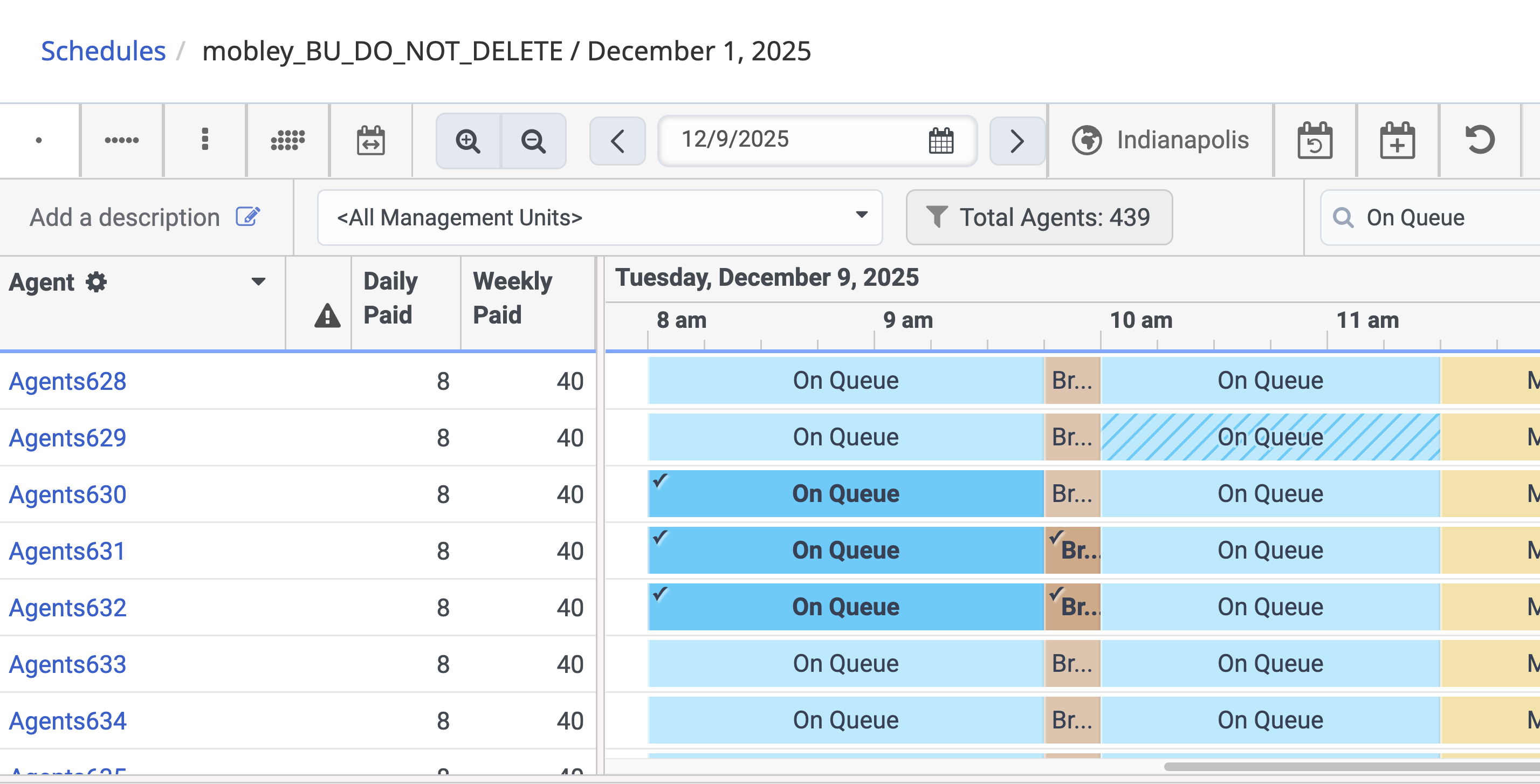
    A small checkmark will appear in the top-left corner of any selected activity

    This provides a consistent, unmistakable visual cue - especially helpful when several activities share similar color tones, or when the luminance-based adjustment results in a shade close to others in your schedule.

    Here is what the selection checkmark can look like:
    Screenshot-20251209T134411Z@2x.png

    The checkmark will appear only when an activity is selected, working alongside the updated color adjustment.

    What we want to validate with you

    We'd love your feedback on this approach:

    • Would this checkmark + color-shift combination solve the visibility issues for you?
    • Does it give you confidence that selections will always remain clear - even with heavily customized color palettes?
    • Is the checkmark noticeable enough in your day-to-day scheduling workflow?
      • Should it be larger, differently positioned, or styled differently?
    • If this doesn't fully solve the problem, what alternatives would you prefer?
      • A border? A glow? A pattern overlay? Something else?

    Why your input matters

    This feature touches one of the most visually dense and high-use areas of WFM. Your feedback will directly influence how we deliver custom color support while still ensuring:

    • Accessibility
    • Clarity under all color choices
    • Fast, confident interactions for Schedulers

    Please let us know what you think - your insights shape how we design this.

    Looking forward to your feedback!


    #ScheduleManagement
    #WFMConfiguration,BestPractices
    #GeneralQuestion

    ------------------------------
    Andy Boland
    Product Manager
    ------------------------------


  • 2.  RE: Feedback Request: Improving How Selected Activities Display in the Schedule Editor (as part of upcoming Activity Color Customization)

    Posted 19 days ago

    Hi - While a checkmark sounds ok, I think a border around the selected activity, in addition to the color-shift, would be clearer.

    Thanks,


    ------------------------------
    Mohamed Nasr
    Emovis
    ------------------------------


  • 3.  RE: Feedback Request: Improving How Selected Activities Display in the Schedule Editor (as part of upcoming Activity Color Customization)

    Posted 19 days ago

    Thanks Mohamed

    Appreciate your feedback.

    Our concern wih a border is that we already have different reasons why a border, or partial border, might be required. For instance Adherence and Explanations, both of these add a semi-border to an Activity.

    We wanted to save any confusion on this by adding the checkmark to make it simpler and less likely to clash with other things.

    Would the checkmark be useful if we weren't able to have another border?

    Thanks


    ------------------------------
    Andy Boland
    Product Manager
    ------------------------------


  • 4.  RE: Feedback Request: Improving How Selected Activities Display in the Schedule Editor (as part of upcoming Activity Color Customization)

    Posted 19 days ago

    Hi Andy,

    Thanks for getting back to me. 

    We don't use Explanations so I didn't know.

    Yes, a checkmark would be useful if you weren't able to add another border.

    Thanks,


    ------------------------------
    Mohamed Nasr
    Emovis
    ------------------------------


  • 5.  RE: Feedback Request: Improving How Selected Activities Display in the Schedule Editor (as part of upcoming Activity Color Customization)

    Posted 19 days ago

    Happy Friday!!

    Calling all our Community Legends,

    Andrew (our PM extraordinaire) is cooking up fully custom Activity colors in WFM, and he needs your superpowers.

    Being proposed is a new way to show what's selected in the Schedule Editor:
    ✅ Smart color shift (auto light/darken)
    ✅ A little checkmark in the corner so you can instantly spot what's selected

    You live in the Schedule Editor all day, so we really want to know:

    • Would this combo make selections clearer for you?

    • Is the checkmark the right size/spot/style?

    • Would you prefer something else (border, glow, pattern, etc.)?

    Drop your thoughts on Andrew's post and help shape how WFM looks and feels for everyone.
    You know the drill - feedback = features that actually work for you 💬✨


    ------------------------------
    Tracy
    Genesys
    ------------------------------


  • 6.  RE: Feedback Request: Improving How Selected Activities Display in the Schedule Editor (as part of upcoming Activity Color Customization)

    Posted 16 days ago

    I like the idea of the check mark/color shift. Thank you! 


    ------------------------------
    Kate Russell
    ------------------------------


  • 7.  RE: Feedback Request: Improving How Selected Activities Display in the Schedule Editor (as part of upcoming Activity Color Customization)

    Posted 16 days ago

    Hi Andy,

    The color isn't as important for my team, but I do love the checkmark idea!!

    There are times where I "lose my place" when updating agents schedules. Having that checkmark to easily spot where I left off be helpful and is easy to spot. :) 

    One suggestion I have is perhaps move the check mark a little more towards the words On Queue in case it could "get lost" close to the edge. 


    ------------------------------
    Jacqueline Turner
    Workflow Coordinator
    NYCM Insurance
    ------------------------------


  • 8.  RE: Feedback Request: Improving How Selected Activities Display in the Schedule Editor (as part of upcoming Activity Color Customization)

    Posted 16 days ago

    Love the idea of a checkmark. For me I'd like to see an extensive colour palette for activities and perhaps something to differentiate absences from activities but not a deal breaker as I guess that can just be colours. I also miss having a lock on an activity like other solutions do just so I can re-optimise for example but not touch certain individuals more easily than now. Also be could but again not vital to be able to snip for example a set of activities on who i highlight then be able to do a copy special values and then carry those over to a what if scenario with a copy paste special values - this is something Calabrio does.  


    ------------------------------
    Neil Draycott
    ------------------------------


  • 9.  RE: Feedback Request: Improving How Selected Activities Display in the Schedule Editor (as part of upcoming Activity Color Customization)

    Posted 15 days ago

    Rather than worrying about colors and check marks, we would love the ability to auto-schedule recurring meetings.  Activity plans is not sufficient to meet our needs.  We need cloud to have a meeting scheduler similar to what was in Engage.


    ------------------------------
    Jodi Maffitt
    NA
    ------------------------------


  • 10.  RE: Feedback Request: Improving How Selected Activities Display in the Schedule Editor (as part of upcoming Activity Color Customization)

    Posted 15 days ago

    Thanks Jodi

    Appreciate your feedback.

    As you can imagine, we're working on multiple features at the same time, so we're looking at Activity Plan improvements at the same time we're looking at things like Activity Code colours.

    Out of interest, what is missing from Activity Plans which makes it not sufficient for our needs?

    Thanks


    ------------------------------
    Andy Boland
    Product Manager
    ------------------------------


  • 11.  RE: Feedback Request: Improving How Selected Activities Display in the Schedule Editor (as part of upcoming Activity Color Customization)

    Posted 15 days ago

    Right now it's the limits of 100 active activity plans.  As an example-  we have 100 agents in an MU.  Each one needs a weekly coaching and that is the cap on activity plans.  But in addition to that, we have weekly team huddles (being able to set up by work team would be beneficial here) and then some have SME duties on a regular basis.  So we find oursleves doing a lot of manual schedule updates with each schedule build.  If enhancements to activities plans could address thse, then we wouldn't need color changes or check marks.


    ------------------------------
    Jodi Maffitt
    NA
    ------------------------------


  • 12.  RE: Feedback Request: Improving How Selected Activities Display in the Schedule Editor (as part of upcoming Activity Color Customization)

    Posted 15 days ago

    Hi Jodi. I would love to see the cap increased too, but I am wondering why each agent needs their own activity plan for this? Could you set up an activity plan per coach, as individual sessions with the coach as a facilitator?  Or perhaps each agent has their specified slot -  can they be added into the agent's work plan? I realise this might not be possible, but it is just a suggestion to try to 'free up' some of the activity plan capacity you are using.

    Heather 


    ------------------------------
    Heather Henderson
    ------------------------------


  • 13.  RE: Feedback Request: Improving How Selected Activities Display in the Schedule Editor (as part of upcoming Activity Color Customization)

    Posted 14 days ago

    Each agent has their own unique time (and it is not flexible).  Building it into their work plan would mean that each agent would have their own work plan which is also a bit of a hassle to create and would lead to close to a 100 work plans in that MU.  It was a thought that crossed our mind as well.  We do add it to Work plans in our smaller MUs.


    ------------------------------
    Jodi Maffitt
    NA
    ------------------------------


  • 14.  RE: Feedback Request: Improving How Selected Activities Display in the Schedule Editor (as part of upcoming Activity Color Customization)

    Posted 14 days ago
    Edited by Paul Turner 14 days ago

    Hey Jodi and Heather,

    Thanks for sharing that. We understand the concerns and we are exploring them as part of our planned enhancements to Activity Plans. We are considering options that would reduce the number of plans you need to manage in order to support the use case you described.

    Once we are a bit further along, we would be happy to share some early designs if you are open to reviewing them and confirming they meet your requirements.

    Cheers,


    ------------------------------
    Paul Turner
    Senior Product Manager
    Genesys - Employees
    ------------------------------


  • 15.  RE: Feedback Request: Improving How Selected Activities Display in the Schedule Editor (as part of upcoming Activity Color Customization)

    Posted 14 days ago

    Not to get off topic but....  Totally agree.  We have been pining for a functional recurring event solution as well.  Workplan rotations get too complicated trying to configure for the right weeks and then re-doing it if it changes etc.  We have tried numerous times to get activity plans to work as well but they are too clunky and do not work as expected sometimes (I.e. if ewe are supposed to schedule something every 3 weeks on Tues.  It might schedule it the 3rd week of the month and then again on the 4th week (because its in a new 3 week cycle) rather than three weeks from last occurrence.  Currently we have a WFM mailbox and we require agents to send an outlook calendar invite to us that we accept, then each time we create a schedule we have to manually add the events to the GC schedule.   

    It would be great if there was a simple function that acted like an Outlook calendar i.e. Schedule team meeting every 3 weeks on Tues.   Or even a connector from GC to Outlook that could automatically transfer the recurring events from Outlook to GC.   Completely off topic for this message though so feel free to move it to a more appropriate spot.  Just wanted to agree with you about what some of the real needs our of GC clients.


    ------------------------------
    WFM Assoc Analyst
    J&J
    ------------------------------


  • 16.  RE: Feedback Request: Improving How Selected Activities Display in the Schedule Editor (as part of upcoming Activity Color Customization)

    Posted 14 days ago

    Hi Andy, 

    is the plan to add this to full shift selects also? 

    I have a customer who has to do a lot of manual adjustments on the nature of their business and this would be useful for them.


    ------------------------------
    Regards,

    Gerard McGlynn
    Workforce Management Consultant
    IP Integration Limited
    ------------------------------


  • 17.  RE: Feedback Request: Improving How Selected Activities Display in the Schedule Editor (as part of upcoming Activity Color Customization)

    Posted 14 days ago

    Hi Gerard

    Thanks for your reply.

    We were planning to keep full shift selects (blue background) the same as it is today as it's more obvious.

    However, what is the customer use case? Why would the check mark help them?

    Thanks


    ------------------------------
    Andy Boland
    Product Manager
    ------------------------------


  • 18.  RE: Feedback Request: Improving How Selected Activities Display in the Schedule Editor (as part of upcoming Activity Color Customization)

    Posted 14 days ago

    They do a few shift slides per day and would find this handy to check the number of moves for coverage before publishing, would just make it a little clearer to look at is all. 


    ------------------------------
    Regards,

    Gerard McGlynn
    Workforce Management Consultant
    IP Integration Limited
    ------------------------------