Hi, the reason because the screen is not recorded is caused by a feature released on Nov 4th by Google Chrome and it causes a conflict with GCBA.
https://chromestatus.com/feature/5152728072060928
In order to fix it, the browser must enable the Local Network Access (LNA) through a registry documented here:
https://help.mypurecloud.com/articles/deploy-genesys-cloud-background-assistant-gcba/
If your company is using the embeddable framework, then additionally 3 additional flags are required
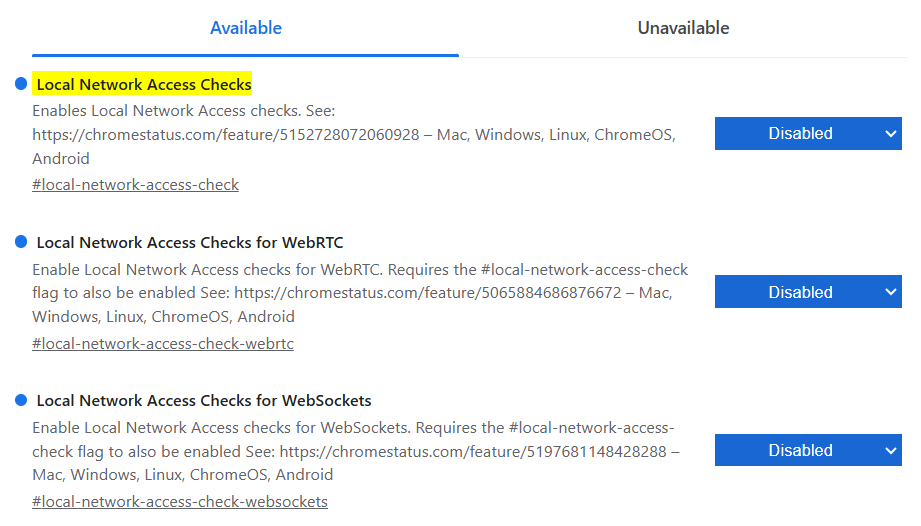
My company is struggling with this issue since the beginning of November, spending a huge amount of hours from many people to discover this issue. It´s a shame that Genesys has not announce this impact and mitigation steps.
Hope this helps.
------------------------------
Jesus Vallejo
CEMEX
------------------------------
Original Message:
Sent: 12-11-2025 13:06
From: Todd Rioux
Subject: Genesys Cloud Background Assistant (GCBA) 1.6.414 issue.
Hello everyone. I'm having an issue with the new version of the GCBA. It seems the installation of the package is being rolled out properly but when pulling up the task manager, only the GcbaMain process is launching. The GcbaBrowser processes are not launching when connecting to Genesys via the browser. I see no difference on a workstation where the software works and one that does not from an installation perspective. I'm wondering if there is a log that I can pull up that would point me in the right direction. I would expect an error message is the software was properly installed but I'm not exactly sure what it would be.
I'm open to any suggestions... Let me know what you think.
#Unsure/Other
------------------------------
Todd Rioux
Sr. IT system analyst
WestJet Airlines
------------------------------