Hi Josh,
Thank you for responding
Just wanted to share that I got this working from the script button in the end.
What worked for me was using a Genesys Function for the final BMC assign step instead of trying to do the full assign directly from the script path.
My flow now is:
• create the incident
• retrieve the BMC request key
• pass the request key and assignee name into a Genesys Function
• let the Function perform the final BMC assign call
A few things that helped me get this working:
• I added friendly error handling in the Function so it returns result and statusMessage instead of only surfacing a generic 500 error in the script
• I mapped those outputs back into script variables so I could see the actual backend message
• the request key coming back from BMC already worked when passed directly from the script into the Function, so I ended up removing the script-side expression I was testing for encoding
• for the assignee, I confirmed the format BMC expects and then passed the script value through the Function input
So the main fix was really moving the final assign logic into the Function and using the Function output to troubleshoot properly. Once I did that, the script button flow worked.
Appreciate the response.
------------------------------
Phaneendra
Technical Solutions Consultant
------------------------------
Original Message:
Sent: 04-14-2026 10:05
From: Josh Coyle
Subject: Genesys Script button to assign external ticket/record to current agent - anyone done this successfully?
Hi @Phaneendra Avatapalli
Since your assignment data action works in both the test UI and in Architect Workflows but fails with a 405 error from Scripts, there's likely a difference in how Scripts execute data actions versus other contexts.
To help troubleshoot, can you check:
- What type of integration is your data action using?
- Assumption this may be a Web Services Data Actions
- What HTTP method is configured in your assignment data action? (GET, POST, PUT, PATCH, DELETE?)
- Does the agent have these permissions:
- Integrations > Action > View
- Bridge > Actions > Execute
Immediate things to verify:
- Ensure the ticket ID output variable from the creation step is properly assigned and passed to the assignment action input
- Verify "Data Actions" is enabled in your Script properties
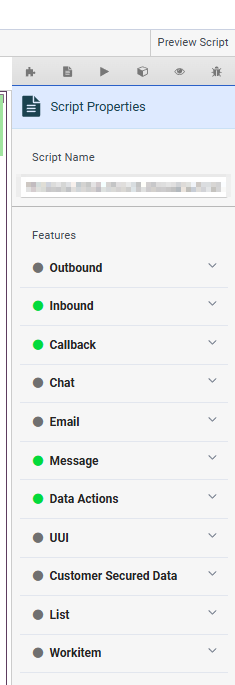
- Check that both the ticket ID and agent name values are populated before the assignment call
- For all the inputs used within the script custom action you can create "holders" within your script page to ensure they are populated with what you expect, this will allow you to see them first hand on the script page itself as opposed to assuming they have what you expect.
The 500 error you're seeing likely means the Function isn't receiving the expected inputs, this comes back to starting with point 4 above to ensure what is being passed in is what is expected and also what is tested within the Data Action UI & Workflow
------------------------------
Josh Coyle
Senior Professional Services Consultant
------------------------------