Great question and a well-structured requirement, happy to help break this down.
For the single campaign piece, Genesys Cloud handles this natively out of the box. Attempt Controls let you set Max Attempts Per Contact to 2 with a 7-day reset period, which covers your weekly limit at the campaign level. The February 2026 enhancements also added phone-type-specific limits and extended reset windows to up to 30 days for even more precision.
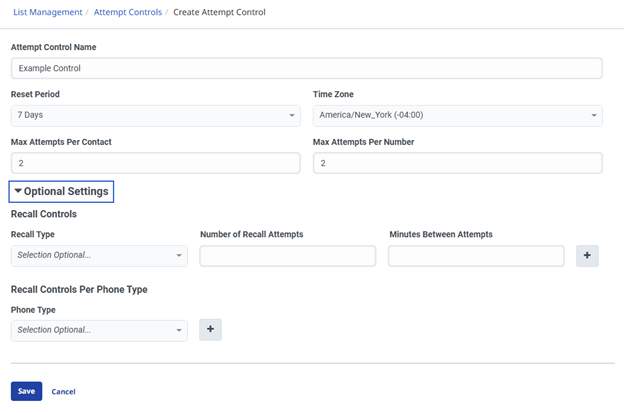
Navigate to Menu > Digital and Telephony > Outbound > List Management > Attempt Controls > Create New. Set Reset Period to 7 Days, Max Attempts Per Contact to 2, and Max Attempts Per Number to 2 as shown below:
The cross campaign piece is where it gets more involved since Attempt Controls are per campaign, and there is no native global weekly counter that tracks attempts across Campaign A and Campaign B simultaneously. Here is the architecture that works natively.
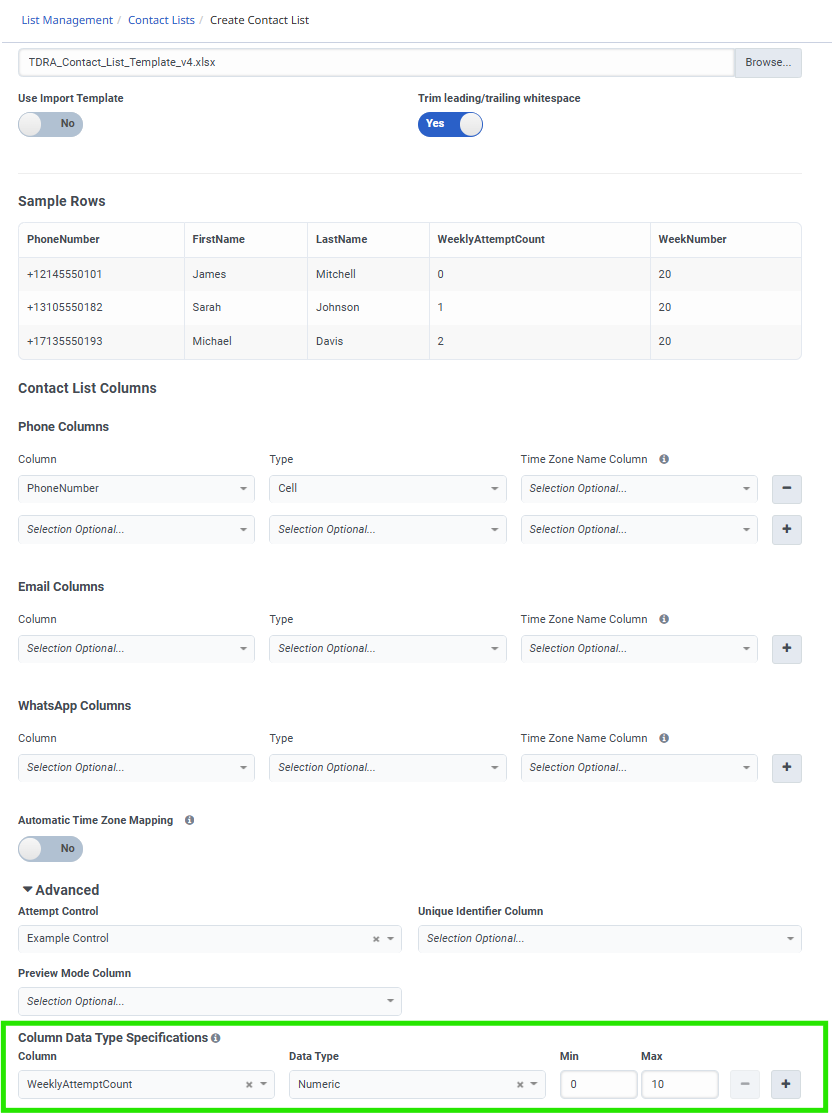
When you create your contact list, go to Menu > Digital and Telephony > Outbound > List Management > Contact Lists > Create New and add two custom columns. You can name them anything, but WeeklyAttemptCount and WeekNumber keep things simple. Under Column Data Type Specifications, set both to Numeric. WeekNumber stores the ISO week number of the year as a plain integer, for example, week 20 for May 11 to 17, 2026. You can use the week number for other use cases, but it might not be needed in your case.
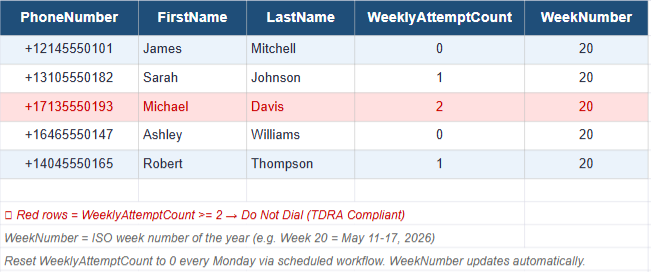
Here is what your contact list structure looks like. Red rows have hit the 2 attempt limit and will be blocked by the pre-call rule:
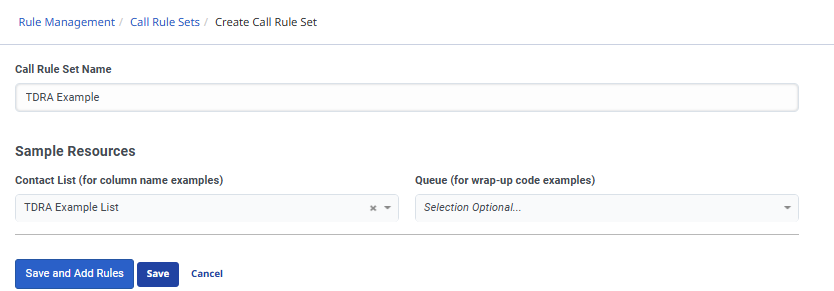
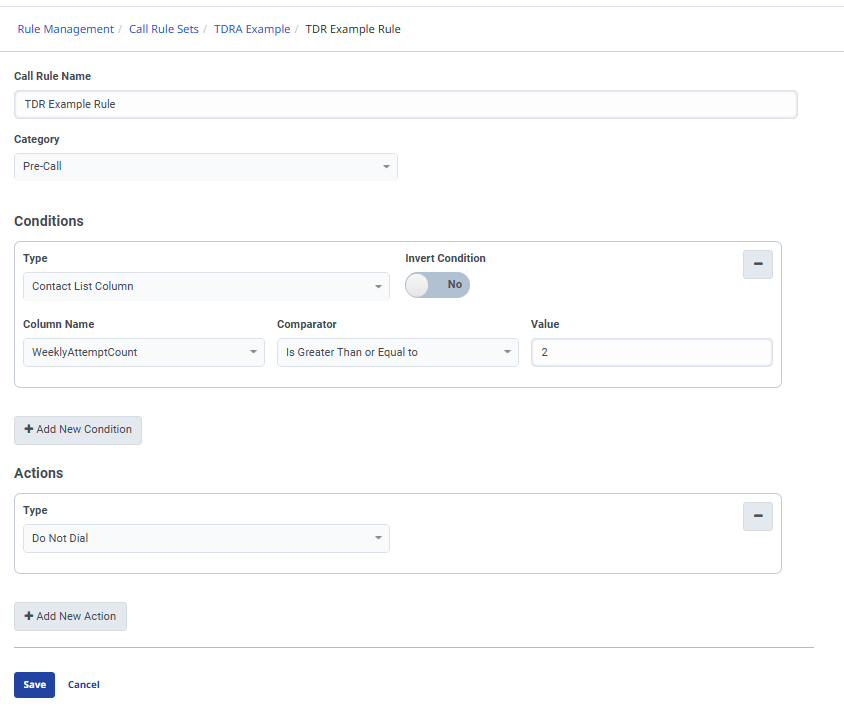
From there, go to Menu > Digital and Telephony > Outbound > Rule Management > Call Rule Sets > Create New and build a pre-call rule with two conditions joined by AND. First condition checks WeeklyAttemptCount is greater than or equal to 2. The second condition checks whether WeekNumber equals the current ISO week number. When both are true, the action is Do Not Dial. Assign this rule set to every campaign.
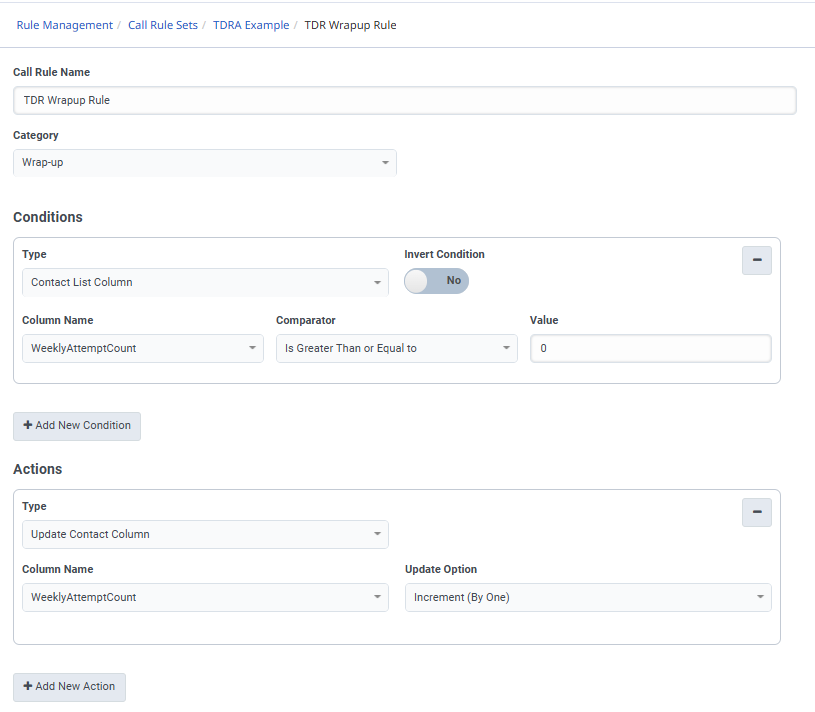
 In the same ruleset, add a wrap-up rule. Set two Update Contact Column actions. First increments WeeklyAttemptCount by 1. Second sets WeekStartDate to the current timestamp. This keeps the counter accurate in real time across all campaigns sharing that contact list.
You would add these rules to each campaign you have in production needing these rules.
This is where it gets a little more complex, depending on your skill level.
For an automated weekly reset, here is how to do it completely natively inside Genesys Cloud. There are three pieces to set up once, and then everything runs automatically.
The smart way to handle this is to set your campaigns up with a recurring daily schedule under Menu > Digital and Telephony > Outbound > Campaign Management > Schedule tab. Set a daily start and end time for each campaign, for example, 8 am to 5 pm Monday through Friday. Your campaigns stop every evening automatically and start fresh every morning. That handles the campaign lifecycle without anyone touching anything manually.
Then you set your reset workflow to fire every Monday morning before your campaigns start, say 7 am if your campaigns kick off at 8 am. That one-hour window is all you need.
The first piece is building a Data Action that calls the Genesys Outbound API to reset WeeklyAttemptCount to 0. Go to Menu > Admin > Integrations > Actions, make sure you have a Genesys Cloud data actions integration active, click Add Action, and name it TDRA Weekly Reset Action. Under Setup, set the request type to POST and the URL to:
https://api.mypurecloud.com/api/v2/outbound/contactlists/{yourContactListId}/contacts/bulk/update
Replace {yourContactListId} with your actual contact list ID, which you can find in the URL when you open your contact list in List Management. The request body sets WeeklyAttemptCount to 0 for all contacts. Save and publish.
The second piece is an Architect Workflow that uses that data action. Go to Menu > Orchestration > Architect > Flows > Workflow, create a new one called TDRA Weekly Reset Workflow. Inside the workflow, add the Call Data Action from the toolbox, select your TDRA Weekly Reset Action, map your contact list ID, add Success and Failure paths that both end the flow, and publish it.
The third piece is a Scheduled Trigger that fires the workflow automatically every Monday morning. Go to Menu > Orchestration > Triggers > Scheduled Triggers tab > Add Trigger, name it TDRA Monday Reset, select your TDRA Weekly Reset Workflow as the target, and use this cron expression:
0 7 * * 1
That fires every Monday at 7 am, one hour before your campaigns start (as an example). Toggle it Active and save.
From that point on, your campaigns run daily on their own schedule, stop each evening, and every Monday at 7 am, Genesys resets WeeklyAttemptCount to 0 across all contacts before the campaigns spin back up at 8 am. Fully automated, zero manual work.
If you have a CRM like Salesforce or Dynamics, the architecture gets even cleaner. Use a pre-call data action that queries your CRM for the contact's weekly attempt count in real time. If it hits 2, the rule blocks the call. A wrap-up data action increments the counter in the CRM after each attempt, making your CRM the single source of truth across all campaigns and any other channel touching the customer simultaneously. Worth noting, Genesys limits you to two data action conditions per rule set, so design your data action to return a single pass or block decision to stay within that limit.
Useful links to get started:
Configure Attempt Controls: help.genesys.cloud/articles/configure-attempt-limits-entry
Attempt Control Enhancements Feb 2026: help.genesys.cloud/announcements/genesys-cloud/attempt-control-enhancements
Pre-call Rules overview: help.genesys.cloud/articles/pre-call-rules
Using Data Actions in Rule Sets: help.genesys.cloud/articles/use-a-rule-condition-to-evaluate-information-from-a-data-action
Hope this helps!
------------------------------
Chris Rodriguez
Contact Center System Administrator
------------------------------