Genesys Cloud - Main

 View Only

Sign Up

Expand all | Collapse all

I don't receive ACD calls on Genesys Communicate App

  • 1.  I don't receive ACD calls on Genesys Communicate App

    Posted 22 days ago

    Hello everyone,

    as announced in the last release notes, from Genesys Communicate App is possible to receive and handle ACD calls.

    I downloaded Communicate App and I am using Android (v.16). 

    I followed all requirements indicated by Genesys (below) but I don't receive inbound call on mobile app.

    Agent remains in "Idle" status and doesn't receive calls. I performed several test but call remains in queue (waiting) and isn't transferred to the Agent (In Idle status on mobile app).

    Have you encountered the same issue? Do you have any suggestions? I don't find anything else on Resource Center about communicate app utilization.

    Thank you in advance.

    What are the requirements for Communicate for Android?

    To use Communicate for Android, you must have the following:

    • A WebRTC phone, assigned as your default phone
    • A browser that supports Chrome Custom Tabs

    And the following permissions:

    • Conversation > Call > Add (to add a call)
    • Conversation > Call > Record (to record a call)
    • Conversation > Call Forwarding > Edit (to configure automatic call forwarding)
    • Conversation > Conference > Add (to create an ad hoc conference)
    • Conversation > One Number Fax > Receive (to enable one number fax)
    • Mobile > Communicate > View (to access the Communicate apps)
    • Pushnotification > Registration > All (to create, view, and delete a registration)
    • Voicemail > Voicemail > Receive (to receive voicemail) 
    • Apps > Connections > View (to remember your presence)
    • Apps > Connections > Add (to remember your presence)
    • Apps > Connections > Delete (to remember your presence)
    • MobileAssociate > ACD > Receive (to receive ACD voice calls on mobile devices)
    • MobileAssociate > Wrapup > Add (to add ACW on mobile devices)
    • MobileAssociate > Wrapup > View (to add ACW on mobile devices)

    #Routing(ACD/IVR)
    #Telephony
    #GenesysAnnouncements

    ------------------------------
    Carmine Esposito
    Senior Solution Engineer
    ------------------------------


  • 2.  RE: I don't receive ACD calls on Genesys Communicate App

    Posted 22 days ago

    Hi Carmine

    I tested this on my side using the same permissions and noticed that the agent goes into not responding status on my side.

    Not seeing the call on my mobile phone/communicate app when its ringing so not sure if its a connectivity issue on my side.  It does however display under history in the app that I missed a call
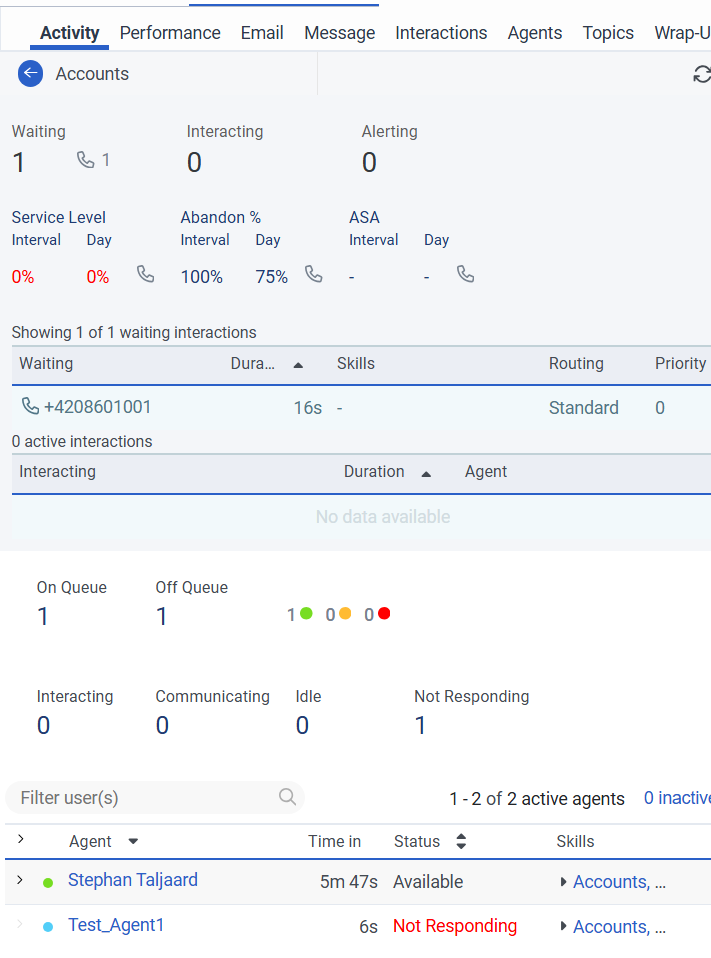
    Not sure if anyone else on the community has been able to test this successfully.

    Regards


    ------------------------------
    Stephan Taljaard
    EMBEDIT s.r.o
    ------------------------------


  • 3.  RE: I don't receive ACD calls on Genesys Communicate App

    Posted 22 days ago

    Hi Stephan,

    I tested this on my side as well and observed the same behaviour you described.


    ------------------------------
    Phaneendra
    Technical Solutions Consultant
    ------------------------------


  • 4.  RE: I don't receive ACD calls on Genesys Communicate App

    Posted 22 days ago
    Edited by Carmine Esposito 22 days ago

    Hi @Stephan Taljaard, Hi @Phaneendra Avatapalli,

    thank you for sharing your outcome on your side.

    This behavior is very strange. At least @Stephan Taljaard can see the missed call in the history (mobile app). And from Queue Activity, he sees the agent in "Not Responding" state.

    I see the agent in "Idle" state and I don't see any missed call from history (mobile app). Call remains in queue (waiting). Same behavior for @Phaneendra Avatapalli's side.

    But I made a different scenario: I tried to login with the same agent both on mobile app and desktop.

    In this case, the inbound call rings both on mobile app and desktop. I can answer to the call on mobile app, and it works fine!

    I don't know what to think about now. 😁


    ------------------------------
    Carmine Esposito
    Senior Solution Engineer
    ------------------------------


  • 5.  RE: I don't receive ACD calls on Genesys Communicate App

    Posted 22 days ago

    Hi Carmine

    Very interesting, thank you for sharing the update.

    Regards


    ------------------------------
    Stephan Taljaard
    EMBEDIT s.r.o
    ------------------------------


  • 6.  RE: I don't receive ACD calls on Genesys Communicate App

    Posted 22 days ago
    Edited by Tatjana Knezevic 22 days ago

    Hi @Stephan Taljaard, @Phaneendra Avatapalli, @Carmine Esposito

    I ran the same test today and got the same outcome as all of you - Not Responding state. 

    The only time I got the ACD call on my Communicate Android app was when I was simultaneously logged to Genesys via a Web browser and on the phone (same as Carmine).  

    As for the configuration, all permissions were assigned to the profile and the default phone. 

    Thanks,


    ------------------------------
    Tatjana Knezevic

    www.startelecom.cloud

    https://www.linkedin.com/company/star-telecom-www-startelecom-ca-/
    ------------------------------


  • 7.  RE: I don't receive ACD calls on Genesys Communicate App

    Posted 22 days ago
    • A WebRTC phone, assigned as your default phone....        ok, but is the phone number associated with the user's profile?


    ------------------------------
    Kaio Oliveira
    GCP - GCQM - GCS - GCA - GCD - GCO - GPE & GPR - GCWM

    PS.: I apologize if there are any mistakes in my English; my primary language is Portuguese-Br.
    ------------------------------


  • 8.  RE: I don't receive ACD calls on Genesys Communicate App

    Posted 22 days ago

    Hello @Kaio Oliveira,

    I assigned a default phone to my agent. But, I didn't assign any telephone number to my agent. Should I do it? What type of telephone number?

    Have you assigned a telephone number to your agent?

    Thank you,  


    ------------------------------
    Carmine Esposito
    Senior Solution Engineer
    ------------------------------


  • 9.  RE: I don't receive ACD calls on Genesys Communicate App

    Posted 22 days ago

    I apologize, I misspoke.
    It wasn't a phone number; in fact, I was talking about WebRTC.


    ------------------------------
    Kaio Oliveira
    GCP - GCQM - GCS - GCA - GCD - GCO - GPE & GPR - GCWM

    PS.: I apologize if there are any mistakes in my English; my primary language is Portuguese-Br.
    ------------------------------


  • 10.  RE: I don't receive ACD calls on Genesys Communicate App
    Best Answer

    Posted 21 days ago

    You may want to open a case with Product Support so that they can check where the call was routed and why the the users are being marked as Not Responding. Please let me know what your case number is so that I can monitor the issue internally.


    ------------------------------
    Jason Kleitz
    Online Community Manager/Moderator
    ------------------------------


  • 11.  RE: I don't receive ACD calls on Genesys Communicate App

    Posted 17 days ago

    Hi @Carmine Esposito

    This may be of use to yourself, there is an active enhancement request to automatically reassociate the WebRTC station when changing presence or routing status in the Communicate app:

    Idea: Automatically reassociate WebRTC Station when changing presence or routing status on the communicate app https://genesyscloud.ideas.aha.io/ideas/EPMAUCC-I-55


    ------------------------------
    Josh Coyle
    Senior Professional Services Consultant
    ------------------------------


  • 12.  RE: I don't receive ACD calls on Genesys Communicate App

    Posted 17 days ago

    Thank you @Josh Coyle, @Jason Kleitz.

    I opened a case and Support Team is working on that.

    Thanks all for support!


    ------------------------------
    Carmine Esposito
    Senior Solution Engineer
    ------------------------------


  • 13.  RE: I don't receive ACD calls on Genesys Communicate App

    Posted 17 days ago

    Have you enabled "Remember Status" in the Communicate App by clicking on your profile picture?

    If that isn't enabled you'll go offline as soon as you minimize the app.


    ------------------------------
    Jan Heinonen
    Contact Center Specialist
    GlobalConnect AB
    ------------------------------


  • 14.  RE: I don't receive ACD calls on Genesys Communicate App

    Posted 21 hours ago
    Edited by Pei Wen Quek 19 hours ago

    Not sure if it's the same for your case but I had a similar issue where my user logged into mobile app was placed into Not Responding but my phone never ring.

    I managed to get it working by disabling Auto Answer on my queue. Turning Auto Answer back on will lead to the same issue again. 

    After further testing - I think there are 2 issues here:

    1. If I logged out from web browser, even auto answer disabled - it won't work due to the station being disassociated. - which is related to this https://genesyscloud.ideas.aha.io/ideas/EPMAUCC-I-55 (shared by Josh) - there is a workaround posted on this idea to reassociate the station. On my testing, if I login to web browser and click exit to close it, the station remain associated.
    2. ⁠If i closed my web browser (without proper log out and station still associated), with auto answer enabled, it wont ring my mobile and the system will put me into Not Responding. 


  • 15.  RE: I don't receive ACD calls on Genesys Communicate App

    Posted 17 hours ago
    Edited by Izeck McRae 17 hours ago

    We had the same issue. What we discovered was a couple of things:

    • Toggle off the persistent connection in the WebRTC phone
    • Remain logged in to Genesys on a laptop/desktop
      • It seems like the app isn't meant to be a replacement for Genesys desktop, just a "I'm away from my desk, so I need to say available"
    • Toggle off auto-answer for the agents
    • Ensure "Remember Status" is enabled
    • Ensure "Receive Calls on this device" is enabled
    • Check "Push Notifications"

    We have two testers using it this weekend for a project, and one is running an iPhone and the other an Android. Not sure if that's the intended magic concoction, but that's what we came up with and have had success with!


    ------------------------------
    Izeck McRae
    Product Manager 2
    The Church of Jesus Christ of Latter-day Saints
    ------------------------------