Good Day Prathap
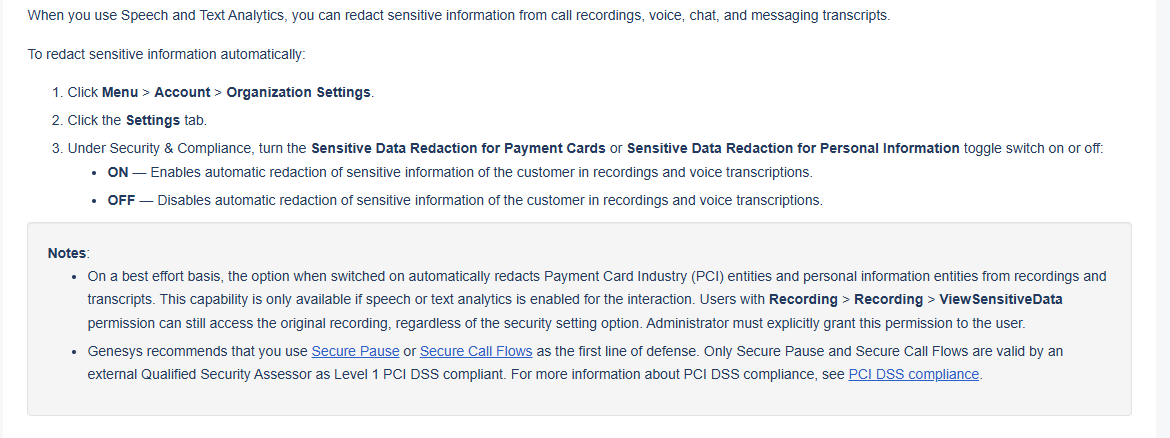
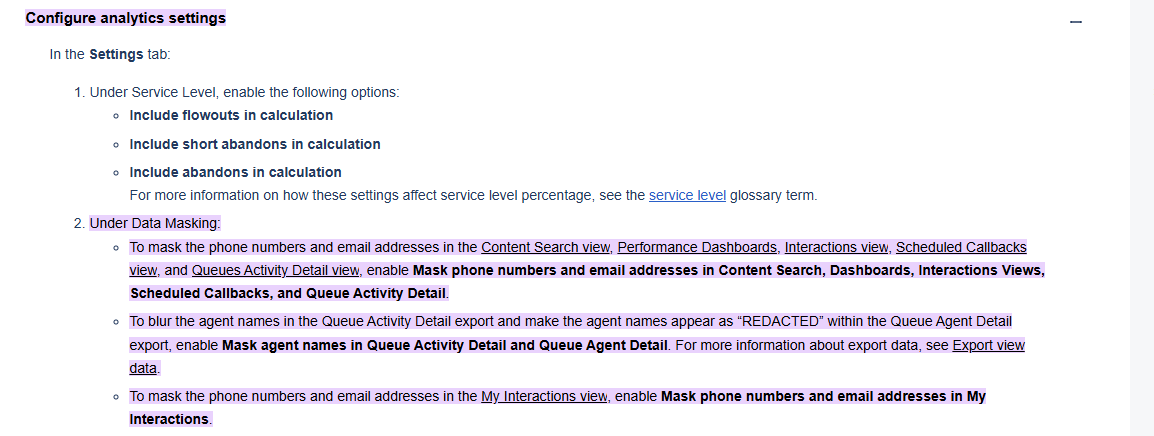
I managed to find the following on Genesys Cloud Resource center.
https://help.mypurecloud.com/articles/configure-contact-center-analytics-options/#:~:text=Configure%20analytics%20settings&text=Under%20Data%20Masking:,accessible%20through%20direct%20API%20calls.
https://help.mypurecloud.com/articles/enable-automatic-redaction-of-sensitive-information/#:~:text=When%20you%20use%20Speech%20and,this%20permission%20to%20the%20user.
https://help.mypurecloud.com/articles/enable-automatic-redaction-of-sensitive-information/#:~:text=Click%20Admin.,Level%201%20PCI%20DSS%20compliant.
It mentions the options that you have already enabled on your side. It seems that if the user has the correct permissions, they will still be able to view the information. Genesys recommends using secure pause or secure call flows for this.
Mentions some options which you can configure in the analytics view for some of the workspace views.
Not sure if anyone else is perhaps aware of any other options to achieve this.
Regards
Stephan
------------------------------
Stephan Taljaard
NA
------------------------------
Original Message:
Sent: 12-04-2025 02:13
From: Prathap Daniel
Subject: I have my transcript saved in Analytics Dashboard -> Interactions
I read thru the article https://help.mypurecloud.com/faqs/which-entities-are-redacted/ and understood from the below statements.
Currently, you can turn on/off PCI and PII data masking using the following two toggles, but you cannot select which individual entities to mask:
- Sensitive Data Masking for Payment Cards
- Sensitive Data Masking for Personal Information
But even though I have turned ON PCI/PII data masking (ref. screenshot), emails, mobile numbers are all not masked. Kindly provide your inputs to fix them.
------------------------------
Prathap Daniel
-
------------------------------