Hello @Haridass Sarangan, greetings from Brasil!
You don't necessarily need to use Architect to control how long an email remains in the queue.
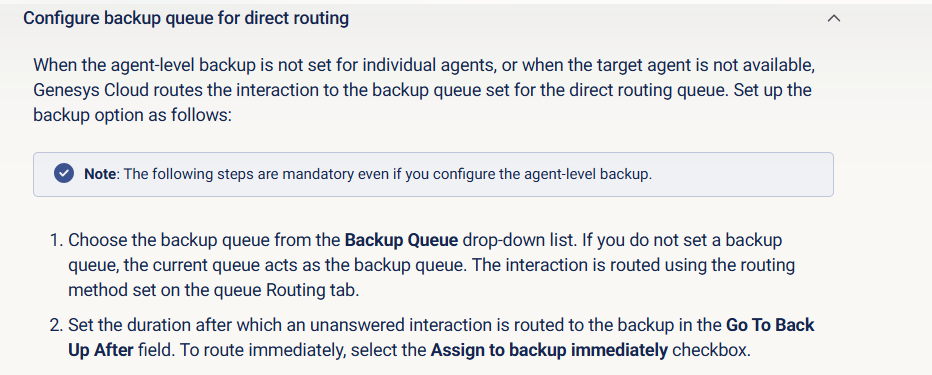
This can be handled directly at the queue configuration level by defining a Backup Queue (Queue → Direct). In the primary queue, you can configure the Go To Backup After timer, which determines how long the email interaction can remain enqueued. Once that time threshold is reached without being answered, the interaction is automatically moved to the backup queue.
From there, the backup queue can be used as a controlled handling point. You may associate an In-Queue Email Flow to the backup queue and apply the desired behavior, such as a short wait followed by a disconnect, an automated response, or any other business-specific treatment.
With this approach:
-
the long wait logic is handled natively by queue routing, not by extended waits or loops in Architect;
-
the primary queue remains focused on normal email handling;
-
the backup queue centralizes the exception logic for aged interactions in a supported and predictable way.
This pattern avoids the 72-hour In-Queue Flow limitation and provides a cleaner, more maintainable solution for managing long email wait times.
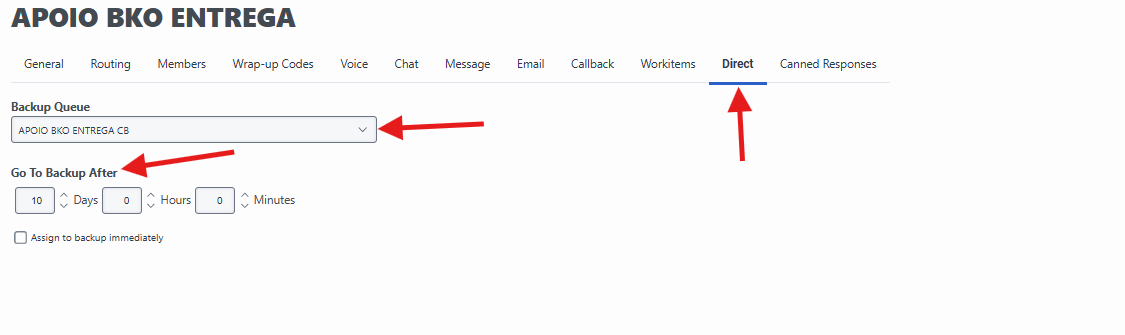
In this example, the interaction will be routed to the "Apoio BKO Entrega CB" queue, where it will be disconnected by the configured in-queue flow.
Create and configure queues View summary - Genesys Cloud Resource Center
------------------------------
Fernando Sotto dos Santos
Consultor Grupo Casas Bahia
------------------------------