Genesys Cloud - Main

 View Only

Sign Up

  • 1.  In-Queue Flow Timing

    Posted 6 hours ago

    Is there a way to perform an action in an in-queue flow after a certain amount of time of a call queueing without being answered? We have a requirement for calls to be routed to another queue/skill if unanswered after 1 minute. The easiest way would be to play 60 minutes of hold music and then perform the action, however the call flow also plays other prompts and actions so getting the timing right is a bit more complicated. Is it just a case of working out the combined timings of the different prompts and hold audio or is there something else I can use?


    #ArchitectandDesign

    ------------------------------
    James Foster
    Technical Consultant
    ------------------------------


  • 2.  RE: In-Queue Flow Timing
    Best Answer

    Posted 6 hours ago
    Edited by Jason Kleitz 3 hours ago

    Hi James,

    You should not need to work out the combined timing of prompts and hold music manually.
     
    One option would be to use a time threshold in the In-Queue Flow and check the actual queue/wait time instead. Once the interaction has been waiting for 60 seconds, you can then transfer it to another queue or route it to a different skill.
     
    From my understanding, hold music can typically be interrupted (if you enable barge-in), whereas prompts generally play through to completion, so using audio timing as the control mechanism can become a bit unpredictable and harder to maintain.
     
    So if possible, I would lean toward the elapsed wait time / threshold approach instead.


    ------------------------------
    Phaneendra
    Technical Solutions Consultant
    ------------------------------


  • 3.  RE: In-Queue Flow Timing

    Posted 6 hours ago

    Hi James,

    Going from what Phaneendra has already said above.


    You can try to work with the "GetCurrentDateTimeUtc()" function. Use it as soon as the inQueue starts, so you will have the exact timestamp of when it started.
    You can then use it again after each action (between each prompt/music, etc.) to check the current timestamp, and then you can compare both of them (the current one, with the starting one) using the function "DateTimeDiff()", and check if the difference is 60 seconds, and then make a decision based on that.

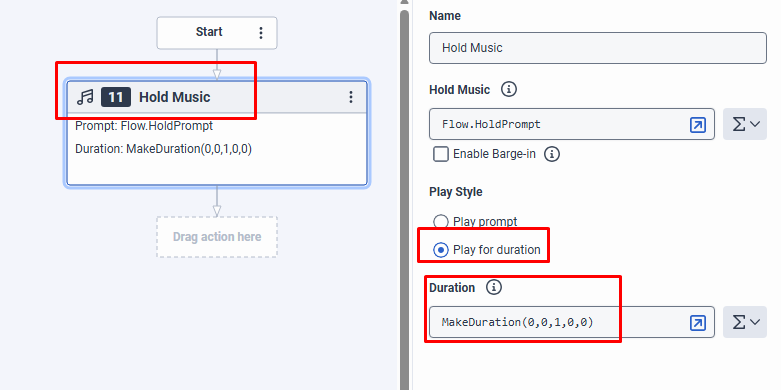
    One last thing that you can also do is use the "Play for Duration" setting when playing the Hold music, in case you already know the 60 seconds is going to be reached in "X seconds".

    For example.. Let's say you played some prompts and checked that the current duration on InQueue is already 53 seconds... With that you have the information that there is only 7 more seconds until you reach 60 seconds. Right?
    So in that case you can use the "play duration" on the next "Hold Music" with a duration of only 7 seconds, and this way the music stops when you reach exactly 60 seconds, then you can move on with your next actions:


    ------------------------------
    Marcello Jabur
    ------------------------------